FUV Owner's Guide - 52
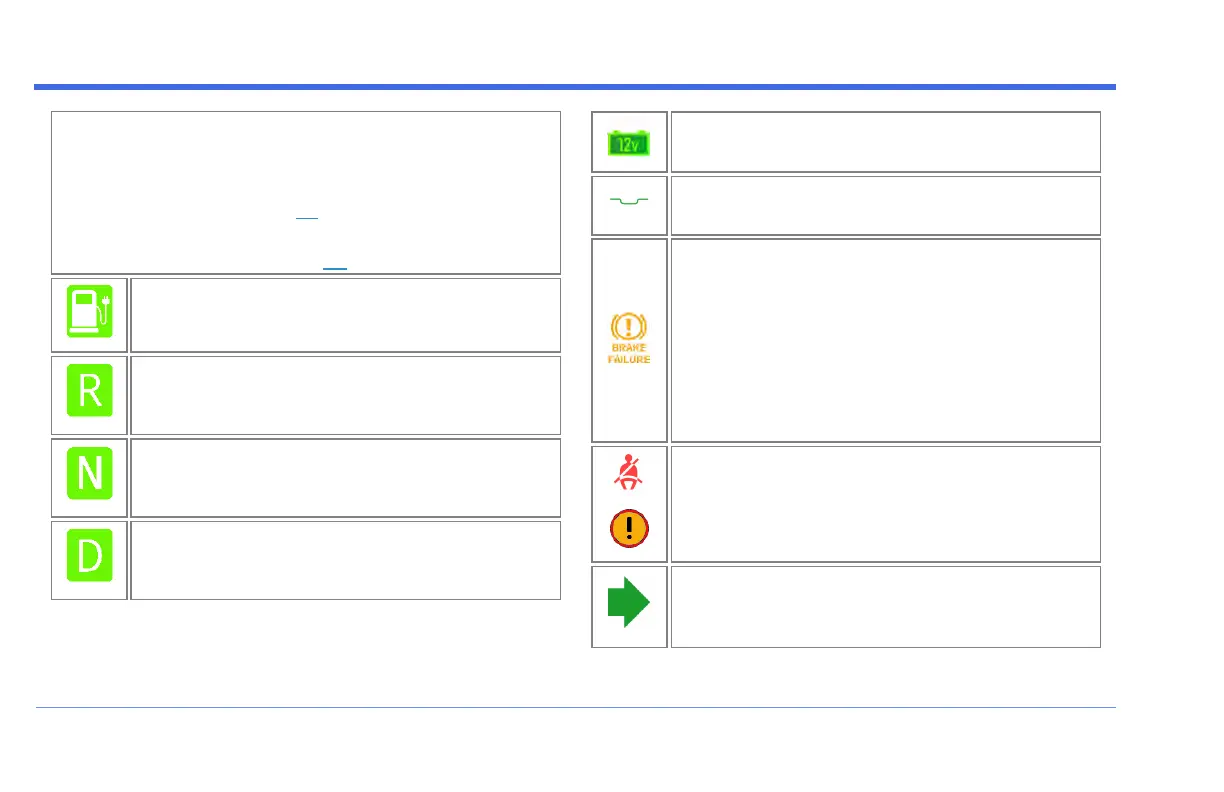
Direction / Charging Indicator - The center telltale
serves a dual purpose:
On the Drive Screen, it indicates the current Direction
setting (R/N/D - see page 32).
When the FUV is plugged into a charging station, it
indicates Charging (see page 99).
Charging - Indicates that the FUV is connected
to a charging station and is charging.
Reverse - Indicates that the Direction switch is
set to Reverse (ò). When the throttle is twisted,
the FUV will go backwards.
Neutral - Indicates that the Direction switch is
set to Neutral (•). When the throttle is twisted,
the FUV will not move.
Forward - Indicates that the Direction switch is
set to Forward (ñ). When the throttle is
twisted, the FUV will go forwards.
12V System Warning - Indicates a problem
with the low-voltage electrical system.
Power Steering -Reserved for future
implementation.
Brake Failure - - Indicates a potential problem
with the hydraulic brake system. Typically, this
means either that the hydraulic brake system is
low on brake fluid, or the brake sensor switch is
incorrectly adjusted.
If this telltale stays illuminated, contact
Arcimoto Technical Support at (541) 780-0032
before driving again.
Seat belt Warning - Lights to indicate that one
or more seat belts are not fastened.
A warning message at the top of the Display
indicates which belt is not locked.
Right Turn Signal Indicator - Flashes green
when a right turn is indicated by the turn signal
switch. Push the turn signal switch to turn it off.
DISPLAY


 To Next Page