HARDWARE INSTALLATION
22
Summary of the Installation
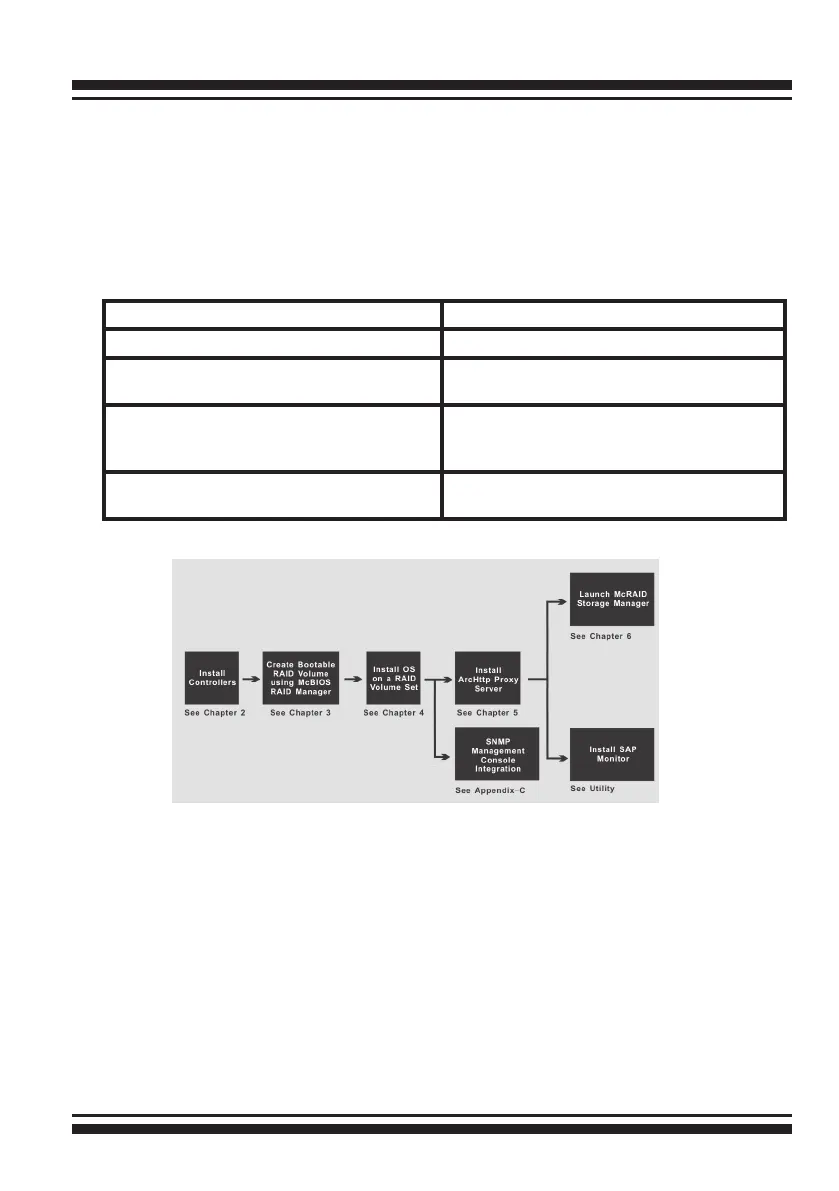
The ow chart below describes the installation procedures for
SATA RAID controller. These procedures include hardware installa-
tion, the creation and conguration of a RAID volume through the
McBIOS, OS installation and installation of SATA RAID controller
software.
Conguration Utility Operating System Supported
McBIOS RAID Manager OS-Independent
McRAID Storage Manager
(Via Archttp proxy server)
Windows 2000/XP/2003/Vista, Linux,
FreeBSD, Solaris and Mac
SAP Monitor (Single Admin portal to
scan for multiple RAID units in the net-
work, Via ArcHttp proxy server)
Windows 2000/XP/2003/Vista
SNMP Manager Console Integration Windows 2000/XP/2003/Vista, Linux,
FreeBSD
The software components congure and monitor the SATA RAID
controller via ArcHttp proxy server.
McRAID Storage Manager
Before launching the rmware-embedded web server, McRAID stor-
age manager, you can to install the ArcHttp proxy server on your
server system. If you need additional information about installation
and start-up of this function, see the McRAID Storage Manager sec-
tion in Chapter 6.



 To Next Page