Arkel Elektrik Elektronik San. ve Tic. A.Ş. www.arkel.com.tr
ARKEL 50 ARCODE
Elevator will move bottom floor after completed
shaft learning to reset floor numbers. The car will
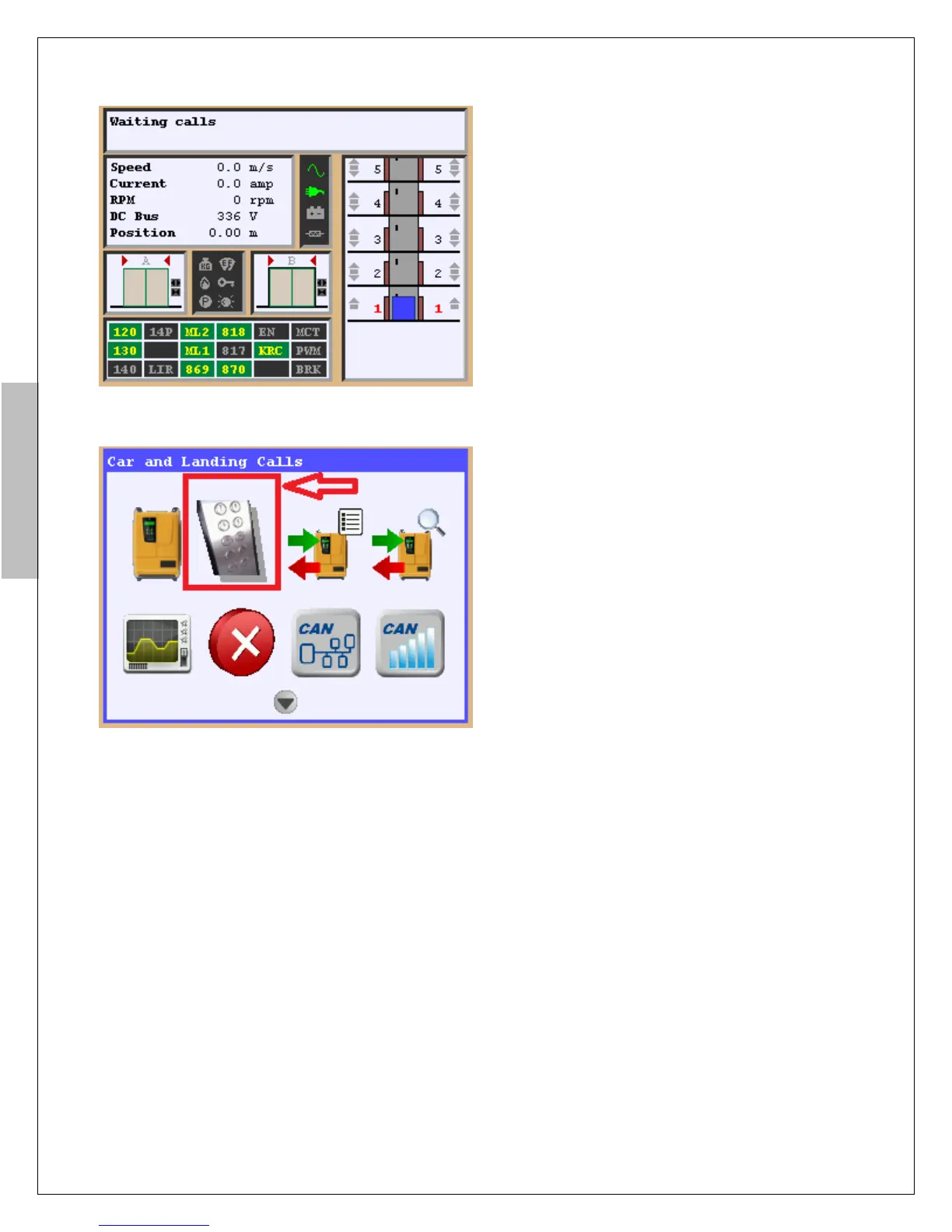
appear on screen as shown figure-16 when car
reaches to the bottom floor. The car goes bottom
floor to reset floor number every time when
ARCODE energized first time.
The elevator must be checked by given call whether
it reaches to destination floors or not. To give a call
by AREM there are two methods. Press up or down
button after pressing “F2” button. If you press one
time to direction button the car moves 1 floor up or
down. Given call is determined with the number of
pressed direction buttons.
Second method is press “info” button when AREM
shows main screen (Figure-16).
Select icon of “COP and LOP calls” and press Enter
button.
Use direction arrows to give a call. Press Enter
button. The car will move to given floor.
Figure-16: Floor resetting
Figure-17: give a call by “COP and LOP calls”


 To Next Page