Arkel Elektrik Elektronik San. ve Tic. A.Ş. www.arkel.com.tr
ARKEL 52 ARCODE
“A” shows defined floor. For B door this sign will
be “B” . “+” means the display is used for landing
call button. If “-” sign appears on screen of LOP,
this means the display is used only display.
LOP learning:
If the car is at bottom floor and LOP display shows “??” or wrong landing floor, you must hold down call button
of LOP until appears correct floor number on LOP screen. For first floor door A you must see “A” “+” and ”1”
respectively. If your system has B door you should slide scroll box to right side and hold down call button of
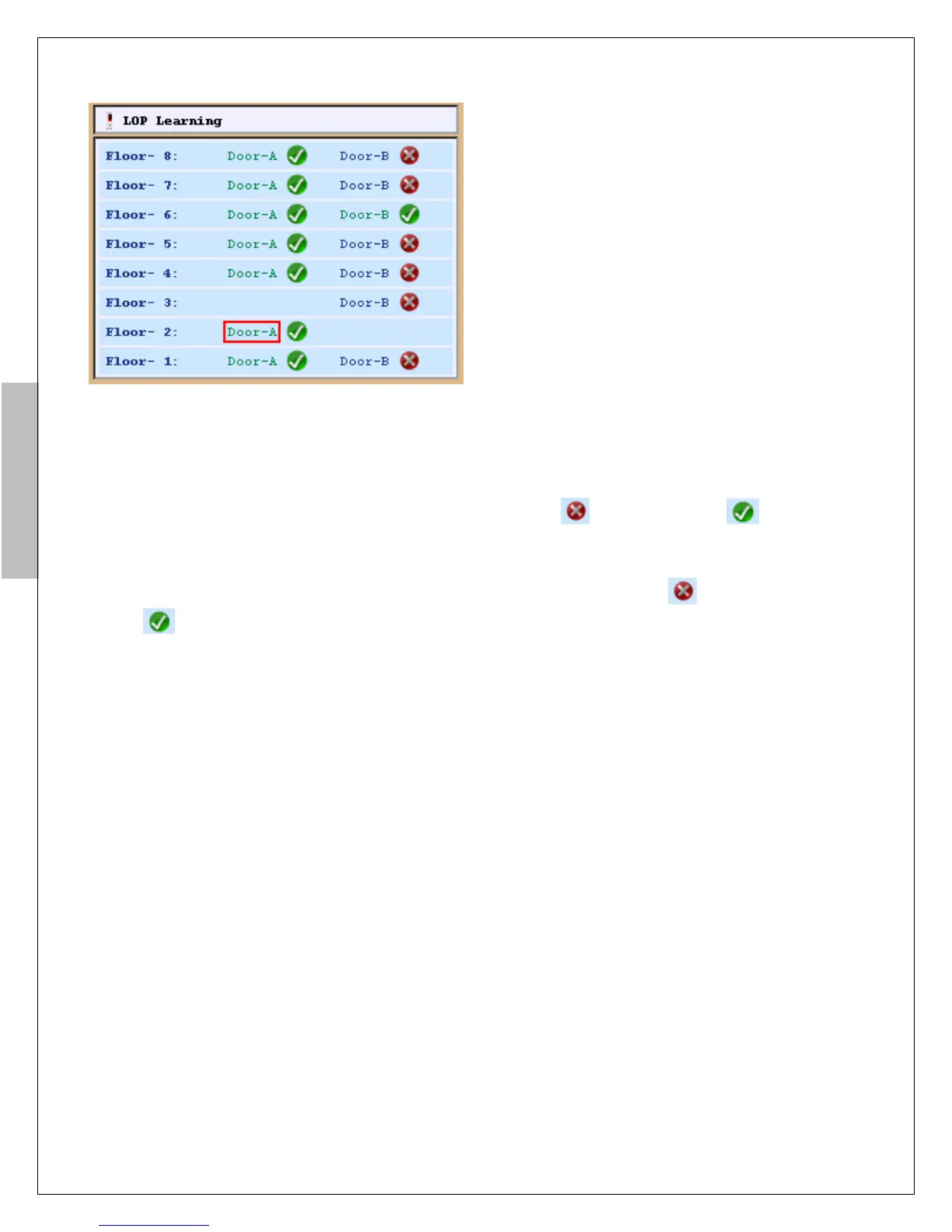
LOP until appears “B” “+” and “1” respectively. The while figure will change as figure . Give a call
from COP to second floor after completed definition of first floor. All LOPs must be defined for all floor
according to explanation above.
If LOP doesn’t have a screen, you should hold down call button of LOP until figure will change as figure
on AREM screen. The while led of LOP will flash for a second when landing position is learned.
If the LOPs are used only for display you don’t have to do these settings. The display will show floor number
when elevator starts to normal working.
Figure-18c: LOP position learning screen
Figure-18c: LOP position learning screen


 To Next Page