Arkel Elektrik Elektronik San. ve Tic. A.Ş. www.arkel.com.tr
ARKEL 51 ARCODE
Step-7: Landing and car calls settings
Car Calls:
CPC or CPC-T (Car Panel Controller) boards are used to give car calls. These are connected to IBC (Inspection Box
Controller) board by serial communication. if dipswitch settings were done which is shown Appendix-1, it is not
necessary to do any additional settings. (Note that CPC and CPC-T dipswitch settings are different from each other.)
Landing Calls:
ARCODE can accept landing calls both serial connection(CANBus) and parallel connection. If landing calls are
wanted to use as paralel, the SP-16 board has to be used.(see Appendix-1 for more information)
If CANBus is wanted to use for landing calls, position of landing calls’ buttons would be defined.
Firstly AREM hand terminal should be connected to
CANBus connector on the CPC board to define place
of landing buttons.
Give a call to bottom floor from COP.
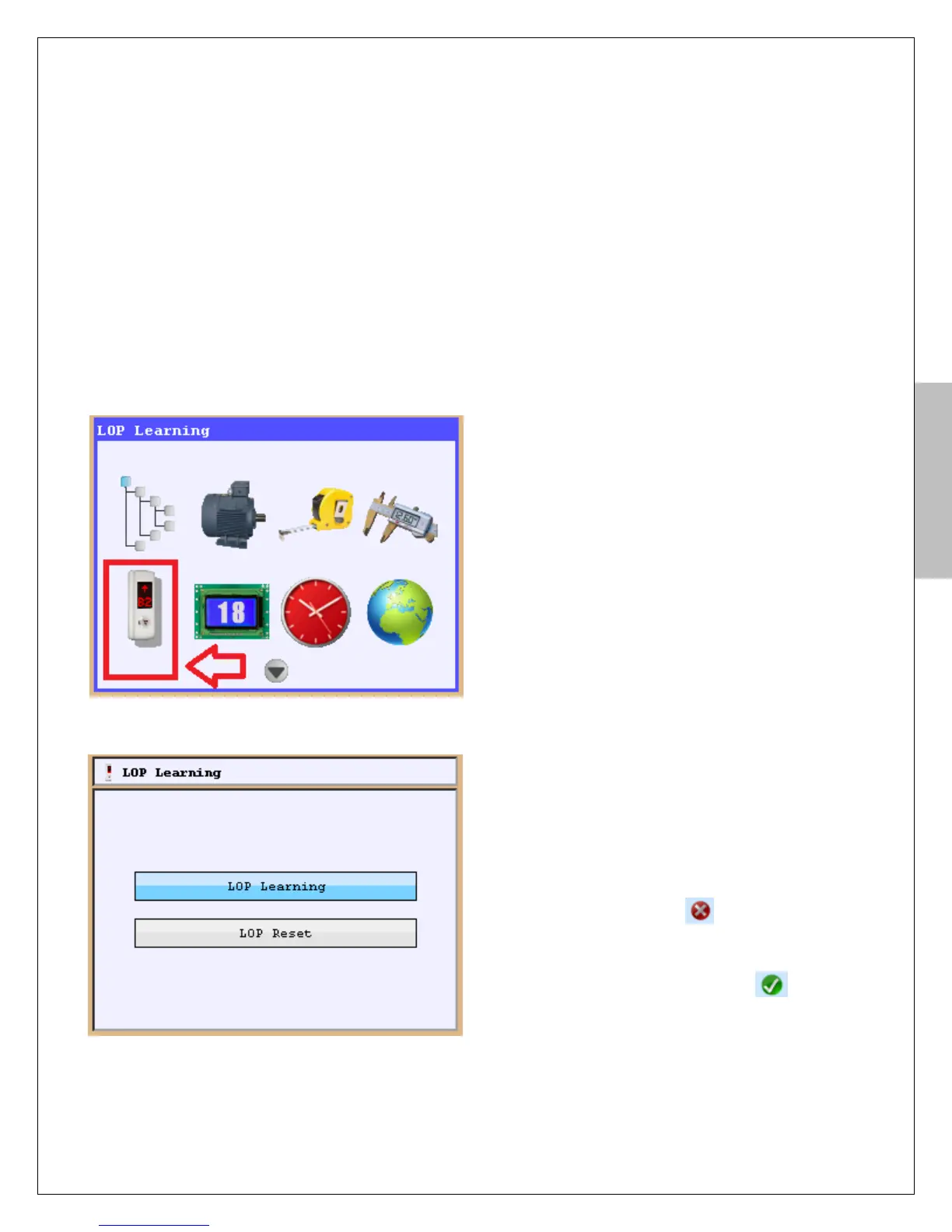
Press “Tools” button and select icon of “LOP
Learning” and press Enter button.
“LOP learning” must be selected to start to learn
landing button position.
“LOP position reset” is used to reset which was
learnt LOP positions.
When selected “LOP learning” the figure-18c appears
on the screen of AREM. If there aren’t any learned
position you will see figure right side of floor
numbers. In that situation if your LOP has a display
you will see “??” on LOP screen. If position learning
was done previously you will see figure right
side of floor numbers. In that situation you will see
“A” “+” and defined floor number on LOP screen
respectively.
Figure-18b: selection of LOP learning


 To Next Page