4. THE PRESET BROWSER
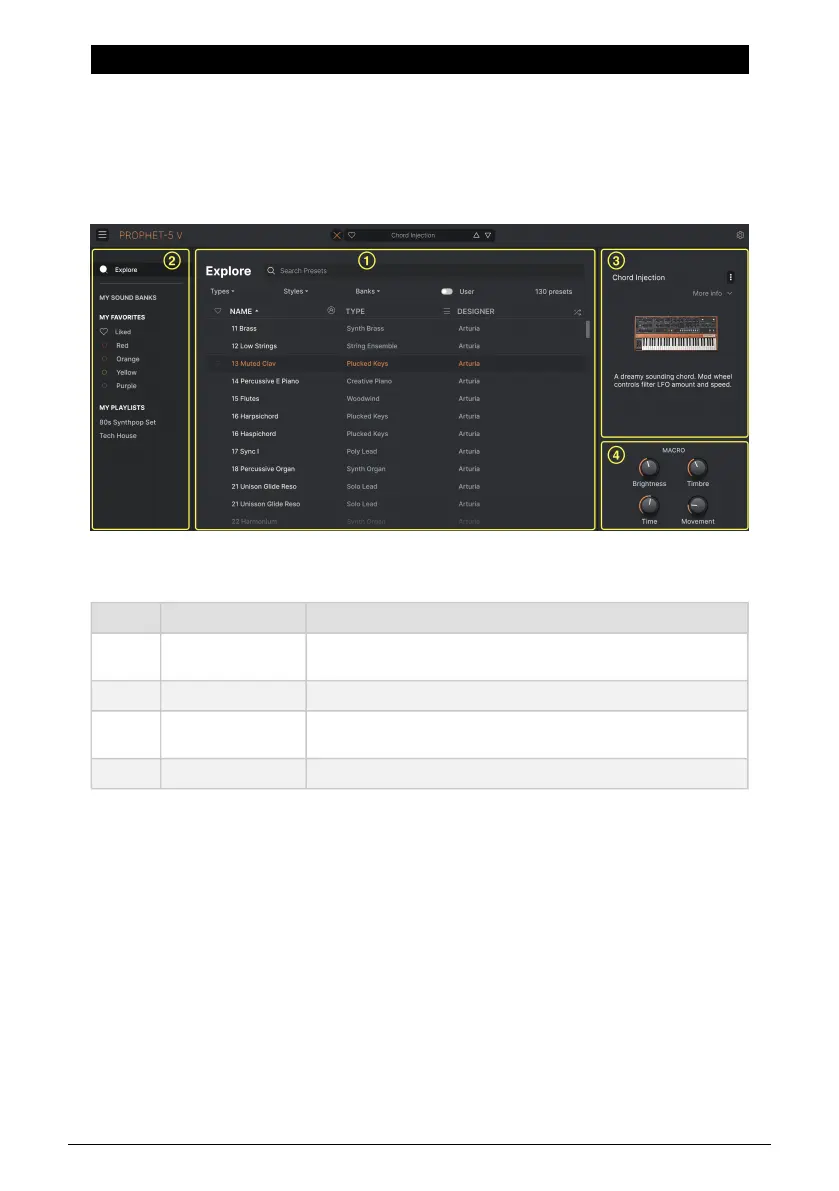
The Preset Browser is how you search, load, and manage sounds in Prophet-5 V. It has
different views but they all access the same banks of Presets.
To access the search view, click the browser button (the icon looks a bit like books on a
library shelf). To close the browser, click the X that appears in its place.
The browser has four main areas:
Number Area Description
1.
Search and Results
[p.29]
Search Presets with text strings, and by tags for Type and Style.
2. Sidebar [p.34] Manage Banks and Playlists.
3. Preset Info [p.36]
Summary of Bank and Tags, Designer name, and description info for
current Preset.
4. Macro Knobs [p.19] Large size duplicates of Macro knobs in Lower Toolbar.
The full Preset Browser window
Arturia - User Manual Prophet-5 V - The Preset Browser 28














 To Next Page