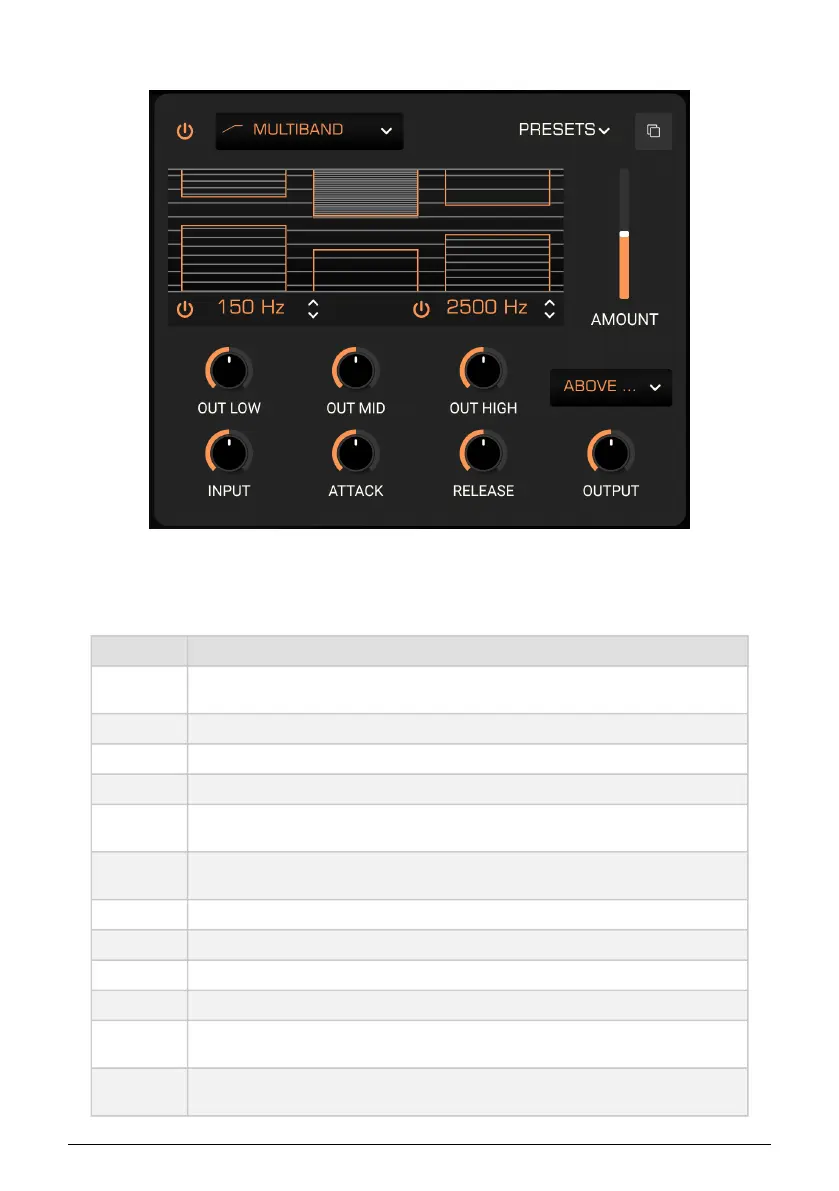
7.3.10. Multiband
The multi-band compressor in Prophet-5 V lets you apply different amounts of compression
and expansion to up to three adjustable frequency bands. You can also turn up to two of the
bands on or off.
Control Description
Threshold
Drag on the top or bottom of edge of a band in the visualizer to change the level at which gain
reduction or expansion starts to occur.
Ratio Drag
inside
a band in the visualizer to change the amount of compression/expansion.
Low On/Off Enables or disables the low band.
High On/Off Enables or disables the high band.
Low-Mid
Crossover
Drag to adjust the crossover frequency between low and mid bands.
Mid-High
Crossover
Drag to change the crossover frequency between mid and high bands.
Out Low Sets the overall output level of the low band.
Out Mid Sets the overall output level of the mid band.
Out High Sets the overall output level of the high band.
Input Adjusts the input gain for all three bands.
Attack
Adjusts how quickly or slowly the compressor “grabs on” to the sound when the threshold is
reached.
Release
Adjusts how quickly or slowly the compressor “lets go” of the sound once the level dips below
the threshold.
Arturia - User Manual Prophet-5 V - Effects 82











 To Next Page