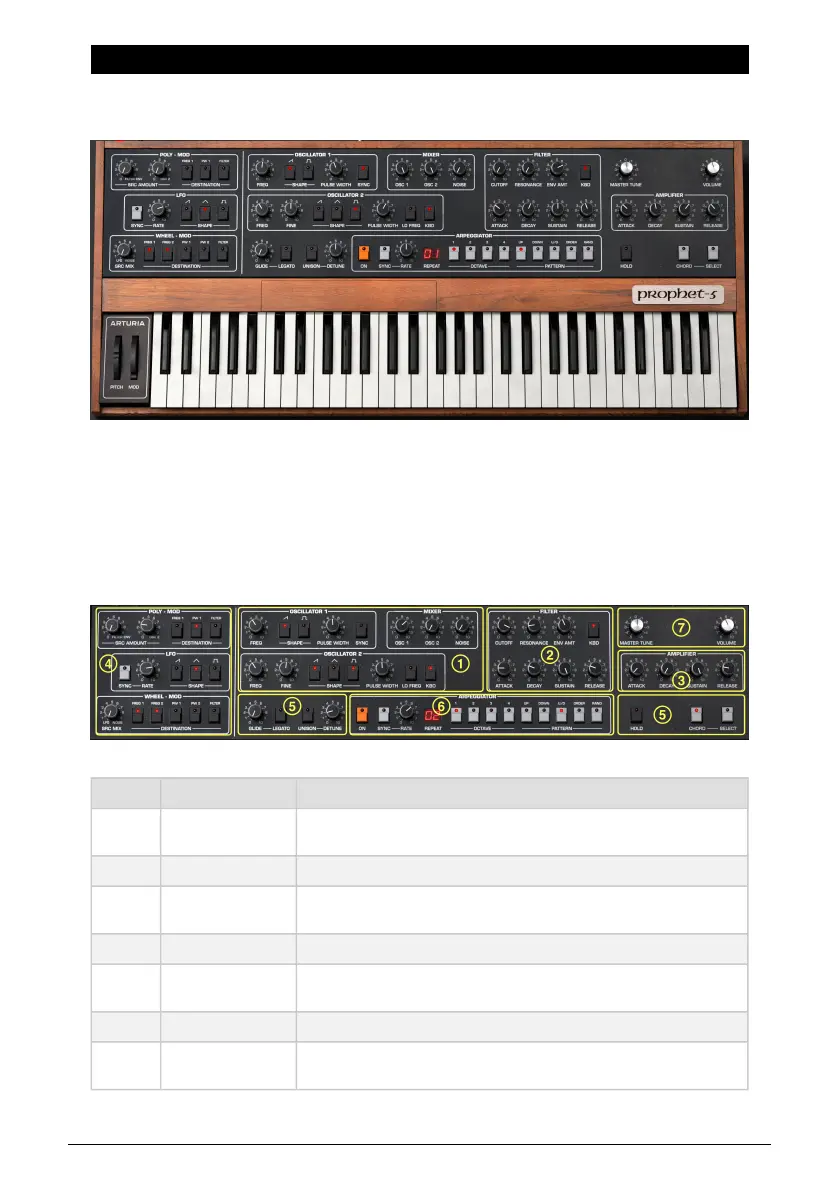
5. MAIN SYNTH PANEL
Here is where the real fun begins: the panel that duplicates all controls and functions of the
mighty Prophet-5, then adds some cool features of our own.
Like all classic analog synths, the Prophet-5 used
subtractive
synthesis as its method of
creating sounds. Subtractive synthesis is the audio equivalent of sculpture: you start with
one or more harmonically complex waveforms, then chisel away what you don’t want using
filters. That’s a very simplified definition because when you bring in modulation, things get
truly interesting.
This chapter will assume a basic knowledge of synthesis and tell you what all the areas of
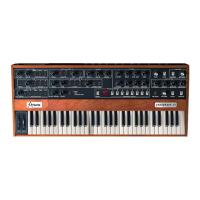
Prophet-5 V’s main panel do.
Number Area Description
1.
Oscillator Section
[p.44]
The two oscillators and mixer with noise source.
2. Filter [p.46] The Prophet’s voltage-controlled filter, with its own envelope.
3.
Amplifier Envelope
[p.47]
Volume envelope plus master volume and tuning.
4. Modulators [p.48] Modulation sources including the Prophet’s famous POLY-MOD.
5.
Keyboard Controls
[p.50]
Controls that affect how and what the keyboard plays: Glide, Unison, Hold,
and Chord Mode.
6. Arpeggiator [p.53] The vintage-style Arpeggiator is an Arturia addition.
7.
Output Section
[p.54]
Master tuning and volume controls.
Arturia - User Manual Prophet-5 V - Main Synth Panel 42











 To Next Page