User-speci$c
settings
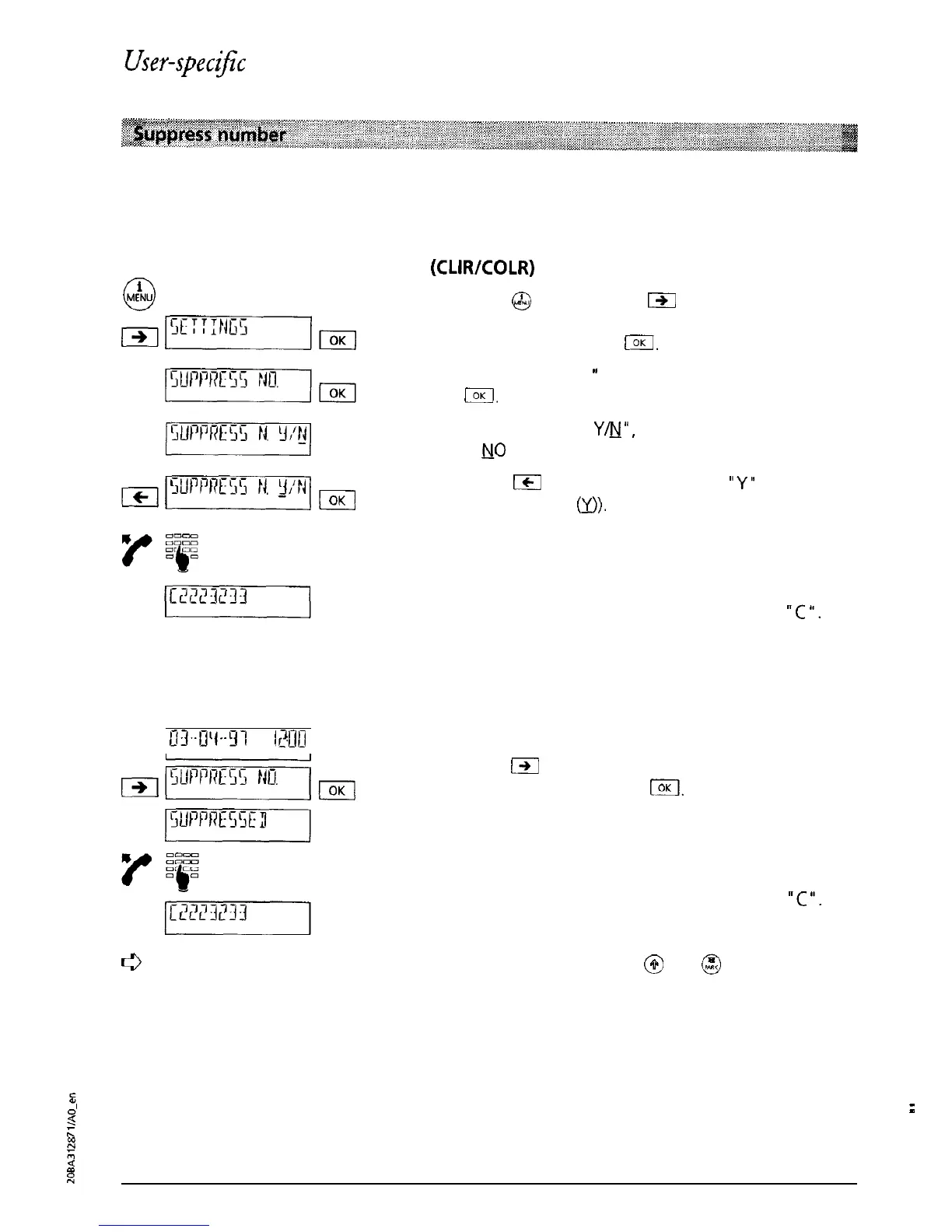
When you make a call, your number (i.e. their MSN) is displayed for the called party. When you
are called, your number is sent to the calling party. You can suppress your call number for
outgoing and incoming calls:
Permanently suppress the number
(CLIRKOLR)
i
0
MENU
Press
@
and then press
191
as often as necessary
until “SETTINGS” is displayed. Confirm the menu
selection by pressing
I.
“SUPPRESS NO.
’
is displayed. Confirm by pressing
El.
“SUPPRESS NO.
Y&J’“,
(The status set in the factory
is MO (OFF)).
Press
Ic1
and the cursor jumps to
“Y’
(Suppress
number is ON
0).
Confirm the menu selection by
pressing I.
Dial the number.
When calling line number suppression is active, the
dialled number is displayed preceded by a
“C
‘I.
Suppress the number for a single call (CLIR)
03-U’1-‘31
I?UIII
The telephone is in the basic state (on-hook).
Press
m
as often as necessary until “SUPPRESS
NO.” is displayed. Press
@!I.
The confirmation
“SUPPRESSED” is shortly displayed.
Dial the number.
When calling line number suppression is active, the
dialled number is displayed preceded
by a
“C
‘I.
ti
You can also suppress your number with Eurit 22 by pressing
@
and
@
in the basic
state.
2
:
K
R
5
K
16



 To Next Page