2-29
ASUS ESC4000A-E12
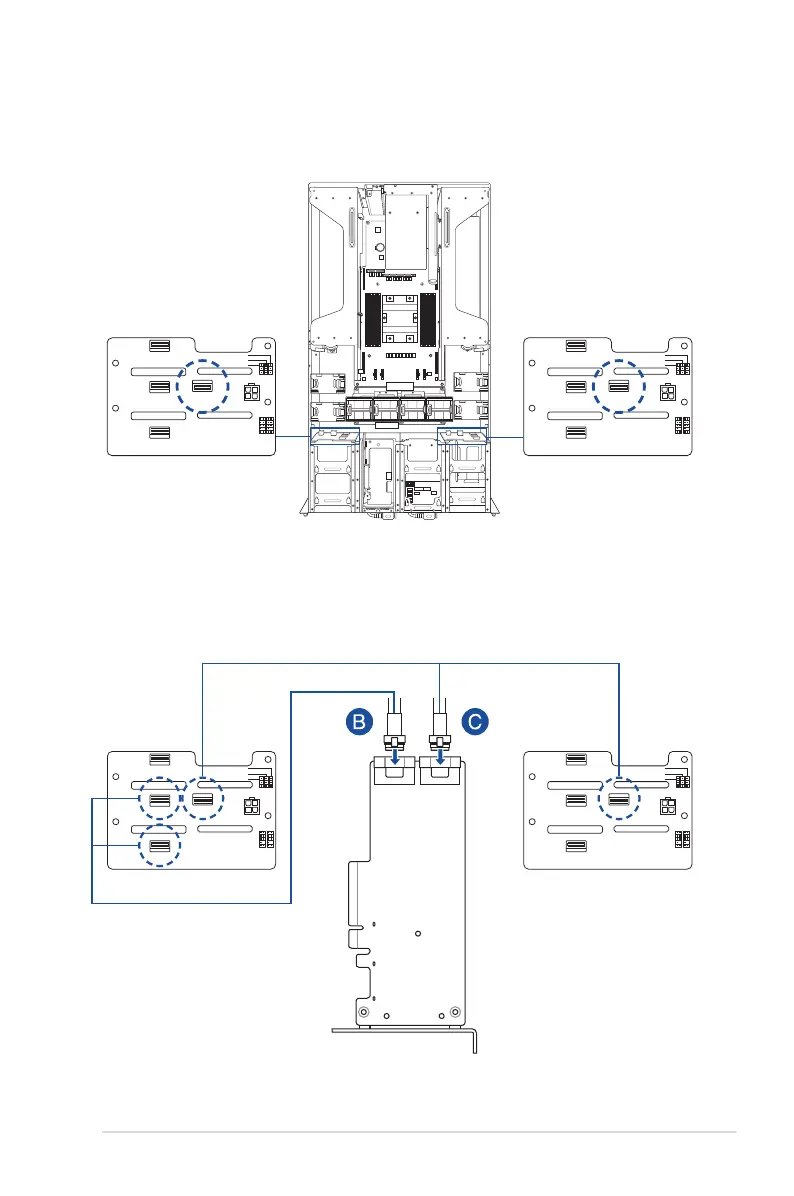
To connect a 9560 RAID card in SATA configuration:
a. Disconnect the default SLIMSAS cables connected to
SLIMSAS1
on the left and
right backplanes.
VPP_I2C1
BP_TP_BP1
BPPWR4
SGPIO_SW1
BP_NUM_SW1
TRI_DIS1
SLIMSAS1
MCIO3
MCIO1
MCIO4
Left backplane
Right backplane
VPP_I2C1
BP_TP_BP1
BPPWR4
SGPIO_SW1
BP_NUM_SW1
TRI_DIS1
SLIMSAS1
MCIO3
MCIO1
MCIO4
b. Connect the left SLIMSAS connector (B) on the RAID card to
MCIO3
and
MCIO4
on the left backplane using the bundled cables.
c. Connect the right SLIMSAS connector (C) on the RAID card to
MCIO3
and
MCIO4
on the right backplane using the bundled cables.
VPP_I2C1
BP_TP_BP1
BPPWR4
SGPIO_SW1
BP_NUM_SW1
TRI_DIS1
SLIMSAS1
MCIO3
MCIO1
MCIO4
Left backplane Right backplane
VPP_I2C1
BP_TP_BP1
BPPWR4
SGPIO_SW1
BP_NUM_SW1
TRI_DIS1
SLIMSAS1
MCIO3
MCIO1
MCIO4














 To Next Page