General operation 9
Function buttons
Press a function button to start an operating mode. For example,
start the FM/AM operating mode by pressing the function
button.
Using the function button, you can open additional
settings for the active operating mode.
Control buttons
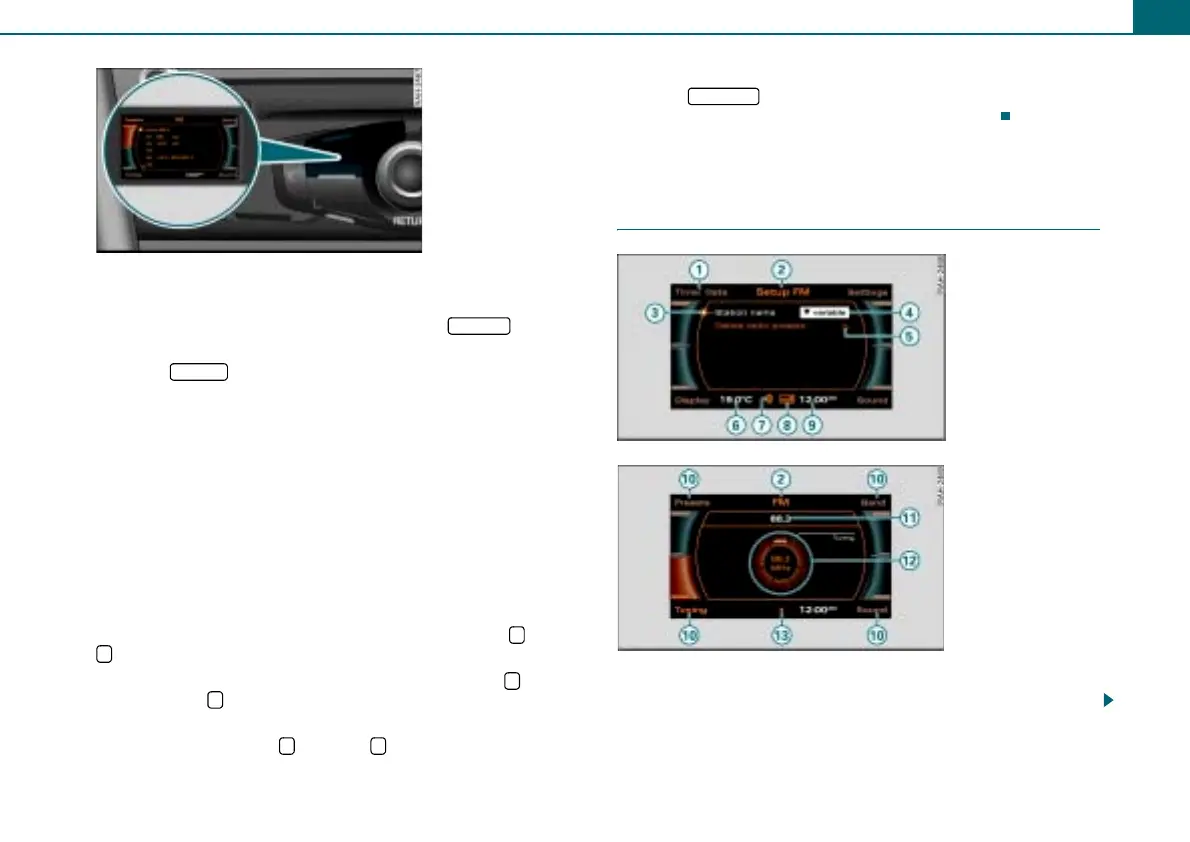
To access the function shown in one of the four corners of the
display, press the control button corresponding to this display
corner. For example, the control button in the upper left corre-
sponds to the upper left display corner ⇒ fig. 4.
Control knob
To select a menu item highlighted in the display, rotate the control
knob to the left or right and press the control knob.
Arrow buttons
To select the previous or the next radio station, press the or the
button.
To select the next track on a CD or memory card, press the button.
If you press the button within 10 seconds after a track has started
to play, playback jumps to the beginning of the previous track.
If you press and hold the button or in CD or SD mode, fast
rewind or fast forward is activated.
Return button
Press the button to cancel a selection you have not yet
confirmed or to return to the next higher menu level.
Display
“Standard” menus
After you press a function button ⇒ page 9, a menu appears in the
display.
Fig. 4 Assigning the
control button to the
button symbol in the
display
1
FM/AM
SETUP
2
3
4
<
>
>
<
< >
5
RETURN
Fig. 5 Setup Radio
Fig. 6 Radio submenu



 To Next Page