12
Axess Pro Series 3000 Owner Installation Instructions
9. Safety Beam Installation
Safety Beams
Safety Beams extend across the doorway opening. The Safety Beam is
designed to detect an obstruction while the shutter is closing and to send
a signal to the opener to reverse or stop the shutter movement.
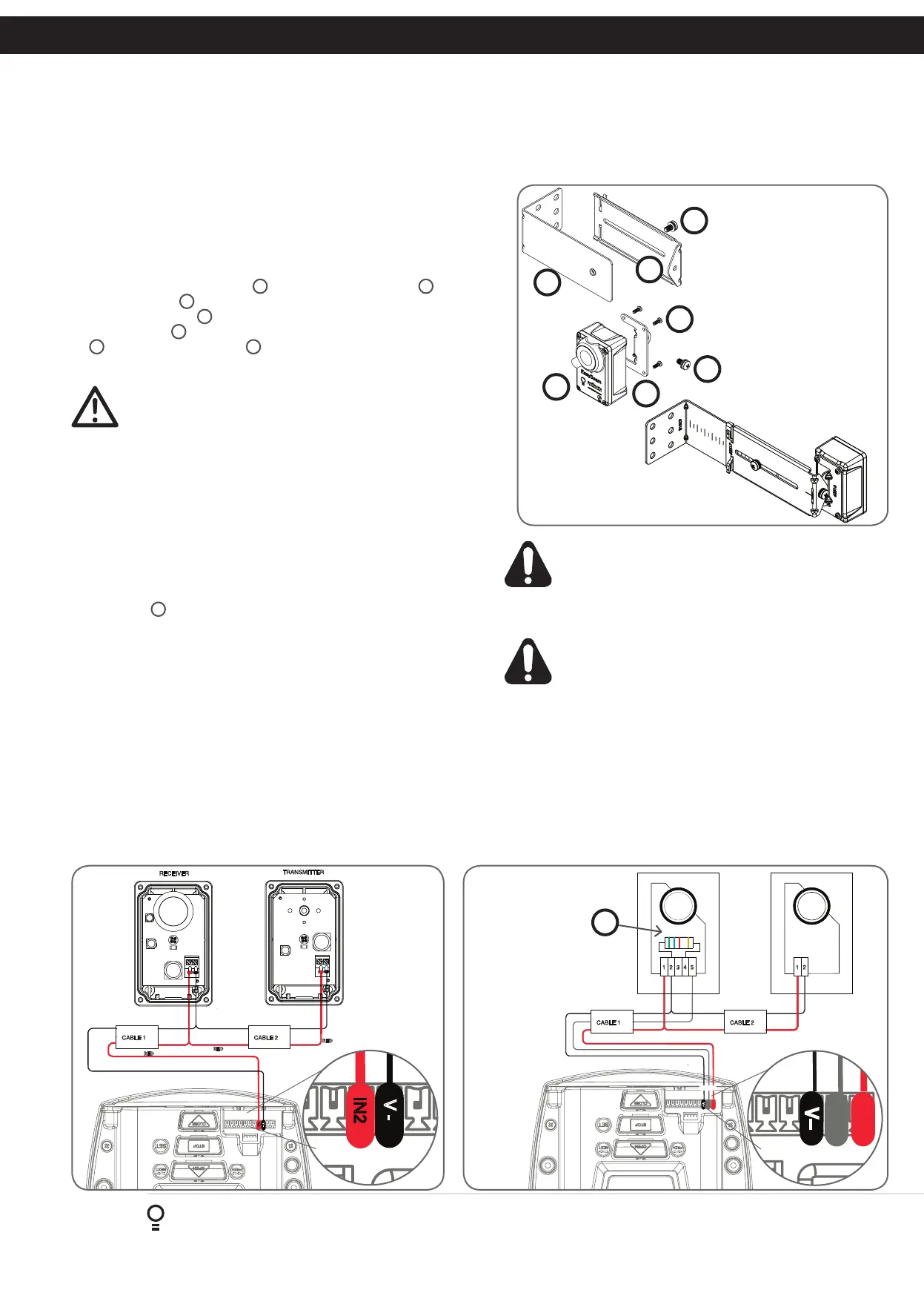
9.1 Fitting the Safety Beam
a. Attach the mounting bracket
4
to the adjustment bracket
3
with the
pan head screw
6
. (Fig. 6.1)
b. Attach the bracket
2
to the Safety Beam transmitter with four taptite
screws (m3x5)
7
and attach the other side to the adjustment bracket
3
with the pan head screw
6
.
c. Repeat steps a and b to assemble the Safety Beam receiver.
CAUTION: Locate the Safety Beam in a strategic location in the
doorway. Automatic Technology recommend that the sensor is
placed 100mm above the floor level and as close as possible to
the door opening.
9.2 Wiring the Safety Beam to V1 Logic Console
a. Connect the wires from the Safety Beams wiring harness to terminal
block.
i. By default the Axess
®
Pro Series 3000 will take two wire safety
beams (connect one wire to IN2 input and the second wire to V-,
next to the IN2 terminal (Fig. 6.2) ).
ii. The V1 Console will only take 2 wire safety beams or 3 wire beams
not a combination of both.
b. For three wire beams connect the Resistor 5k6 ohms (Green Blue
Red Gold)
5
to number 2 (two) and 4 (four) terminal on the Safety-2
receiver (Fig. 6.3). Make sure to align the beams correctly. Follow the
manual supplied with the Safety Beams.
c. Ensure you program the Axess
®
Pro Series 3000 to idenitfy what type
of Safety Beam or combination of Safety Beams you have installed.
i. Press NEXT to Navigate to Menu 6
ii. Press SET to display Menu 6.4 (for IN3).
iii. Use the UP and DOWN arrows to change the Safety Beam type
from two to three wires.
iv. Press SET to accept the selection.
V+
IN3
V−
RED
BLUE
GREEN
GOLD
BLACK
BLACK
BLACK
BLACK
YELLOW
RED
YELLOW
RED
+
+
-
-
RED
P.E BEAM
Fig 9.1
Fig 6.3
1
2
3
4
7
6
6
5
IN2
V -
RED
BLACK
RED
BLACK
RED
BLACK
BLACK
Fig 6.2
WARNING: When using Safety Beams, the doorway must be
clear of all obstructions and persons at all times. The location
of the beams and manner in which it is installed might not
give safety protection at all times. Check to make sure
that the height of the beam and type used give maximum
protection possible
WARNING: Tampering with Safety Beams could result in
serious personal injury and/or property damage and will void
the warranty.
V+
IN3
V−
RED
BLUE
GREEN
GOLD
BLACK
BLACK
BLACK
BLACK
YELLOW
RED
YELLOW
RED
+
+
-
-
RED
P.E BEAM
IN2
V -
RED
BLACK
RED
BLACK
RED
BLACK
BLACK


 To Next Page