Owner Installation Instructions Axess Pro Series 3000 17
13.2 Activate Remote Code Set Mode
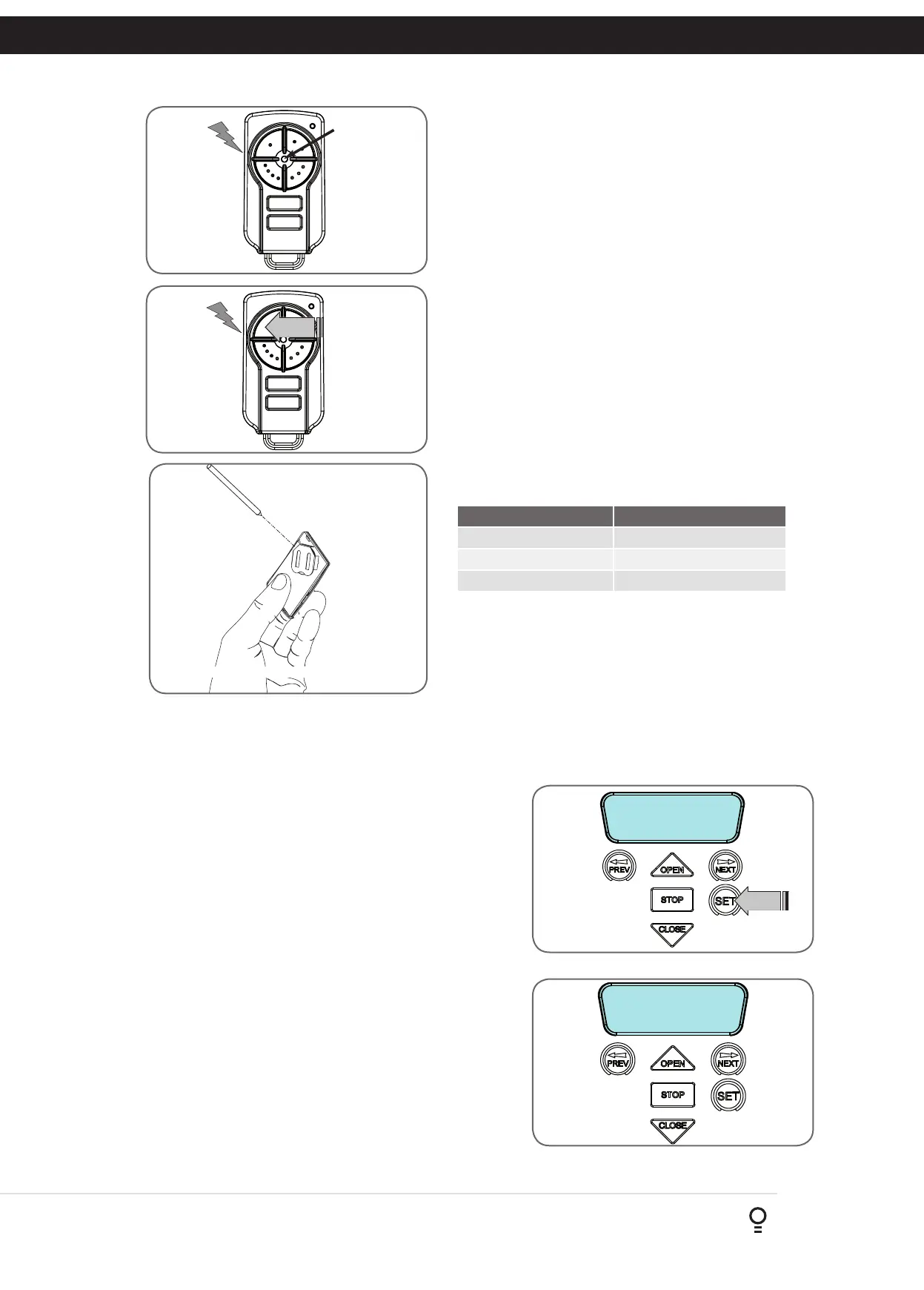
c. Use a small pin to press and hold through the Coding Hole of the existing
transmitter for 2 seconds (Fig. 13.2).
d. Within 10 seconds, press the button on the new transmitter you wish to
code for 2 seconds (Fig. 13.3).
e. Press the same button again (within 10 seconds)
for confirmation.
f. Test Operation. The new transmitter button should now function as the
existing transmitter.
New
transmitter
Existing
transmitter
Fig 13.2
Fig 13.3
NOTE: When a transmitter is remotely coded, its ID label is set to that
of the existing transmitter. If the existing transmitter does not have an ID
label assigned, then the ID label of the new transmitter is set to: R/C Tx
###, where ### is the existing transmitters store number. This ensures that
the originator of any remotely coded transmitter can be identified.
NOTE: To Manage your Transmitters, refer to Transmitter Management
in Appendix G.
13.3 Removing the Battery From the Transmitter
(Battery Type: 3V Lithium Battery CR2032).
Use a non-metallic object (e.g. pen) to remove the battery. (Fig. 13.4).
To test the battery is working, press and hold a transmitter button;
(Fig. 13.5).
Light Status Battery Status
Solid OK
Flashing Requires replacement
No light Requires replacement
REPLACE BATTERY WITH CR2032 ONLY
Fig 13.4
Fig 13.5
Use a pen
to push the
battery down
through the
side opening
to release
battery
14. Setting Pedestrian Position
After completing the limit setup procedure the Pedestrian Access
position is automatically set to a position which is approximately in
the middle of the door travel. The position can be manually set by
following the Setting Pedestrian Position procedure.
14.1 Setting Pedestrian Position
a. Drive and stop the door at the desired Pedestrian Access
position by using a transmitter or wall control unit.
b. Press PREV to navigate to Menu 10.
c. Press SET. MENU 10.1 will be displayed.
d. Press NEXT to go to MENU 10.3
e. Press SET on the wall control unit to save the Pedestrian Access
position (Fig. 14.1).
f. Press the STOP button to exit to the main screen.
14.2 Checking Pedestrian Position
When activated by a transmitter button which is coded as Ped
mode, the opener drives the door to the preset position from
either above or below. Ped Mode’s active status is indicated on the
display (Fig. 14.2). If a Ped Mode button is pressed while the door
is moving, the door will stop. If a Ped Mode button is pressed when
the door is in the Ped position, then the door will close.
14.3 Error Displays
During the above procedure many error checks are performed. If
an error is detected, a message will be displayed indicating the
error.
MENU 10.3
Set Pedestrian
Ped’n Access
FRI 11:06:44 STD
Fig 14.1
Fig 14.2



 To Next Page