4
* Function requires AVer
PTZApp
** Not supported for
CAM520 Pro
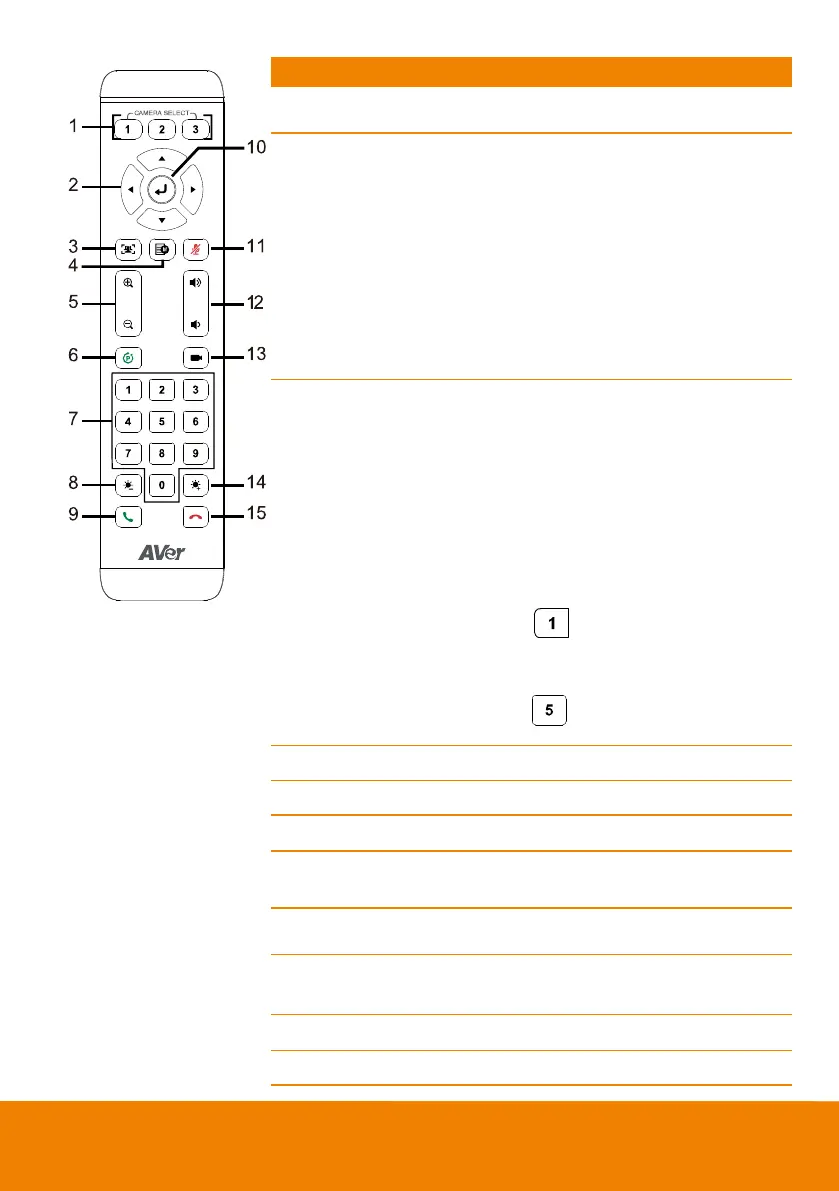
Increase/Decrease the camera zoom.
1. To save the camera at the desired
position, press and hold the preset
button until the "saved message" is
displayed on the PTZApp video
screen or other video apps. Select
preset position button 0 to 9 to
save.
2. Press “preset” + “preset position
button” (0~9) to move the camera to
the saved position.
7. Preset position/Number
buttons
Preset position buttons are used in
conjunction w ith the Preset button to
save positions. There are a total of 10
presets.
Press the preset button first and then
press 0~9 for the camera to move to
the saved position.
[Note]
Press and hold the number button
“ ” to turn the WDR function on
or off.
To turn off SmartFrame function,
Press and hold number button
“ ”for one second to sw itch
the function off or on.
Answer a call or start a call.
11. Mute/Unmute
Speakerphone**
Mute/Unmute the speakerphone.
Adjust volume up or dow n.
Press to move the camera to the
preset position the user has set.



 To Next Page