EasyManua.ls Logo

AVer VC520 Pro - Page 24

AVer VC520 Pro
74 pages
Print Icon
To Next Page IconTo Next Page
To Previous Page IconTo Previous Page
Loading...
16
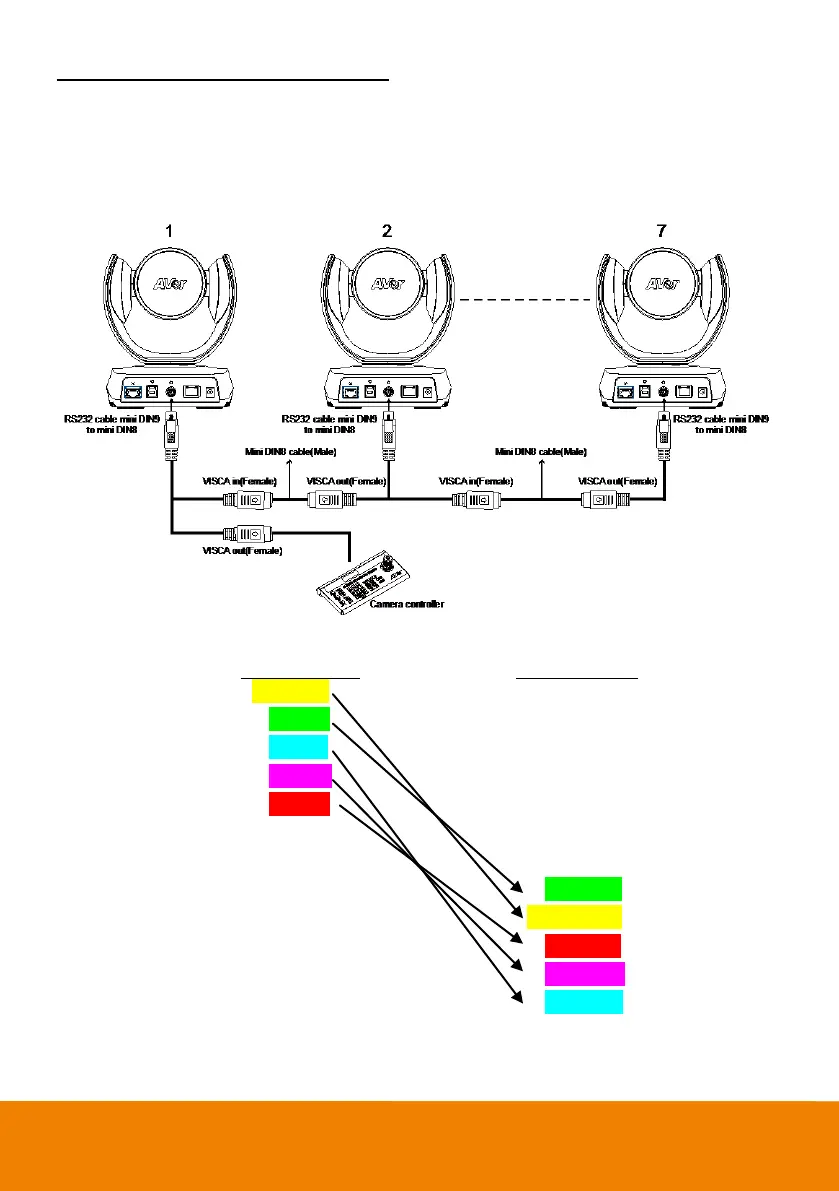
Use the RS232 mini DIN9 to mini DIN8 cable
Total can connect up to 7 cameras.
To facilitate the camera cascade, users can purchase AVer RS232 adaptor cable.
Connect camera with AVer mini DIN9 to mini DIN8 adaptor cable. Connect the mini DIN8 female side
to male mini DIN8 Visca cable (Users have to buy it in the market) and then connect AVer mini DIN9 to
mini DIN8 adaptor cable again to connect to next camera.

Camera 1
(Mini DIN8)
Camera 2
(Mini DIN8)
1. DTR(IN)
1. DTR(IN)
2. DSR(IN)
2. DST(IN)
3. TXD(IN)
3. TXD(IN)
4. GND(IN)
4. GND(IN)
5. RXD(IN)
5. RXD(IN)
6. GND(IN)
6. GND(IN)
1. DTR(OUT)
1. DTR(OUT)
2. DSR(OUT)
2. DST(OUT)
3. TXD(OUT)
3. TXD(OUT)
4. GND(OUT)
4. GND(OUT)
5. RXD(OUT)
5. RXD(OUT)
6. GND(OUT)
6. GND(OUT)

Table of Contents

Other manuals for AVer VC520 Pro

Related product manuals