EN45EN 44
3.2.2. Photocell mode
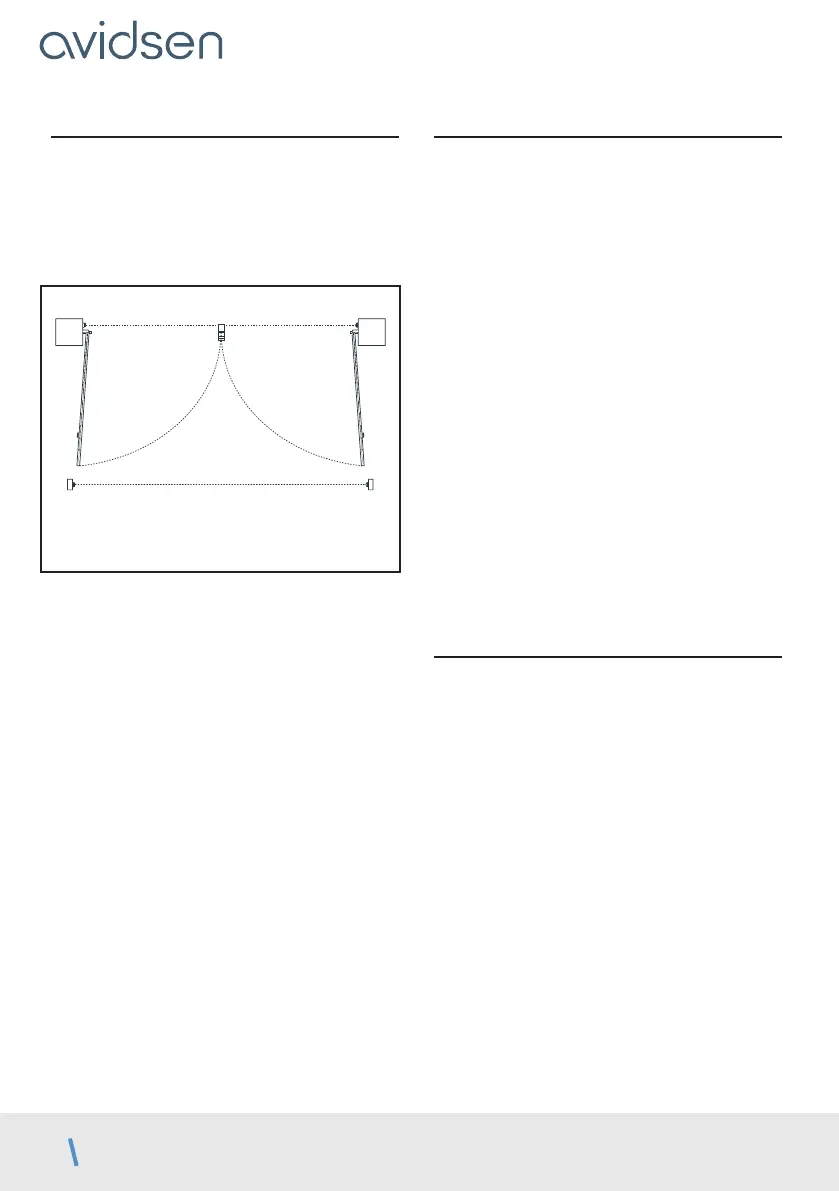
The photocells are active when the panels close
because they are placed between the posts (pair 1)
to secure the passage between panels.
The installation of a second set of photocells is useful
to completely protect the gate movement area during
closing and opening:
Inner side of the property
view from above
pair 2
pair 1
RX1
RX2
TX1
TX2
In that case, the system must verify that its infrared
beam is not obstructed before starting to open the
panels. But by default, photocells are only tested
during closure.
To activate or deactivate photocells at the
beginning of the opening process, follow the
procedure below
• Press PROG for 3 seconds. L0 will flash once and
L1 will switch on.
• Press “PROG” for 3 seconds. L0 will flash twice.
• Press “+” once. L2 will turn on instead of L1.
• Press OK.
• If L1 is off, the photocells are inactive at the
beginning of the opening process. Press “+” to
activate them, then OK to confirm. All LEDs will
turn on and off to confirm the operation.
• If L1 is on, the photocells are active at the
beginning of the opening process. Press “–” to
deactivate them, then OK to confirm. All LEDs will
turn on and off to confirm the operation.
3.2.3. Type of gate
To operate the electronic card on a single-panel gate,
this setting must be changed. By default, this value is
set to 0 (two-panel gate mode).
In addition, the motor output that remains active in
side gate mode is M1 (not to be confused with the
pedestrian passage function).
To activate or deactivate this function, follow
the procedure below
• Press PROG for 3 seconds. L0 will flash once and
L1 will switch on.
• Press “PROG” for 3 seconds. L0 will flash twice.
• Press “+” twice and L3 will turn on instead of L1.
• Press OK.
• If L1 is off, gate mode is activated. Press “+” to
activate side gate mode, then OK to confirm. All
LEDs will turn on and off to confirm the operation.
• If L1 is on, side gate mode is activated. Press “–”
to activate gate mode, then OK to confirm. All
LEDs will turn on and off to confirm the operation.
Self-learning is required if this setting is
changed.
3.2.4. Stop tolerance
During self-learning, the system learns the path of
each panel to determine when a panel stops if it
has reached a stop or an obstacle. In fact, during
a movement, if more than a certain percentage of
the path remains to be completed by the panel but
it comes under strain, the system considers it to be
pushing against an obstacle. If the panel comes under
strain when less than such percentage remains to be
completed, the system considers that the panel has
reached its stop. By default, this percentage is 3%.
However, the accuracy of the system depends on
many parameters, such as temperature, motor
quality, the type of motor cables and the flexibility and
weight of the gate. Depending on these parameters,
the path measuring system may not be accurate
enough to operate with this default tolerance.
In this case, the system can trigger obstacle
detection when the panels reach their normal stop.
If this occurs (and after confirming that the opening
and closing stops are stable), the obstacle detection
tolerance must be increased.
D - BEGINNING OPERATION



 To Next Page