EN57EN 56
1
2
3
1
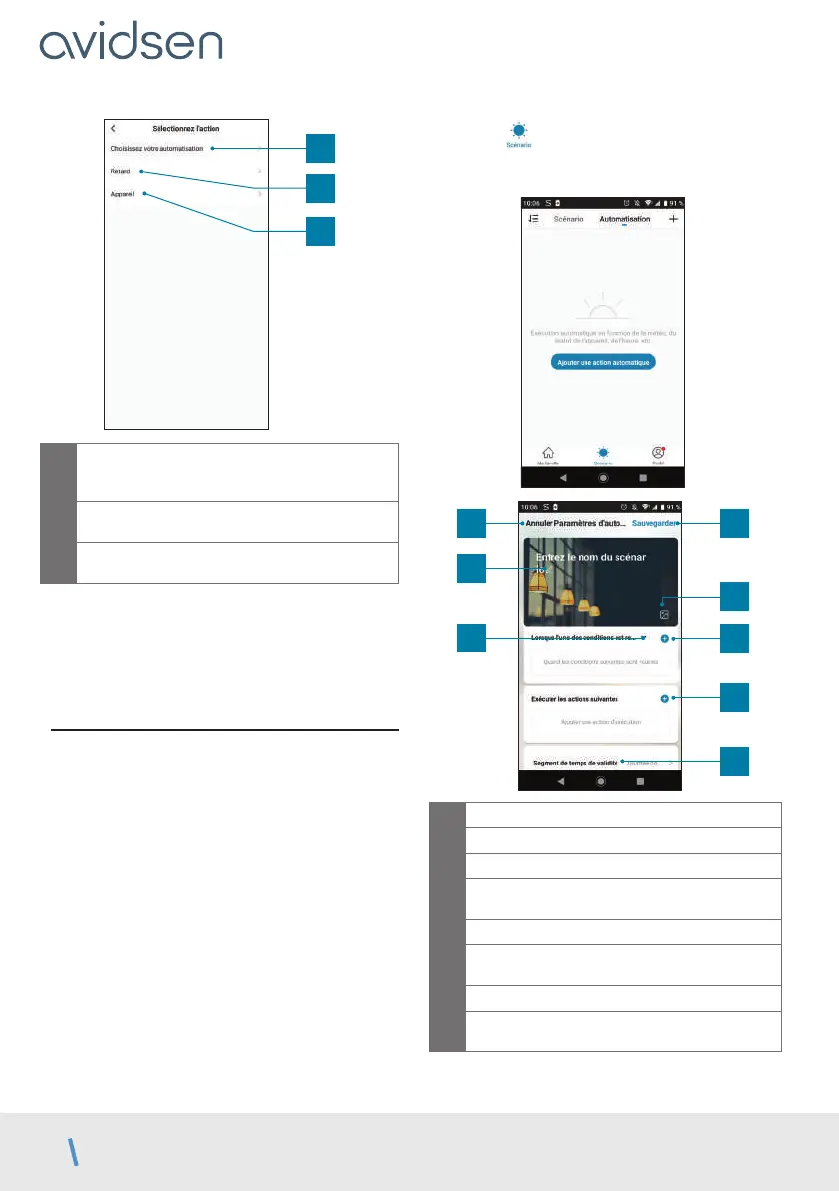
Allows you to use a previously defined
automation (an automatic action). See next
paragraph for more details
2
Allows you to insert a pause of an adjustable
time period in the performance of actions
3
Displays the list of products already linked in
the app and the possible actions
The Choisissez votre automatisation (Choose
your automation) function allows you to call on an
automation that has already been saved and enable
or disable it while the new scenario is running.
11.2 - Creating an automation
The automation system in the Avidsen Home
app allows you to group devices and actions which
will be triggered automatically
by the action of another device or a condition
(temperature, time, etc.) .
Example: creating a “Gate opening” automatic action
that triggers a contact at a given time, only if the gate
is in closed position.
The automation system in the Avidsen Home app
allows you to group devices and actions which will
be triggered automatically by the action of another
device or a condition (temperature, time, etc.) .
Example: creating a “Living room lighting” automatic
action that turns on the light for a few seconds when
a movement is detected by the camera:
Click on and then on Automatisation
(Automation) at the top right, and finally on Ajouter
une action automatique (Add automatic action):
1
3
5
4
2
6
7
8
1
Go back
2
Save automation
3
Change the automation name
4
You can change the background image if
you wish
5
Selection of condition type
6
Selection of conditions to be met for actions
to be executed
7
Selection of actions to be executed
8
Selection of the automation validity time slot
(e.g. only at night)
E - USE



 To Next Page