EN55EN 54
E - USE
· Once a skill is installed, say “Alexa, find new
devices”.
· After 45 seconds, Alexa will give you the devices
found.
For more information on Amazon Alexa, please
consult Amazon support.
One tip however: if you connect multiple modules
within the same zone, and to prevent unwanted
commands, we recommend you do not use the
group name suggested by Alexa (bedroom, office,
living room, etc.) when naming your control module.
In the event of problems with the Amazon Alexa
application or configuration of the device in Amazon
Alexa, contact Amazon support.
11 - SCENARIO AND AUTOMATION
11.1 Scenario
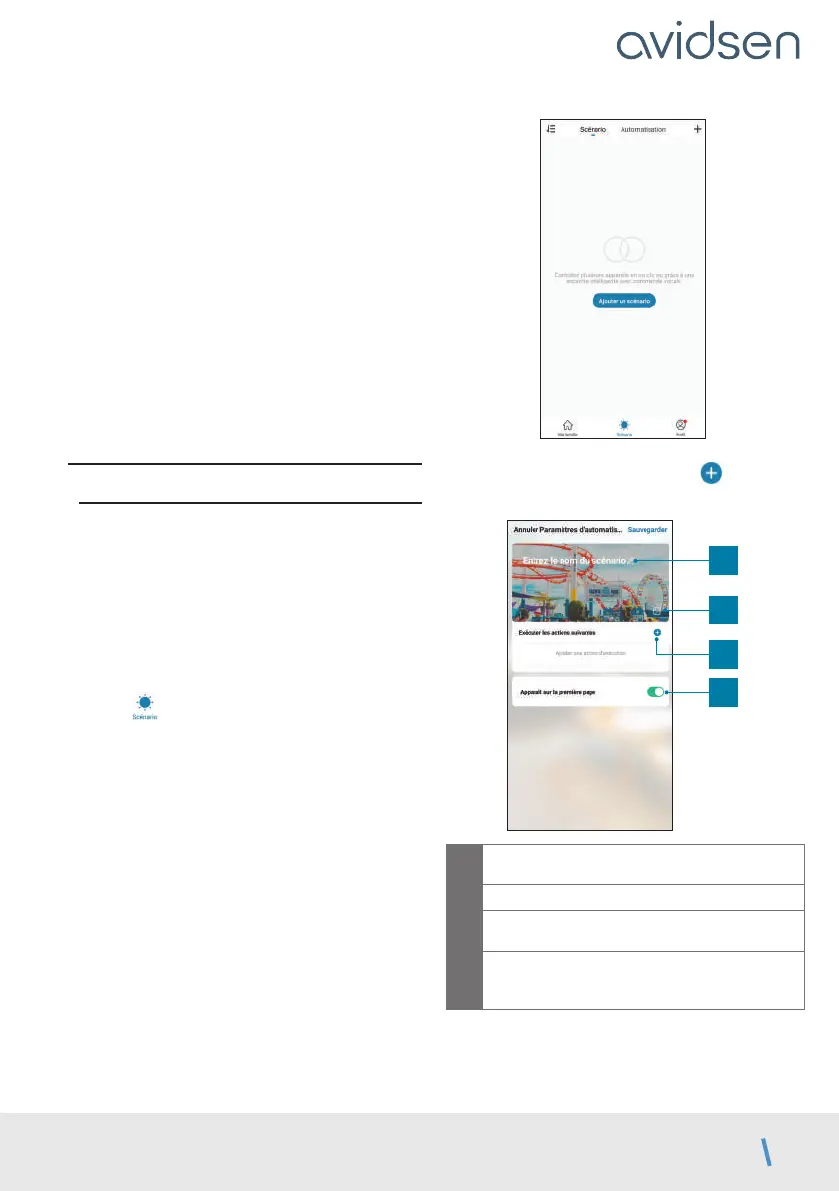
The scenario system in the Avidsen Home app
allows you to group actions that will be triggered
on demand, by clicking on a single button on your
smartphone.
Example: creating an “I’m going” scenario to turn
off my smart plug and activate motion detection on
my camera:
Click on
at the bottom of the screen, then on
Scénario (Scenario) at the top left and, finally, on
Ajouter un scénario (Add a scenario):
Name your scenario, then click on to set the
actions to be executed:
1
2
3
4
1
Name your scenario here at your
convenience
2
You can change the background image here
3
Set the actions to be performed by clicking
here
4
If the box is checked, the scenario will be
displayed alongside your products linked to
the application



 To Next Page