EN43EN 42
D - BEGINNING OPERATION
3.1. Access to advanced settings
(MENUS 2 and 3)
To access menus 2 and 3, follow the procedure
below
• Press PROG for 3 seconds. L0 will flash once,
L1 will turn on and you will be in menu 1 (basic
settings).
• Press PROG again for 3 seconds. L0 will flash
twice, L1 will turn on and you will be in menu 2
(advanced settings).
• Press PROG again for 3 seconds. L0 will flash
three times, L1 will turn on and you will be in
menu 3 (advanced settings).
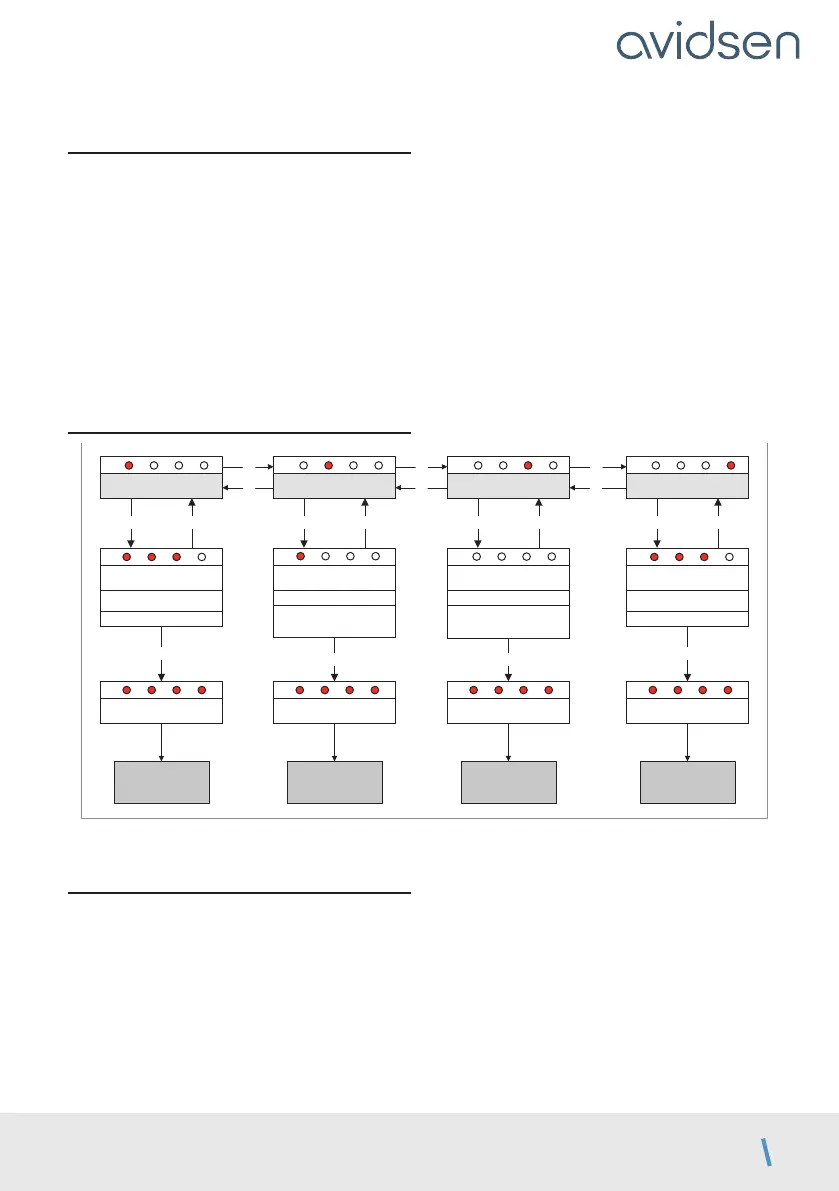
3.2. Advanced settings menu (MENU 2)
Accélération
OK PROG
Réglage accélération
+ : augmente l’accération
– : diminue l’accélération
OK
MENU 0
réglable de 0 à 4
Tolérance butée
OK
PROG
Réglage tolérance
+ : augmente la tolérance
– : diminue la tolérance
OK
MENU 0
réglable de 0 à 4
* cette modification nécessite de refaire un auto-apprentissage
Type de portailMode photocellules
OK PROG
Type de portail
– et + pour régler la valeur
OK
MENU 0
OK PROG
Mode photocellules
– et + pour régler la valeur
OK
MENU 0
0 : inactives en début d’ouverture
(par défaut)
1 : actives en début d’ouverture
0 : portail à 2 battants (par
défaut)
1 : portail à 1 battant (portillon)
–
+
+
–
+
–
L1 L2 L3 L4
L1 L2 L3 L4
L1 L2 L3 L4 L1 L2 L3 L4 L1 L2 L3 L4
L1 L2
L3 L4
L1
L2 L3 L4
L1 L2 L3 L4
Enregistre réglage*
L1 L2 L3 L4
Enregistre réglage
L1 L2 L3 L4
Enregistre réglage*
L1 L2 L3 L4
Enregistre réglage*
L1 L2 L3 L4
This change requires a new self-learning procedure.
3.2.1. Acceleration
The acceleration at the start of the panel opening
process can be adjusted from a level of 0 to 4. The
higher this value, the more time the gate will take to
open. The default level is 3, at which the gate takes
about 4 seconds to open. It may be useful to reduce
the acceleration for a softer start.
To adjust the acceleration, follow the procedure
below
• Press PROG for 3 seconds. L0 will flash once
and L1 will turn on.
• Press
PROG for 3 seconds. L0 will flash twice.
• Press OK and the number of LEDs that turn on
will indicate the set value.
• Use the “+” and “-” buttons to change this value.
• Press OK to confirm this value. All the LEDs will
turn on and off to confirm the operation.
NOTE: If the acceleration setting is changed,
self-learning must be repeated.



 To Next Page