EN57EN 56
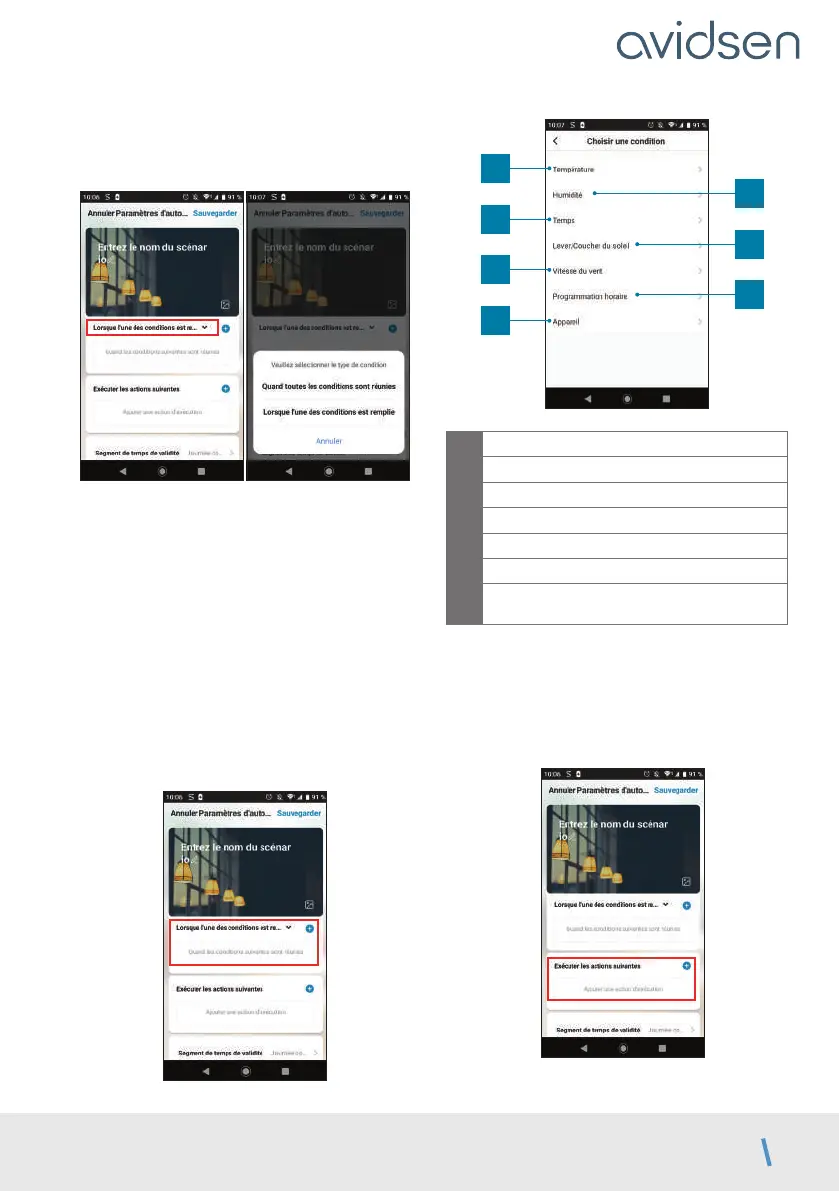
One of the most important settings is the selection
of the type de condition (condition type). This
allows automation to deal with multiple conditions.
• Quand toutes les conditions sont réunies
(When all the conditions are met) corresponds
to an “ET” (“AND”) function:
- If Temperature = x ET (AND) time = y ET
(AND) device = n then…
• Lorsque l’une des conditions est remplie
(When one of the conditions is met)
corresponds to a “OU” (“OR”) function:
- If Temperature = x OU (OR) time = y OU
(OR) device = n then…
After selecting the condition type, choose the
conditions themselves:
1
3
5
7
2
4
6
1
Set a temperature weather condition*
2
Set a humidity weather condition*
3
Set a weather condition*
4
Set a sunrise or sunset condition*
5
Set a wind condition*
6
Set a time condition
7
Set a condition from a device already
linked to the application
*These conditions take into account the geolocation
of your smartphone to access weather data.
The following part is related to the actions that will
be triggered by the conditions:
E - USE



 To Next Page