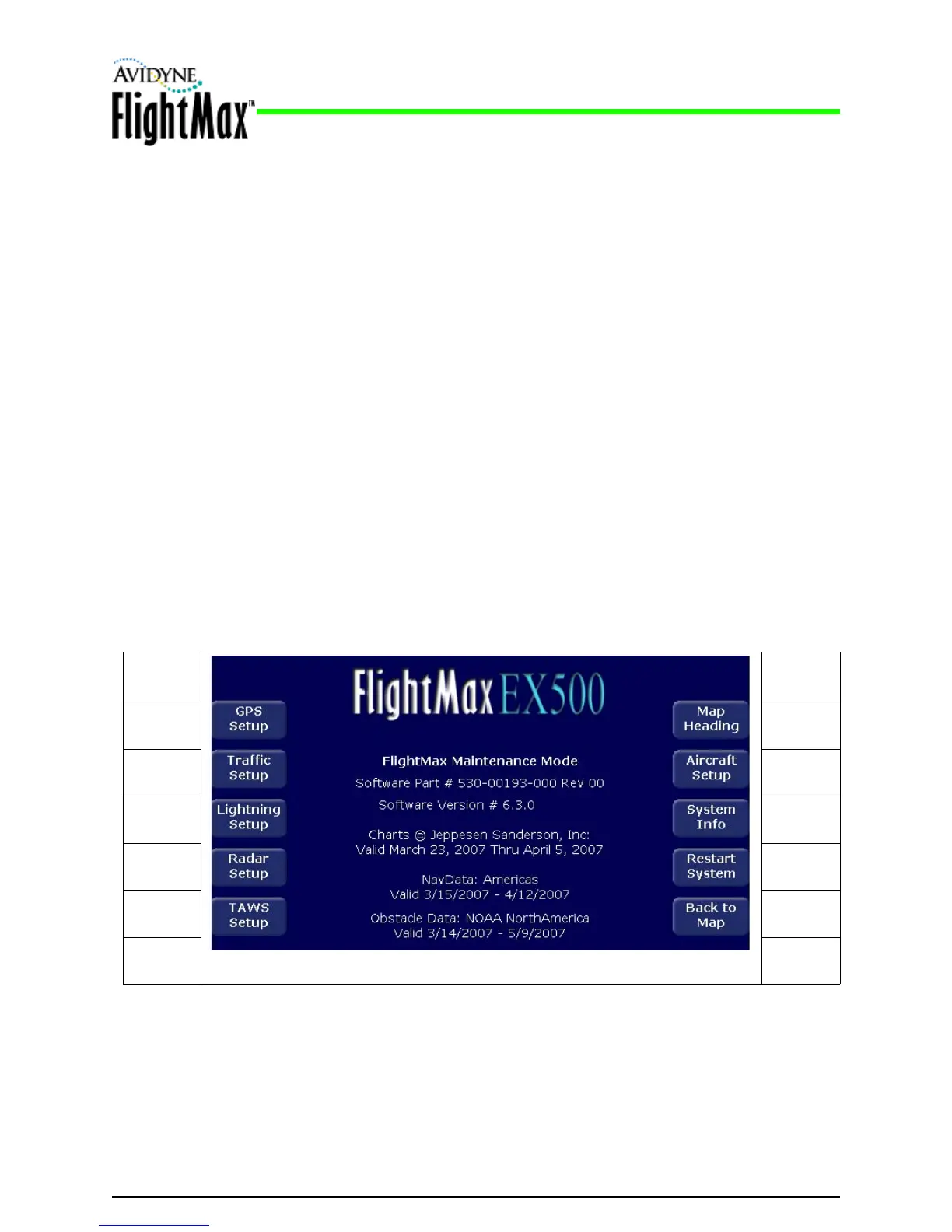
Figure 7: Example Maintenance Mode Page
Installation Manual
P/N 600-00175-000 Rev 04 MFD Feature Setup and Checkout
- 27 -
5.4 Using the Maintenance Mode Page
The MFD Maintenance Mode Page contains the setup pages for each function.
➤ To start using the Maintenance Mode Page, apply power to all the sensors that interface with the MFD,
including the GPS, the Lightning and Traffic sensors, and TAWS sensor.
5.4.1 Entering Maintenance Mode
To enter the Maintenance Mode Page, apply power to all the sensors that interface with the EX500/
EX600, including the GPS, the Lightning and Traffic sensors, and TAWS sensor.
1. Set the aircraft avionics master ON and circuit breaker IN
2. Press PWR to turn on the EX500/EX600
The system will begin its normal start up sequence
3. At the prompt, “Press any bezel key to continue”, press any button.
4. Rotate the Page knob clockwise until the Aux Page displays.
5. Simultaneously press and hold buttons L1 (top left) and L3 (3rd down on the left) (see Figure 7) for
at least 5 seconds.
The Maintenance Mode Page displays. Note that the available setup options depend on the
specific aircraft.
L1 R1
L2 R2
L3 R3
L4 R4
L5 R5



 To Next Page