11
2.4.13 Foot control devices
Notes
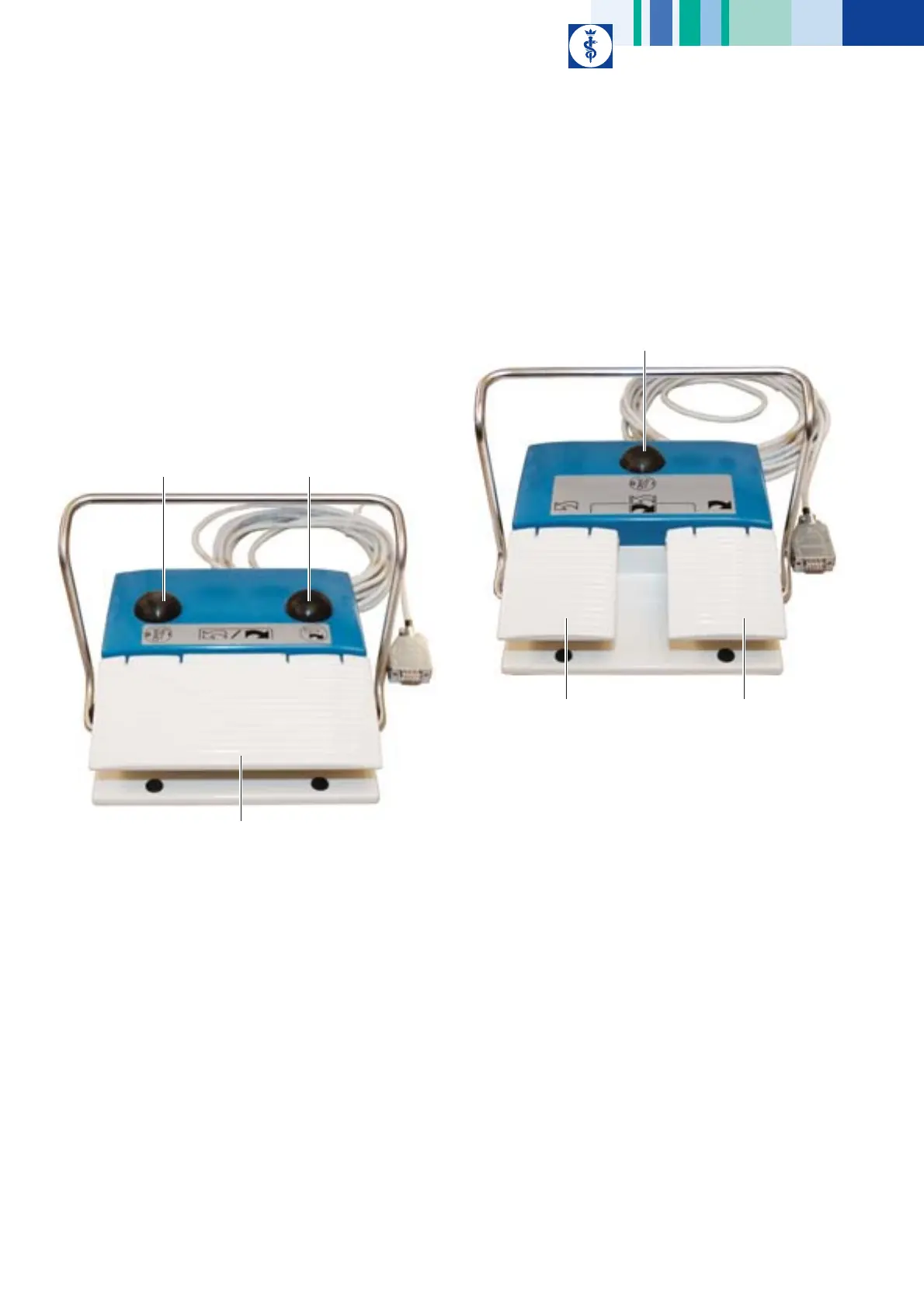
The microspeed® uni motor system includes two different foot controls
(GD668 and GD671).
Only one foot control can be connected to control unit GD670 at any time.
microspeed® uni foot control, one pedal, GD668
Fig. 8
Legend
18 Foot control function button:
Short actuation: Switching on/off the coolant pump
Actuation for more than three seconds (with the motor inactive):
Changing to Device settings menu, see chapter Changing the settings
in the Device settings menu through the foot control
22 Motor direction switch:
Selection of right or left rotation
23 Pedal:
Actuator for motor speed setting
microspeed® uni foot control, two pedals, GD671
Fig. 9
Legend
18 Foot control function button:
Short actuation: Switching on/off the coolant pump
Actuation for more than three seconds (with the motor inactive):
Change to Device settings menu, see chapter Changing the settings in
the Device settings menu through the foot control.
19 Right pedal:
Actuator for motor speed setting in right rotation
20 Left pedal:
Actuator for motor speed setting in left rotation
18
23
22
20
18
19











 To Next Page