33
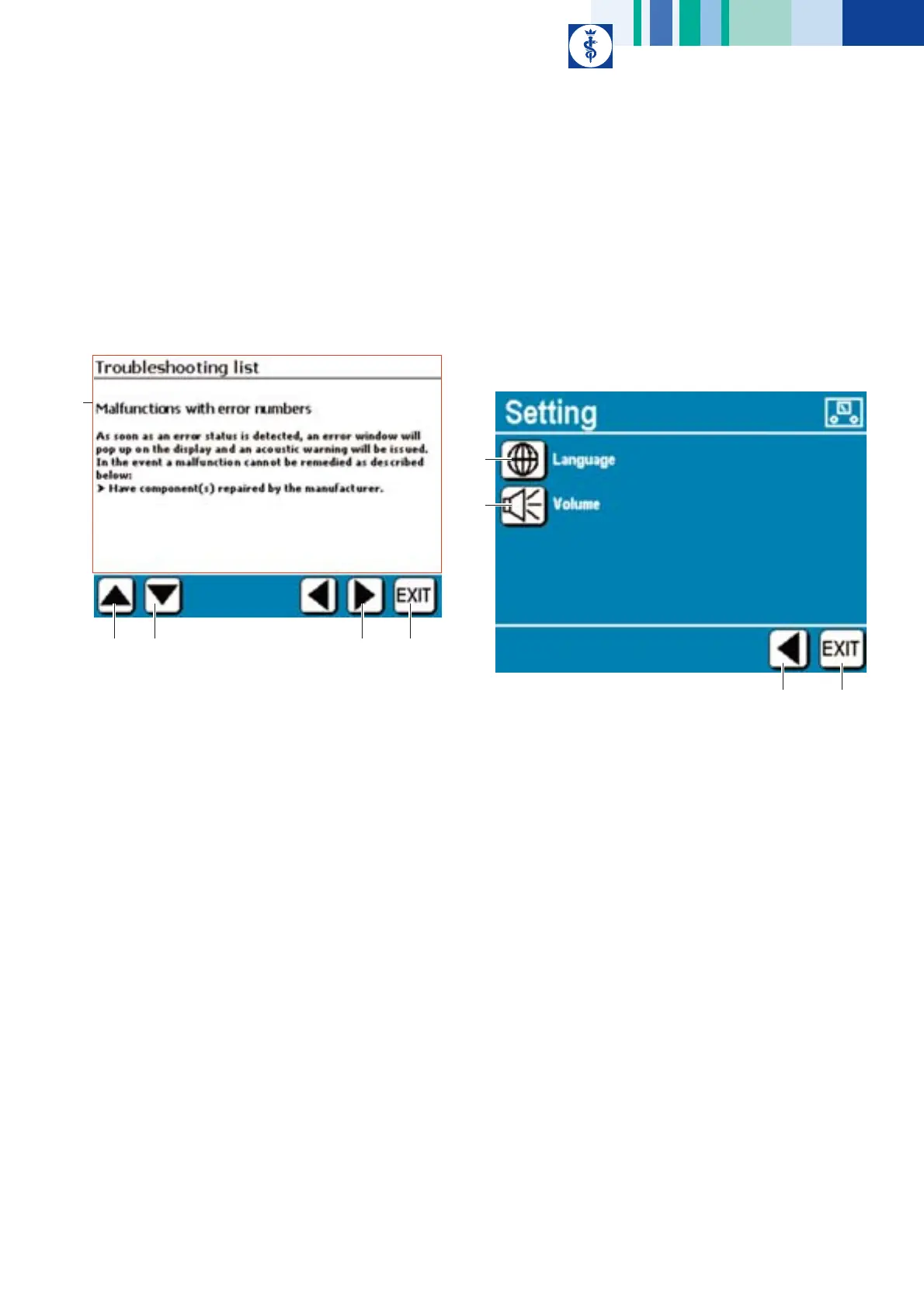
4.4.1 Submenu information on the error conditions shown on
the display
¾ Press control key “Info error list” in menu “Information/Setting”.
Fig. 34
Legend
A Text field:
In this field the chapter “Troubleshooting list”, Malfunctions with
error numbers, is displayed
B Control key "Scroll up":
press this key to scroll up through the text.
If this key is pressed at the beginning of the text, the display jumps to
the end of the text
C Control key "Scroll down":
press this key to scroll down through the text.
If this key is pressed at the end of the text, the display jumps to the
beginning of the text
D Control key "Change to higher menu level"
(to submenu “Device-specific settings”)
E Control key "EXIT":
To exit from the Instruction menu
4.4.2 Submenu Device-specific settings
Device-specific settings are:
• Language setting
• Volume of acoustic alarm/notification signal
¾ Press control key “Device setting” in menu “Information/Setting”.
Fig. 35
Legend
A Control key "Language":
Call up submenu for language setting
B Control key "Volume":
Call submenu for setting the volume of the acoustic alarm/
notification signal
C Control key "Change to higher menu level":
(to Information/Setting menu)
D Control key "EXIT":
To exit from the Instruction menu
A
B
C
D
E
B
D
C











 To Next Page