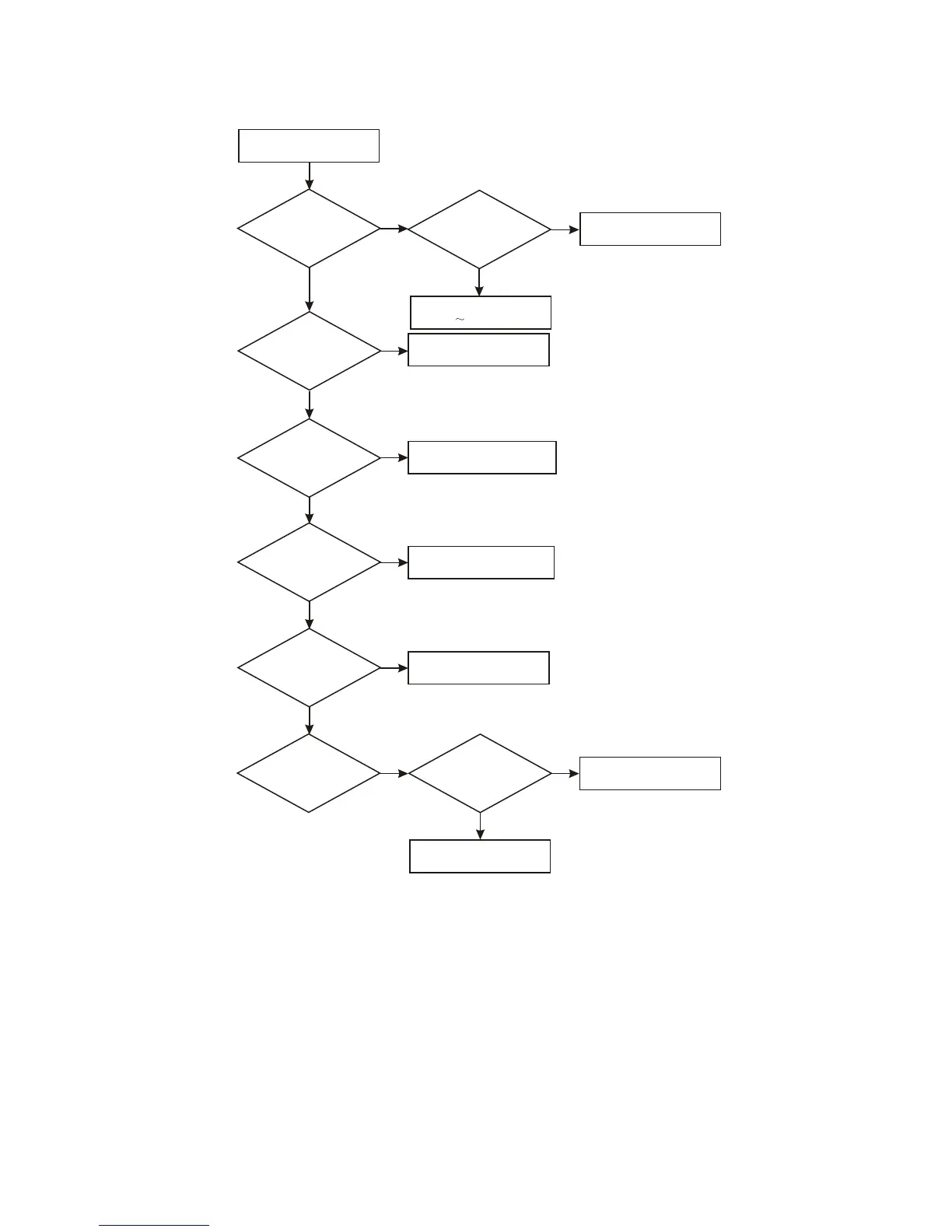
5. Troubleshooting process for “Power not on” is shown in he figure 3.2.2.5:
Power not on
Whether
two ends of TC501
have 300V
voltage
Whether
two ends of power
grid filter have AC
input
Check fuse tube and
power cord
N
N
Y
Y
Check rectifying tube
D501 D504
N
Change U501
Whether
each pin voltage of
U501 is
normal
Check
U501 peripheral and
transformer
N
Check U501 and transformer
Y
Whether
cathode of D510 has
power output
N
Check D501 and transformer
Y
Whether
pin 4 of CN501 has
power output
N
Check +5V filtering circuit
Y
Whether
+5V voltage output is
normal
N
Change TLV431 or
photoelectric coupler
Y
Check
whether TLV431 and
photoelectric coupler
are normal
N
Y
Check peripheral elements
of feedback loop
Figure 3.2.2.5 Troubleshooting flow chart for “Power not on”
- 42 -



 To Next Page