Appendix
EL3773164 Version: 2.5
Changing the ESI slave identifier
The ESI/EEPROM identifier can be updated as follows under TwinCAT:
• Trouble-free EtherCAT communication must be established with the slave.
• The state of the slave is irrelevant.
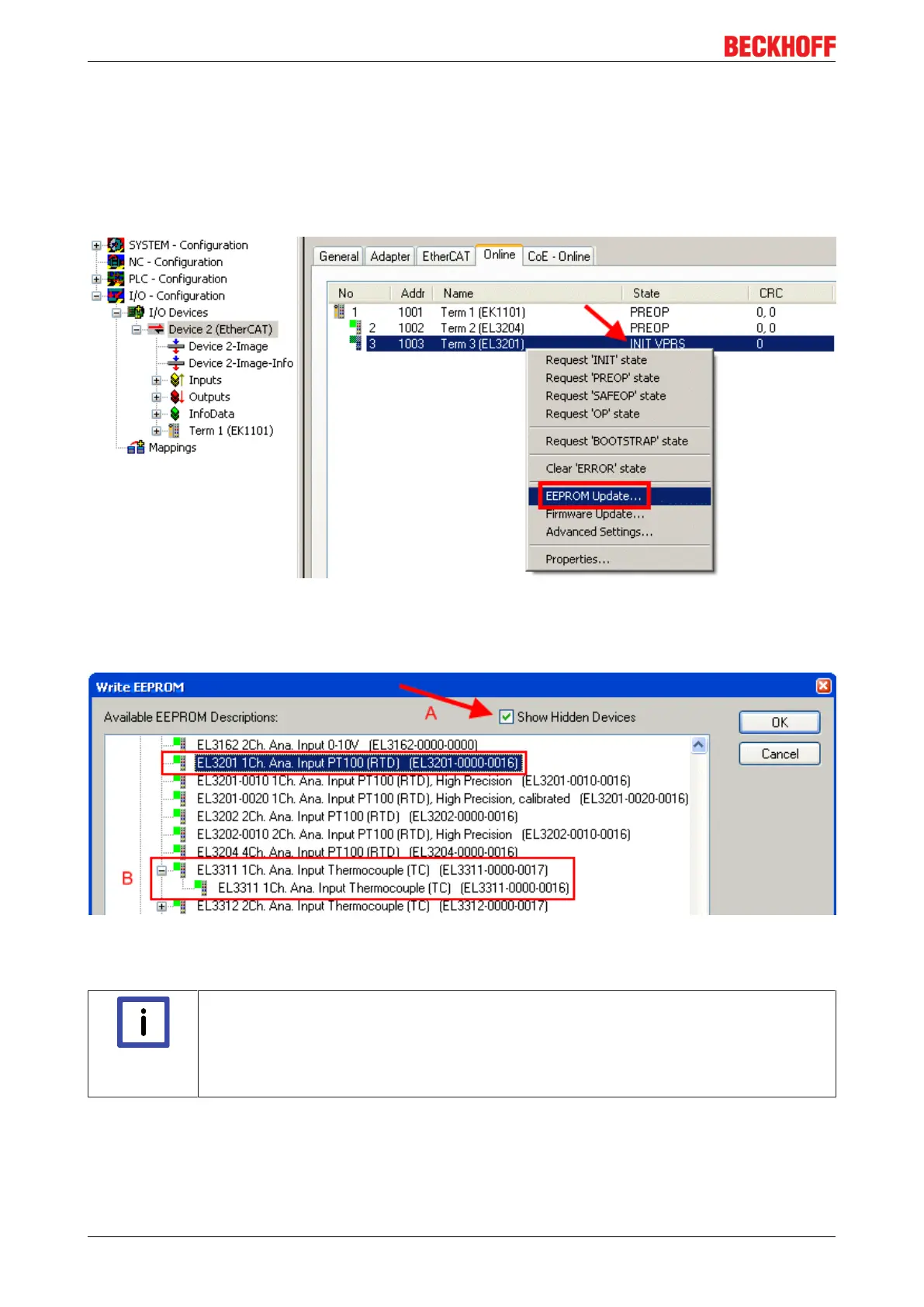
• Right-clicking on the slave in the online display opens the EEPROM Update dialog, Fig. EEPROM
Update
Fig.178: EEPROM Update
The new ESI description is selected in the following dialog, see Fig. Selecting the new ESI. The checkbox
Show Hidden Devices also displays older, normally hidden versions of a slave.
Fig.179: Selecting the new ESI
A progress bar in the System Manager shows the progress. Data are first written, then verified.
Note
The change only takes effect after a restart.
Most EtherCAT devices read a modified ESI description immediately or after startup from
the INIT. Some communication settings such as distributed clocks are only read during
power-on. The EtherCAT slave therefore has to be switched off briefly in order for the
change to take effect.









 To Next Page