Operating the camera 37
English
2. Press or to enter the submenu.
3. Press or to select a metering option.
4. Press to confirm setting.
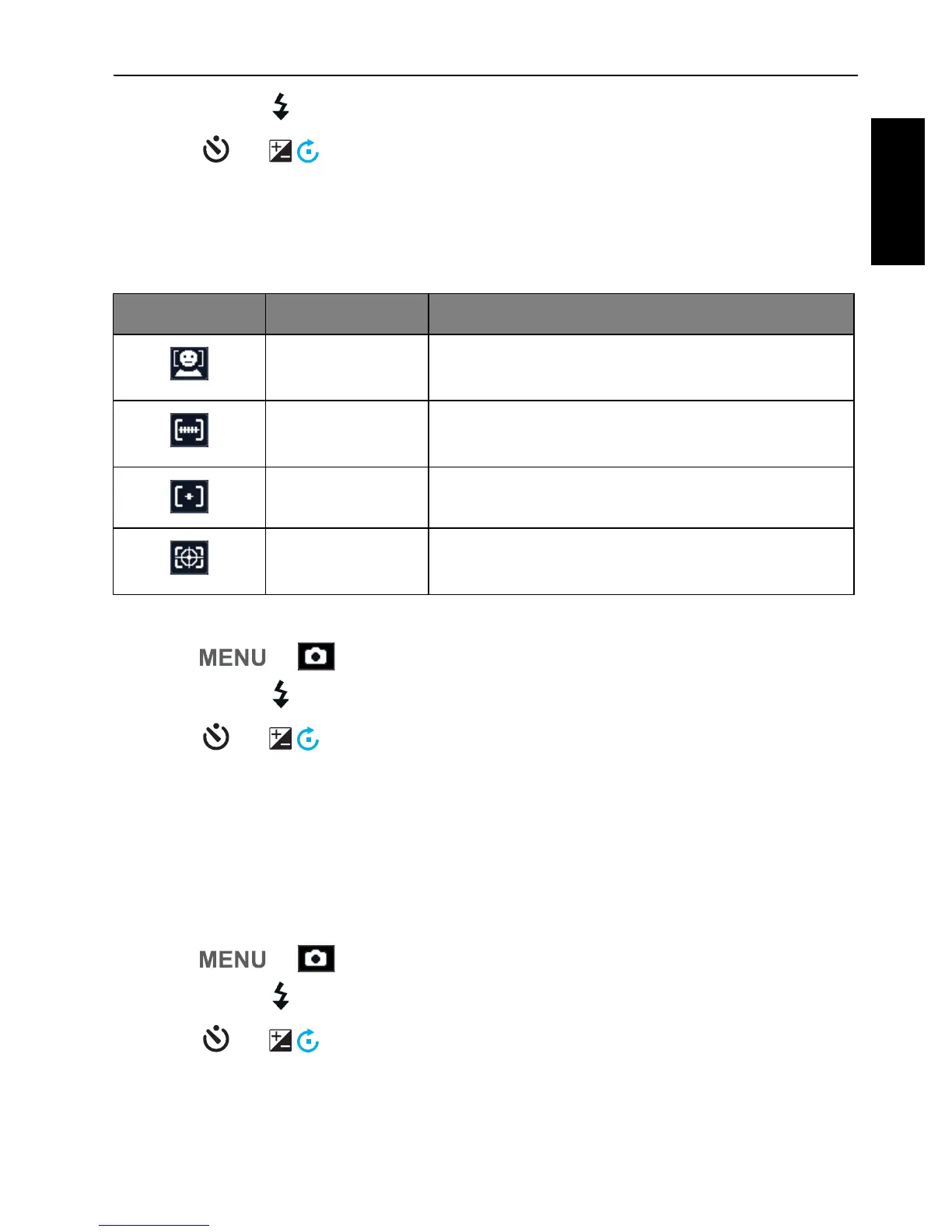
AF Area
This feature determines the area on which the camera focuses.
To set the AF Area:
1. Press > > AF Area.
2. Press or to enter the submenu.
3. Press or to an AF area option.
4. Press to confirm setting.
AF Lamp
This feature allows you to add extra light when the lighting is insufficient while
capturing images.
To enable the AF Lamp:
1. Press > > AF Lamp.
2. Press or to enter the submenu.
3. Press or to select
Auto.
4. Press to confirm setting.
Icon Mode Description
Face Tracking Automatically detects faces and tracks faces
continuously.
Wide Automatically selects the focus area within
the wide frame.
Center The focus is fixed on the center.
Tracking AF Focuses the subject as it moves and the
focus is kept continually automatically.


 To Next Page