
 Need help?
Do you have a question about the BERGLUND INSTRUMENTS NuEVI and is the answer not in the manual?
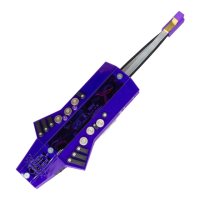
Lists numbered components of the instrument's bottom view.
Lists numbered components of the instrument's top view.
Explains how the left hand holds the NuEVI canister and thumb rollers.
Details thumb placement on pitch bend pads for optimal playing.
Describes holding the NuRAD, its sensors, and mouthpiece details.
Details valves, trill keys, special key, and pinky key on the right hand.
Explains octave rollers and fourth valve for the left hand.
Describes NuRAD's top and bottom controls, including pitch bend and lever.
Explains connecting via DIN MIDI OUT and Micro USB ports for data and power.
Details CV outputs for NuRAD (breath) and NuEVI (pitch/breath).
Explains how battery voltage is displayed and interpreted for different battery types.
Step-by-step guide for replacing AAA or AA batteries in the instrument.
Details the three positions of the LiPo power slide switch and battery life.
Explains OLED display navigation and general setting adjustment.
How to transpose pitch and change octave transposition.
How to select the active MIDI channel (1-16).
Configures harmonization, rotator setups, and key settings for polyphonic playing.
Details OTF Key, HMZ Limit, FWC Type, LOCKH, and DROP2 for poly play.
Sets note priority and configures three rotators for chord generation.
Sets MIDI CC for breath data (BRTH CC A) and secondary CC (BRTHCC B).
Controls sending breath data as Aftertouch (BREATH AT) and velocity settings.
Sets breath sensor transfer curve and velocity sample delay.
Adjusts velocity boost and interval between breath messages.
Sets control destination and CC number for bite sensor and thumb lever.
Configures glide mode, limit, and vibrato settings.
Adjusts sensitivity and eliminates chatter for vibrato lever and bite sensor.
Sets extra controller (lip/touch) to MIDI CC and configures harmonic series.
Configures mod/pinky key for transposition, level control, and other functions.
Selects the primary fingering mode for the instrument.
Sets octave roller handling and pitch bend range division.
Enters sensor adjustment screen to monitor and change THR/MAX values.
Adjusts threshold (THR) and sensitivity (MAX) for breath and lever sensors.
Adjusts threshold (THR) and sensitivity (MAX) for touch, lip/EC, and bend sensors.
Sets threshold (THR) and sensitivity (MAX) for the bite sensor used for portamento.
Toggles legacy instant controls and disables Gate Hold functionality.
Controls 3rd trill key behavior and DAC output channel.
Sets battery type for monitoring and enables fast boot.
Tunes CV output, sets CV LFO, and configures wireless kit power.
Sets the radio channel for the midiBeam wireless transmitter.
How to view and change the currently selected patch number.
Stores and recalls up to seven patch numbers using key combinations.
Sends a "midi panic" command to stop all currently sounding notes.
Activates sustain, hold, and parallel chord/interval functions.
Adds octave-down notes and provides MIDI sostenuto pedal functionality.
Sets up configurable poly play functions with harmonizers and rotators.
Steps to activate the Gate Hold feature for smooth attacks.
Steps to deactivate the Gate Hold feature.
Uses fingerings for patch changes and MIDI channel switching.
Details implemented functions for MIDI parameters and patch changes.
Loosens and shifts pitch bend pads for optimal placement.
Adjusts or replaces pinky keys for preferred positioning and feel.
How to check the instrument's current battery voltage via the display.
Step-by-step instructions for replacing AAA or AA batteries.
Instructions for updating the instrument's firmware using Teensy Loader.
Restores factory default settings, including sensor adjustments.
Displays fingering patterns for SAX, EVI, and EVR modes on NuRAD.
Shows key values specific to EVI fingering.
Displays extended fingering patterns for EWX mode on NuRAD.
Shows core fingerings and alternative fingerings using trill keys for NuEVI.
Solutions for intermittent pitch bend messages and wireless kit key issues.
Solutions for MIDI dropouts, hung notes, and wireless connection loss.
Solutions for bite sensor, vibrato, and CV jack output problems.
 General
| Brand | BERGLUND INSTRUMENTS |
|---|---|
| Model | NuEVI |
| Category | Controller |
| Language | English |

 To Next Page