Creative embroidering
65
2022-08 EN 5020070.40A.04
5.9 Embroidering the embroidery design
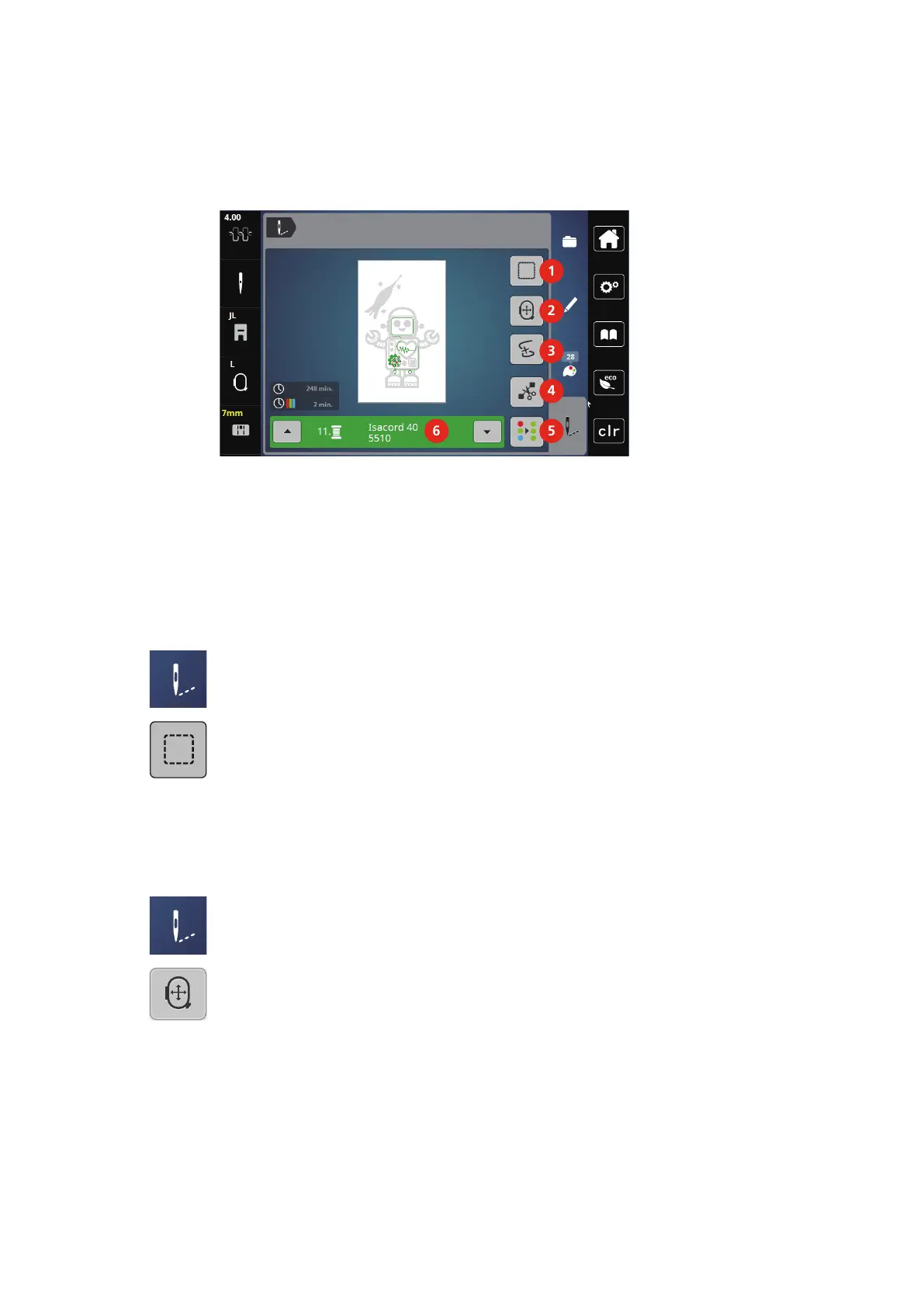
Overview Embroidery Menu
1 Basting 4 Cut Connecting Stitches
2 Moving the Hoop 5 Multi-colored Embroidery Design On/Off
3 Embroidery Sequence Control 6 Color Indication
Adding Basting Stitches
The basting stitches can be embroidered along the embroidery design. As a result, the fabric and the
stabilizer are better fixed together.
> Select the embroidery design.
> Tap «Embroidery».
> To embroider the basting stitches along an embroidery design, tap «Basting».
> To deactivate the basting stitches, tap «Basting» again.
Moving the Hoop
If the embroidery project is so big that repeated rehooping is necessary, the embroidered design can be
moved again.
> Select the embroidery design.
> Tap «Embroidery».
> Tap «Moving the Hoop».
> Turn the «Upper Multi-function Knob» to move the hoop horizontally.
> Turn the «Lower Mult-ifunction Knob» to move the hoop vertically.



 To Next Page