113
Combi mode
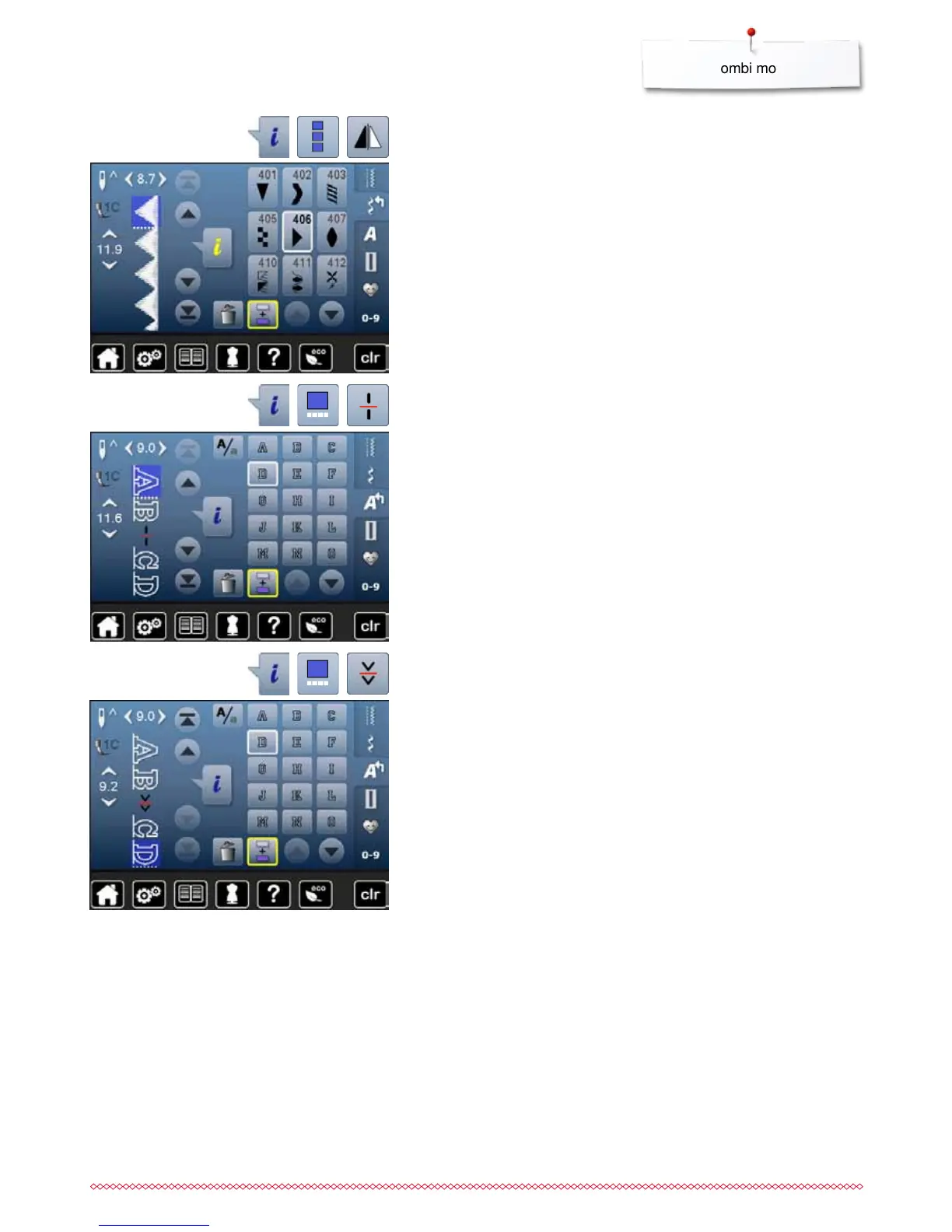
Mirroring complete combinations
⦁
touch «i»-icon
⦁
touch «Edit complete combination»-icon
⦁
touch «Mirror image»-icon
►
the complete combination is mirrored
⦁
touch «Back»-icon twice
Combination subdivider 1
⦁
touch «i»-icon
⦁
touch «Edit combination at cursor position»-icon
⦁
touch «Subdivide combination 1»-icon
⦁
a combination can be subdivided into several sections with the
«Subdivider 1»-function
►
only the section where the cursor is positioned is sewn
⦁
to sew the next section, the cursor must be placed in the respective section
Interrupting a combination
⦁
touch «i»-icon
⦁
touch «Edit combination at cursor position»-icon
⦁
touch «Subdivider 2»-icon
⦁
a combination can be interrupted at any position using
«Subdivider 2»-function
⦁
sew the first section
►
the sewing computer stops automatically when it reaches the programmed
function
⦁
reposition the fabric
⦁
sew the next part etc.


 To Next Page