40
Functions - Display
Deleting
Deletes an individual stitch.
Editing a combination at cursor position
⦁
touch icon
►
the Display is opened
Editing the whole combination
⦁
touch icon
►
the Display is opened
Upper thread tension
⦁
change upper thread tension
►
the respective value is visible in the icon
Altering the needle position
⦁
move the knob in the display to the left/right using
the finger or
⦁
press the arrow icons left/right
►
the needle moves to the left/right
⦁
keep arrow icon pressed
►
quick movement of the needle
►
the yellow-framed icon shows the needle position
⦁
touch yellow-framed icon
►
moves the needle to the middle (Position 0)
Mirror image (Left/Right)
The sewing computer sews the stitch pattern horizontally
mirrored, left/right referring to the sewing direction.
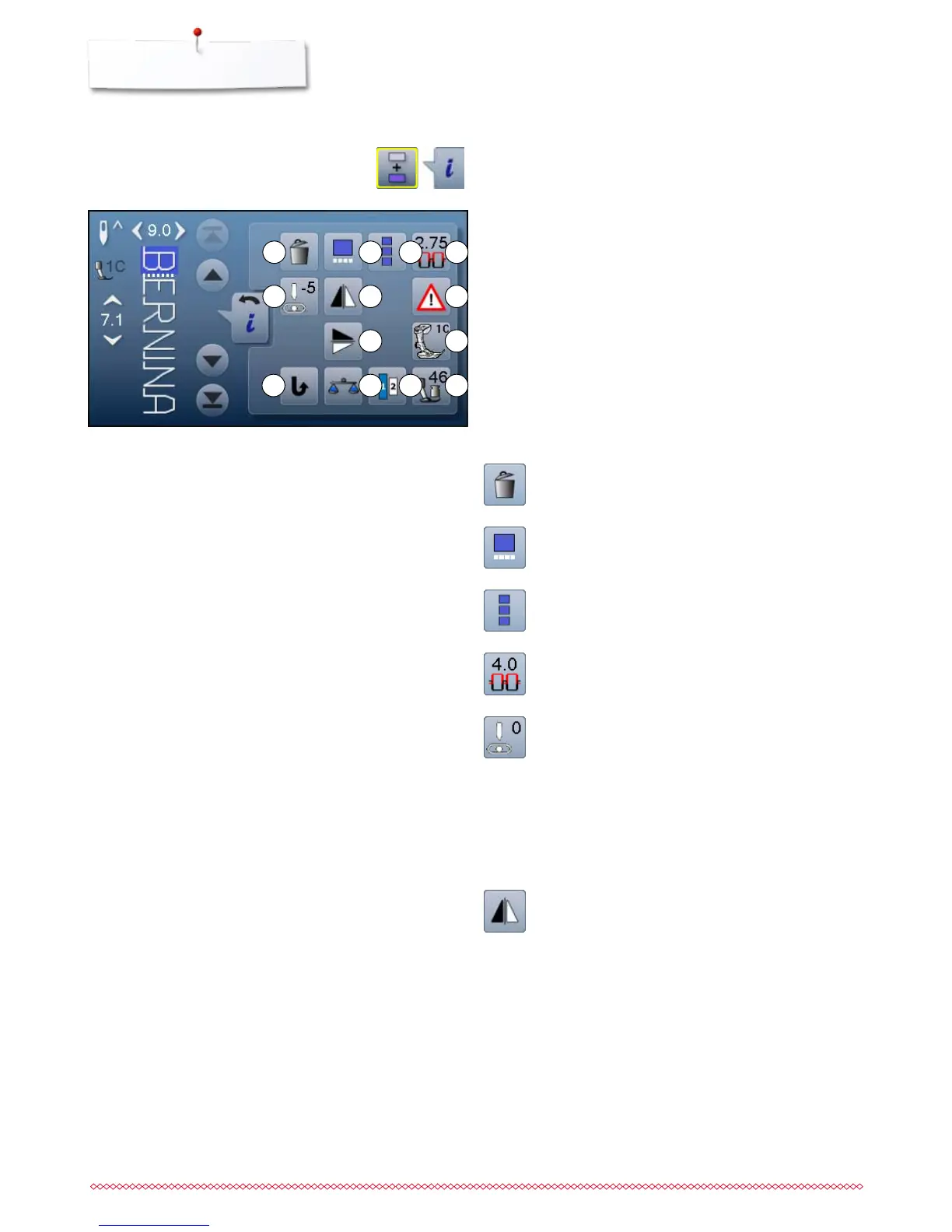
1
5
2 3 4
6 7
8 9
11 131210
Combi mode
1 Deleting
2 Editing combinations at cursor position
3 To edit the whole combination
4 Upper thread tension
5 Altering the needle position
6 Mirror image (Left/Right)
7 Security program
8 Mirror image (Up/Down)
9 Presser foot indicator
10 Permanent reverse sewing
11 Balance
12 Lettering size in alphabets
13 Presser foot pressure
⦁
touch «Combi mode»-icon
⦁
select stitch pattern
⦁
touch «i»-icon
Overview Functions Combi mode


 To Next Page