46
Setup Program
1
2
3
4
⦁
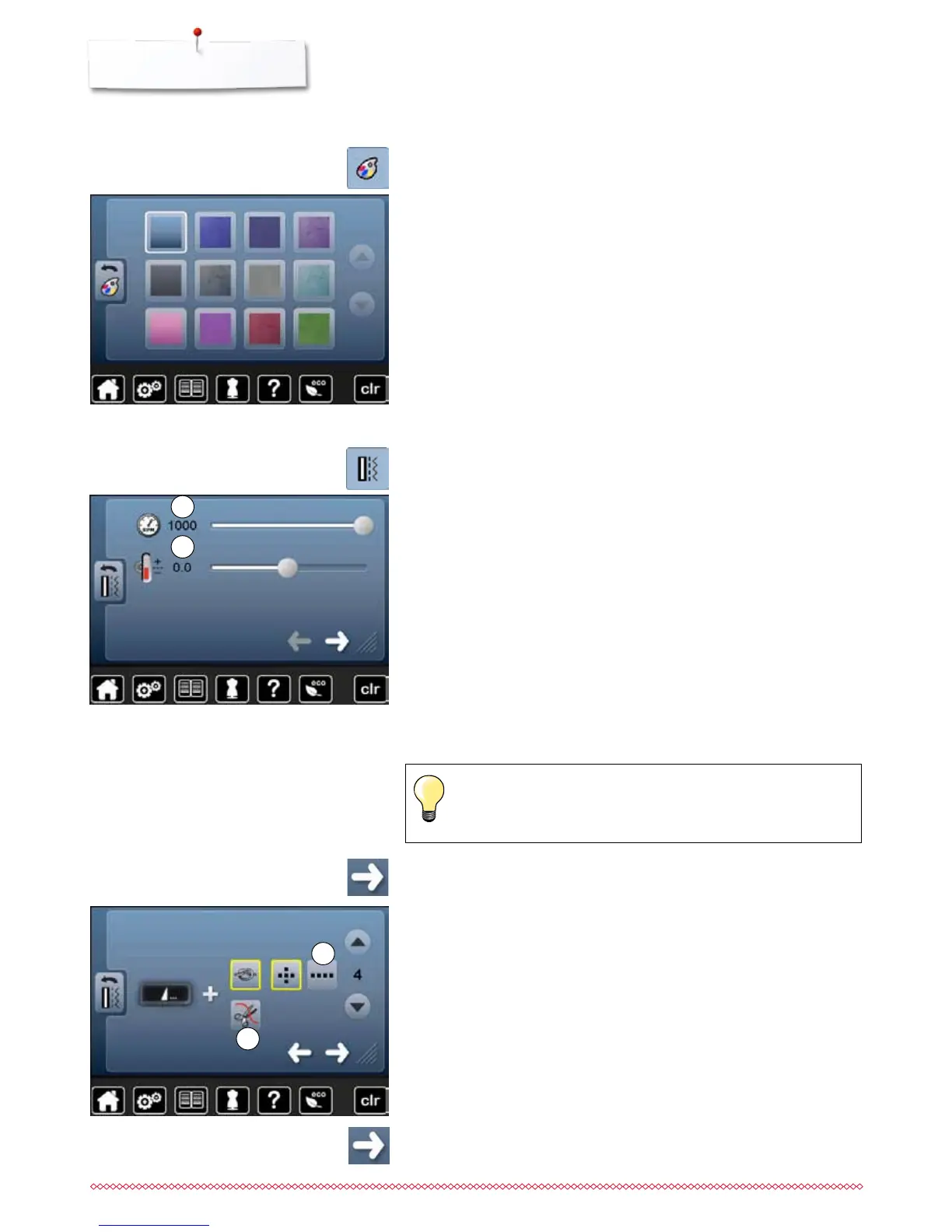
touch «Display color»-icon
⦁
select the desired display color
Selecting the Display color
Sewing settings
⦁
touch «Sewing setting»-icon
Sewing speed
⦁
move the round knob in the Display using the finger to the left/right using
the finger or
⦁
turn the stitch width knob
►
alters the maximal sewing speed 1
►
the number in the yellow-framed icon indicates the stitches per minute, the
basic value is indicated by a white line
⦁
pressing the yellow-framed icon = basic setting is restored
Altering the upper thread tension
⦁
move the round knob in the Display using the finger to the left/right using
the finger or
⦁
turn the stitch length knob
⦁
alters the basic setting of the upper thread tension 2 at plus or minus two
basic values
0.0 = basic setting
Alterations of the upper thread tension and the sewing speed affect
any stitch patterns and embroidery motifs and remain active even
when the sewing-/embroidery computer is switched off.
⦁
touch icon
Automatic securing program at pattern end
the number and type of the securing stitches of the external «Pattern end/
Securing»-button can be programmed
standard = four securing stitches in the same place
⦁
select function 3 for forward securing stitches
⦁
via the arrow icons three to six securing stitches can be programmed
Automatic thread cutter
►
if function 4 is activated, the upper and lower thread are automatically cut
after sewing
⦁
touch icon



 To Next Page