138
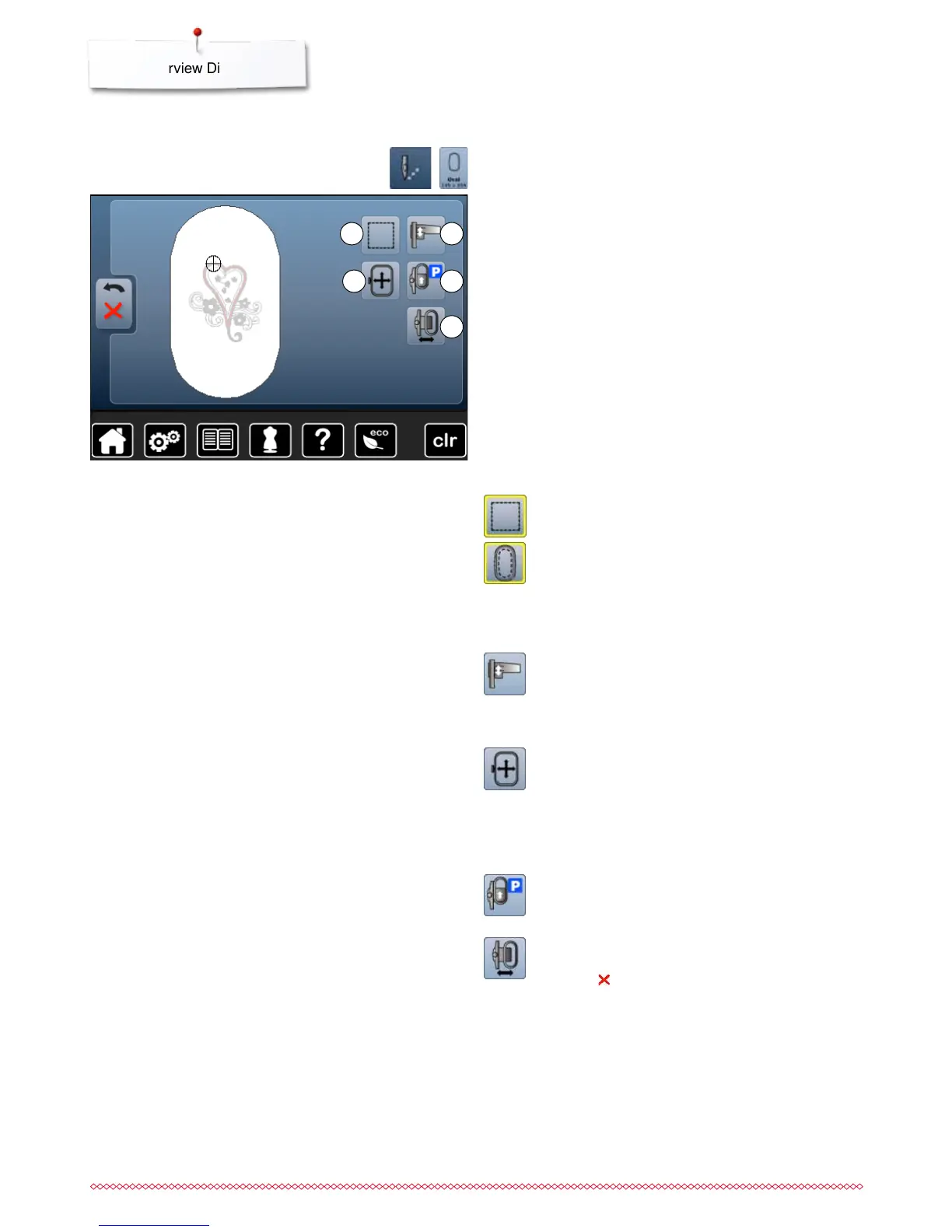
Overview Display
2
4
5
1
3
With some functions the instruction to use the knobs appears.
Functions
1 Basting
2 Calibrating the embroidery module
3 Moving hoop by using the knobs
4 Moving Hoop to Back
5 Embroidery hoop movement
Basting
⦁
touch the button
►
the embroidery motif is outlined with a straight stitch
⦁
touch icon again, the symbol changes
►
the basting is now done along the hoop
⦁
touch the icon again
►
Basting box function is switched off
The function will remain active even after selection of a
new motif.
Moving the hoop
If the fabric has to be re-hooped when stitching a large
embroidery motif (e.g. lettering, borders etc.), the hoop
has to be moved to the last stitch of the already
embroidered part with the stitch width and stitch length
knob.
►
the movement is displayed in the icons
Move hoop to back
►
the hoop moves vertically to the far back
Better access for changing the bobbin.
Moving the hoop to the left
►
the hoop moves horizontally to the center
⦁
touch
⦁
press «Start/Stop»-button
►
the hoop moves back to the previous position
Calibrating the embroidery module
⦁
touch the icon
►
the embroidery module is calibrated (moves to the
reference points)
The embroidery hoop mustn't be attached.
⦁
press «Embroidery menu»-button
⦁
touch «Hoop size»-icon


 To Next Page