BD / ED / FD (E2) 11/2010 page 27/54
6.4.2 Enter a temperature ramp
Temperature ramps can be programmed in order to extend heating up times. This may be necessary in
some cases, in order to prevent temperature stresses in the material during the heating up phase.
Temperature ramps should only be used if required. The use of temperature ramps may result in the
heating up times being considerably slowed down.
The entry in °C/min or in °F/min meaning the nominal value gradient and limits the maximum temperature
increase to this value. Due to the heat and evaporation energy assumed by the drying material, smaller
temperature gradients may also result.
A temperature ramp proceeds from the previously entered to a new set-point. The temperature must
have adjusted to the start set-point. Enter settings in 3 steps:
1. Enter set-point of ramp start temperature. Let temperature adjust to this set-point temperature.
2. Set ramp to the desired gradient. You can set the gradient from 0.0 °C/min up to 1.0 °C/min (BD),
resp. from 1 °C/min up to 10 °C/min (ED, FD).
A heat-up rate of 0.4°/min (BD) resp. 4 °C/min. (ED, FD) can be regarded as a realistic maximum.
3. Enter set-point (final ramp temperature).
The ramp should only be set if required. The setting “0” means ramp function turned off. The unit is being
heated at maximum heat output.
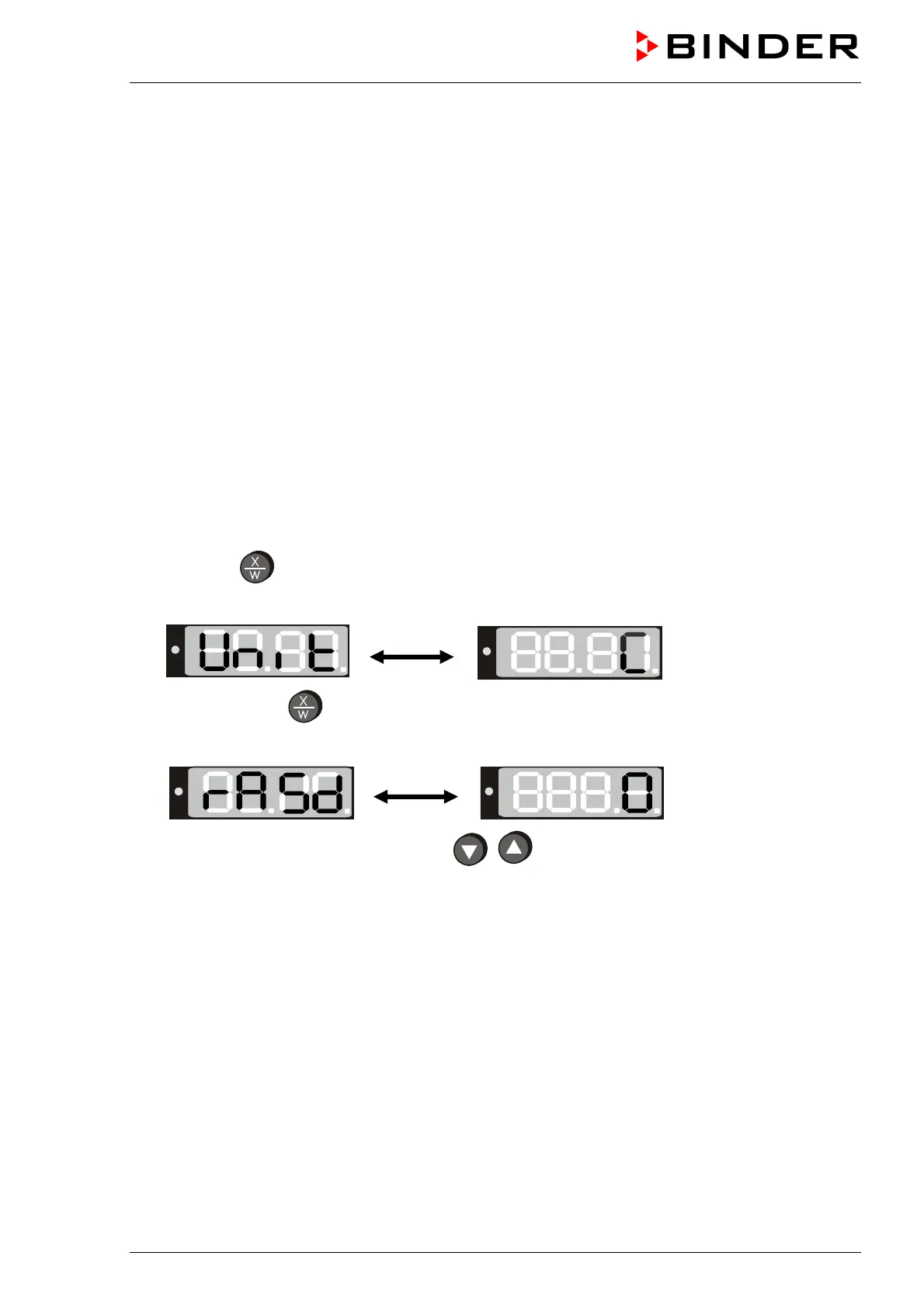
1. Press down
button for approx. 5 seconds.
The display alternately shows “unit” and in the entry level the temperature unit:
2. Press again button
.
The display alternately shows “rASd” and in the entry level the actual setting of the set-point gradient:
3. Set the desired ramp gradient with buttons
(set-point gradient in °F or °C acc. to setting in
chap. 6.4.1).
4. The set value is automatically adopted af
ter 2 seconds.
During ramp operation the actual set-point (SPr) continually rises in accordance to the entered gradient
from the previously entered set-point to the new one (SP). The actual value follows he set-point value.
About set-point display during ramp operation see chap. 6.2.
6.4.3 Chamber addressing
If several incubators BD or heating ovens ED (option) are networked with a PC via the APT-COM
communication software (option, chap. 8.2), each unit must be allocated a unique address. Addressing
takes place on the R 3 controller as follows:






 To Next Page