MKF / MKFT (E5) 06/2020 page 103/176
14.5.2.2 Display of MAC address
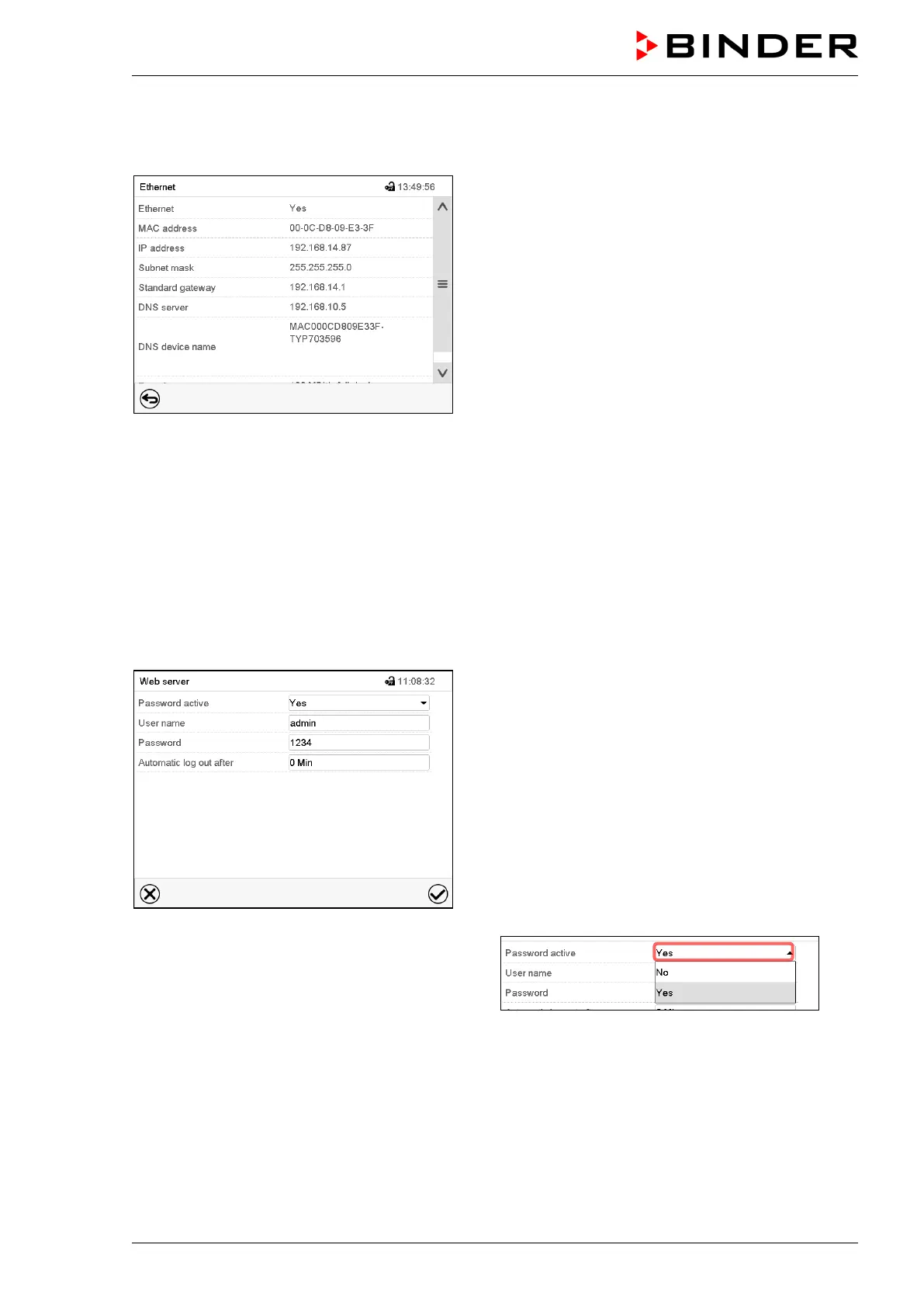
Path: Main menu > Device info > Ethernet
“Ethernet” submenu (example).
14.5.3 Web server
This controller menu serves to configure the web server. Then you can enter the chamber’s IP-address in
the Internet. The IP address is available via Chamber information > Ethernet. The BINDER web server
opens. Enter the user name and password which have been assigned for the web server in the controller
menu. This enables online access to the controller display, to see e.g., the event list or error messages.
In this view no settings can be changed.
Path: Main menu > Settings > Web server
“Webserver” submenu.
• In the field “Password active” select the desired
setting “Yes” or “No”.
• Select the field “User name” and enter the desired user name. Confirm entry with Confirm icon.
• Select the field “Password” and enter the desired password. Confirm entry with the Confirm icon.
• Select the field “Automatic log out after” and enter the time in minutes after which the webserver shall
log out automatically. Setting range: 0 min to 65535 min. Confirm entry with Confirm icon.
After completing the settings, press the Confirm icon to take over the entries and exit the menu, or press
the Close icon to exit the menu without taking over the entries.



 To Next Page