VD (E3.1) 03/2020 page 128/173
17.2 MB2 controller
For the network and communication settings at least the “Admin” authorization level is required.
17.2.1 Ethernet
17.2.1.1 Configuration
Path: Main menu > Settings > Ethernet
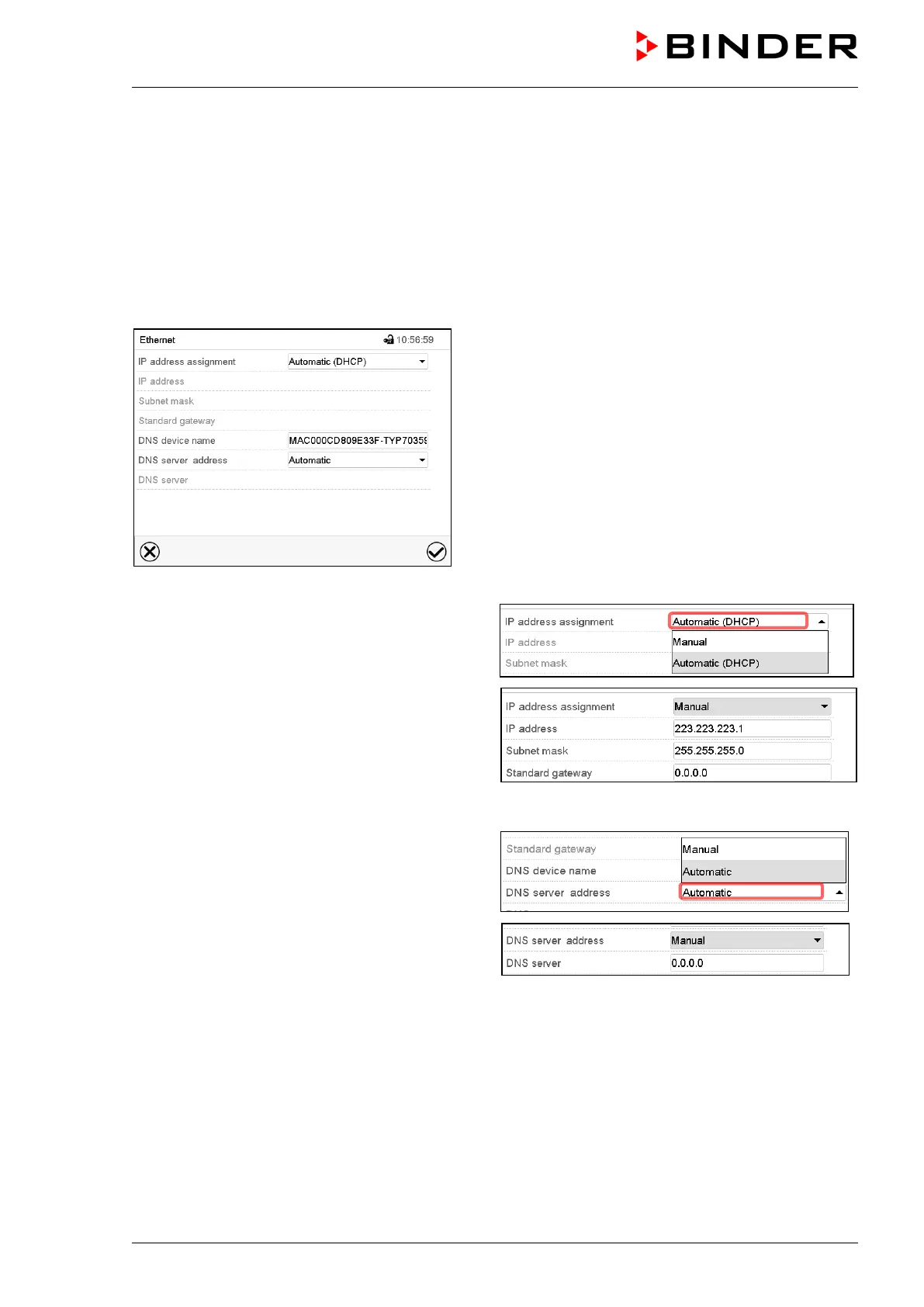
“Ethernet” submenu.
• In the field “IP address assignment” select the
desired setting “Automatic (DHCP)“ or “Manual“.
With selection “Manual” you can enter the IP-
address, the subnet mask and the standard
gateway manually.
• Select “DNS device name” and enter the DNS device name. Confirm entry with Confirm icon.
• In the field “DNS server address” select the
desired setting “Automatic” or “Manual”.
With selection „Manual“ you can enter the DNS
server address manually.
After completing the settings, press the Confirm icon to take over the entries and exit the menu, or press
the Close icon to exit the menu without taking over the entries.



 To Next Page