EasyManua.ls Logo

Bionics BPM-1010 - Print Setup (Optional)

Default Icon
76 pages
Print Icon
To Next Page IconTo Next Page
To Previous Page IconTo Previous Page
Loading...
33
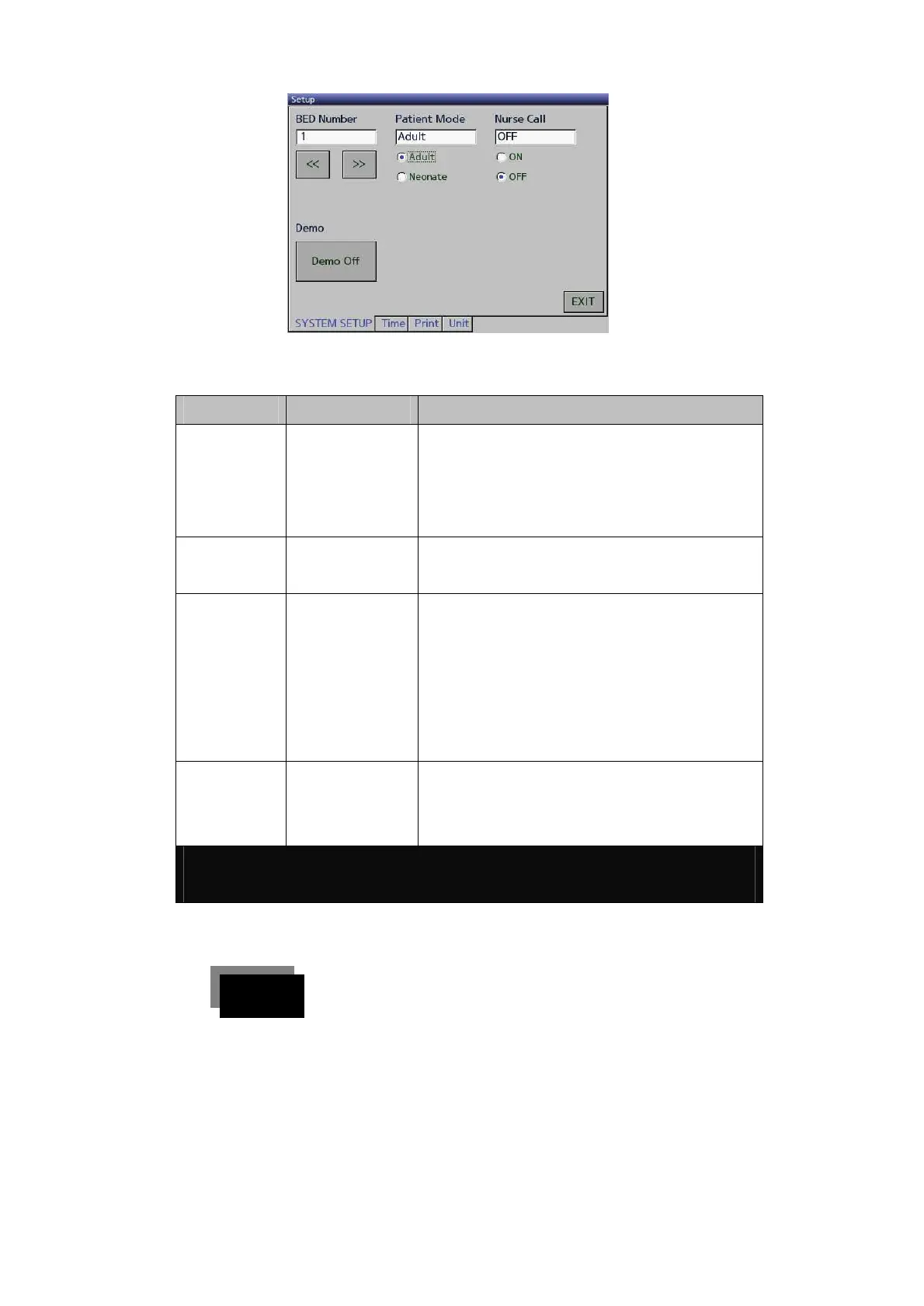
By operating as detailed above, you can change the setting of each
SETUP menu.
Setting
List
Subsection
System Setup
BED Number
Demo
Patient Mode
Nurse Call
1 ~ 99
On / Off
Adult / Neonate
On / Off
Time
Clock Set
Time Format
Change Setting
Print
Sync
Mode
Paper Length
Select Wave1
Select Wave2
Select Wave3
Manual / Alarm
Wave / Trend / Wave+Trend
150 mm ~ 300 mm
Change Wave1
Change Wave1
Change Wave1
Unit
BP Unit
TEMP Unit
Co2 Unit
mmHg / kPa
/
% / mmHg / kPa
Print Setup (Optional)
The patient’s information can be printed out using the printer.
To change the printer setup, push the menu button once
to select setup.
단계 1

Related product manuals