724-746-5500 | blackbox.com
724-746-5500 | blackbox.com
Page 31
LES301A user manual
Chapter 4: Software Setup
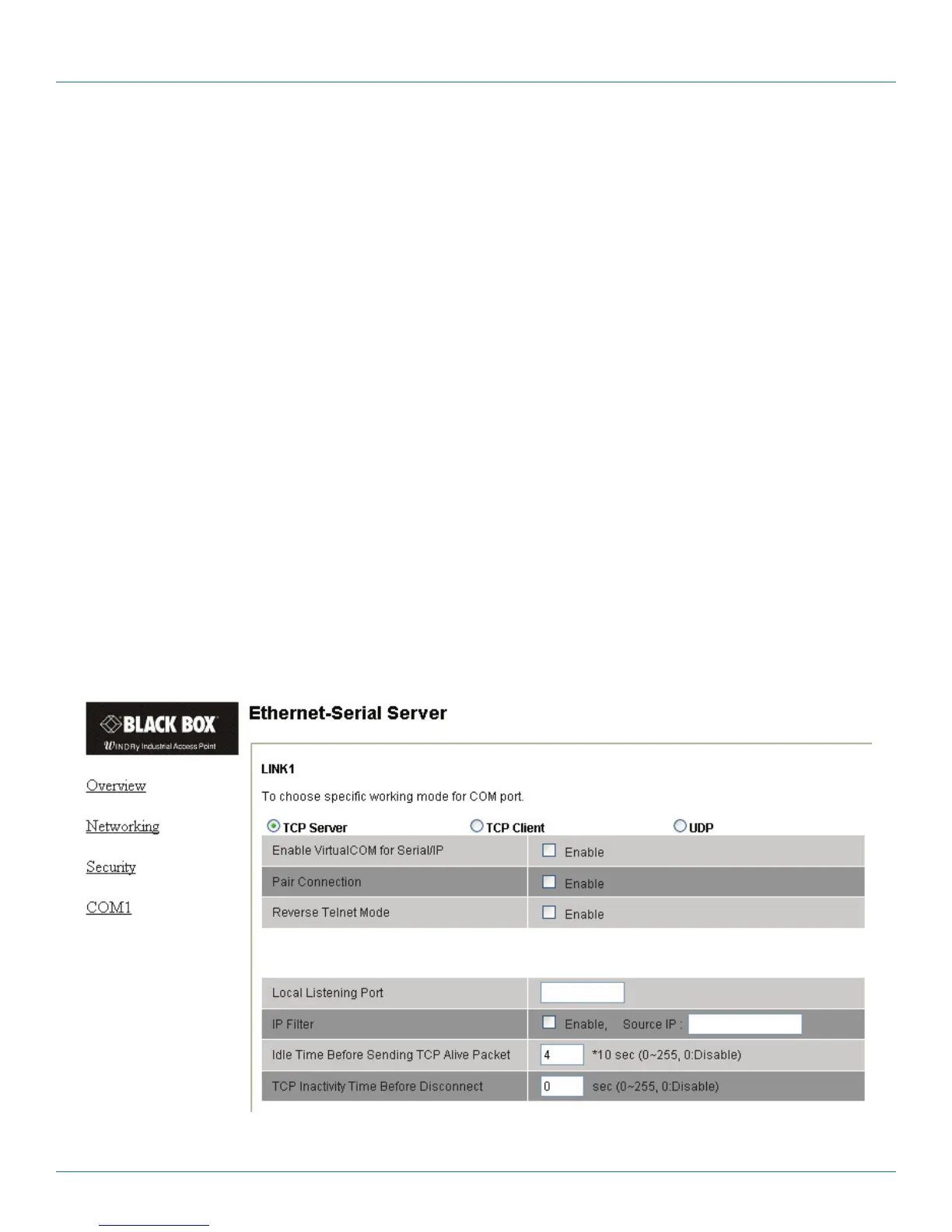
4.3.4 Configure the LES301A as a TCP Server
You can configure the LES301A with transparent mode as the default.
1. Click on the “COM1” link.
2. Configure the LES301A as a TCP server.
3. Input the local listening port “4660.”
To enable the IP filter:
1. Check “IP filter.”
2. Input the source IP in the “Source IP“ field.
If you don’t want to enable the IP filter:
1. Don’t check “IP filter.”
2. Input the idle time at the “Please input idle time to send TCP alive packet(sec):” prompt. (If you input “2,” the sending TCP
keep alive packet period will be changed to 2*10 sec.)
3. Input the TCP Inactivity time at the “TCP Inactivity Time Before Disconnect( sec):” prompt. (If you input “2,” TCP Inactivity
beyond 2 sec will cause a disconnect.)
4. Click on the “Save Configuration” button to save the changes.
NOTE:
1. The IP filtering function is disabled if you set the FILTER_IP to “0.0.0.0”.
2. The IP filter is disabled by default.
3. If the IP filter is enabled, only the source IP assigned can connect to the LES301A.
Figure 4-23. LINK1 setup—TCP server.











 To Next Page