724-746-5500 | blackbox.com
Page 12
LES301A user manual
724-746-5500 | blackbox.com
Chapter 2: Overview
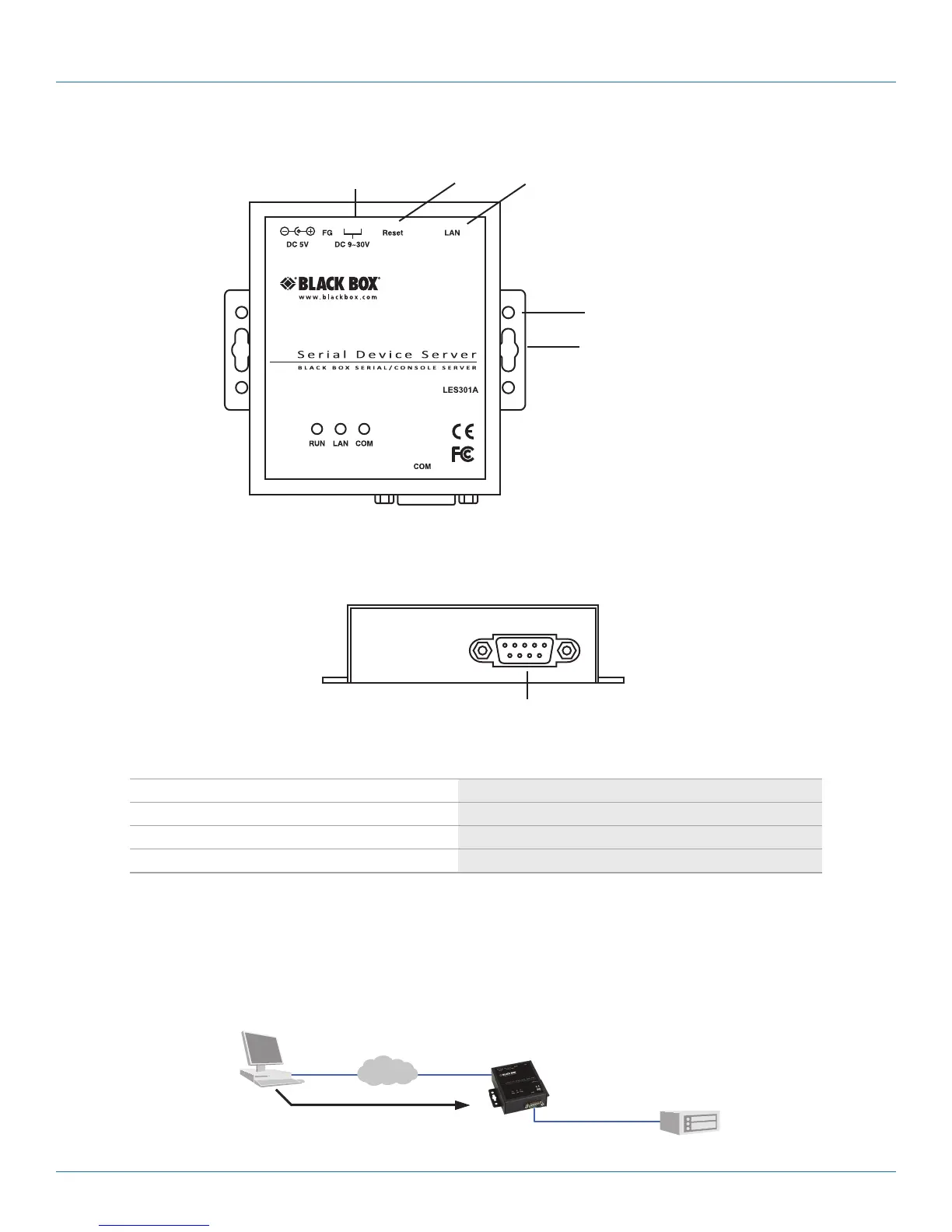
DB9 male serial port
DC 9–30 V
Reset
button
RJ-45
10-/100-Mbps
port
DIN rail screw hole
Wallmount screw hole
Figure 2-2. Top panel.
DB9 male serial port
Figure 2-3. Front panel.
Table 2-1. Ethernet Serial Server components.
Message Description
LED off Ethernet is disconnected
LED is blinking green Data is transmitted at 100 Mbps on Ethernet
LED is blinking orange Data is transmitted at 10 Mbps on Ethernet
2.4 Application Connectivity
TCP Server Mode: LES301A can be configured as a TCP server on a TCP/IP Network to wait for other applications (clients) in the
host computer to establish a connection with the serial device. After the connection is established between the serial device and
the host computer, data can be transmitted in both directions.
PLC
Computer
LES301A
Serial bus
Figure 2-4. TCP server mode.











 To Next Page