724-746-5500 | blackbox.com
Page 40
LES301A user manual
724-746-5500 | blackbox.com
Chapter 5: Using Virtual COM
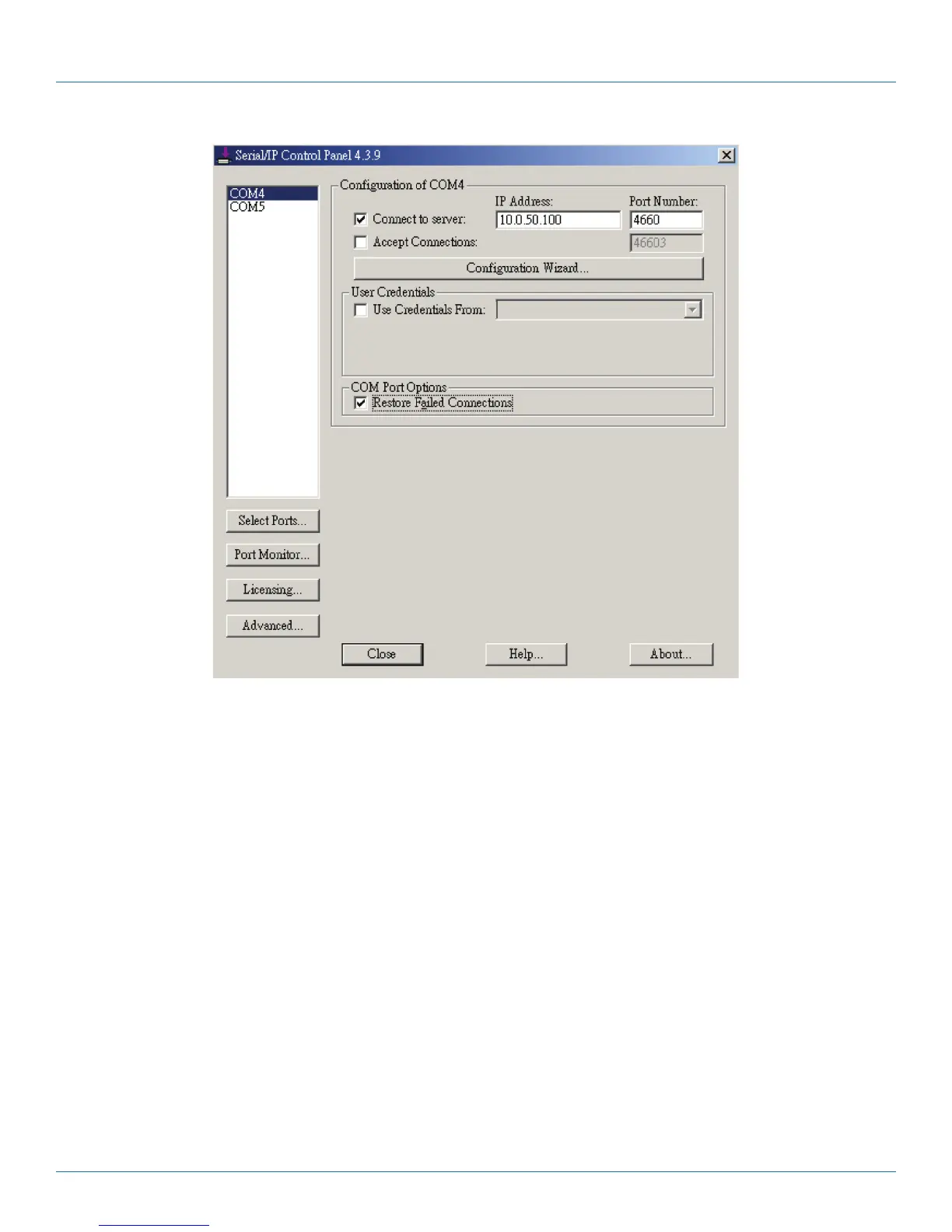
Figure 5-4. Serial/IP configuration.
On the right side of Figure 5-4 is a sample Virtual COM Control Panel window. On the left side is the list of the COM ports that
you have selected (in the Select Ports window) for use by the Virtual COMRedirector. If you want to change which ports appear
in this list, use the “Select Ports” button.
Each COM port has its own settings. When you click on a COM port, the Control Panel display changes to reflect the settings for
that COM port.
NOTE: When you change settings for a COM port, the changes are effective immediately. There is no separate confirmation
dialog to confirm or cancel your changes.
5.3 Configuring Virtual COM Ports
Configure each Serial/IP COM port as follows:
1. Select a COM port in the list.
2. For IP Address of Server, enter a numeric IP address for the serial server.
3. For Port Number, enter the TCP port number that the serial server uses to provide its serial ports to the network.
4. For Server Credentials, the default is “No Login Required.” If your serial server does require a login by the Virtual
COMRedirector, the Virtual COMRedirector needs to provide a username and/or password every time an application tries to
use the serial server.











 To Next Page