724-746-5500 | blackbox.com
Page 32
724-746-5500 | blackbox.com
Chapter 2: System Configuration
2.6.2 Communities
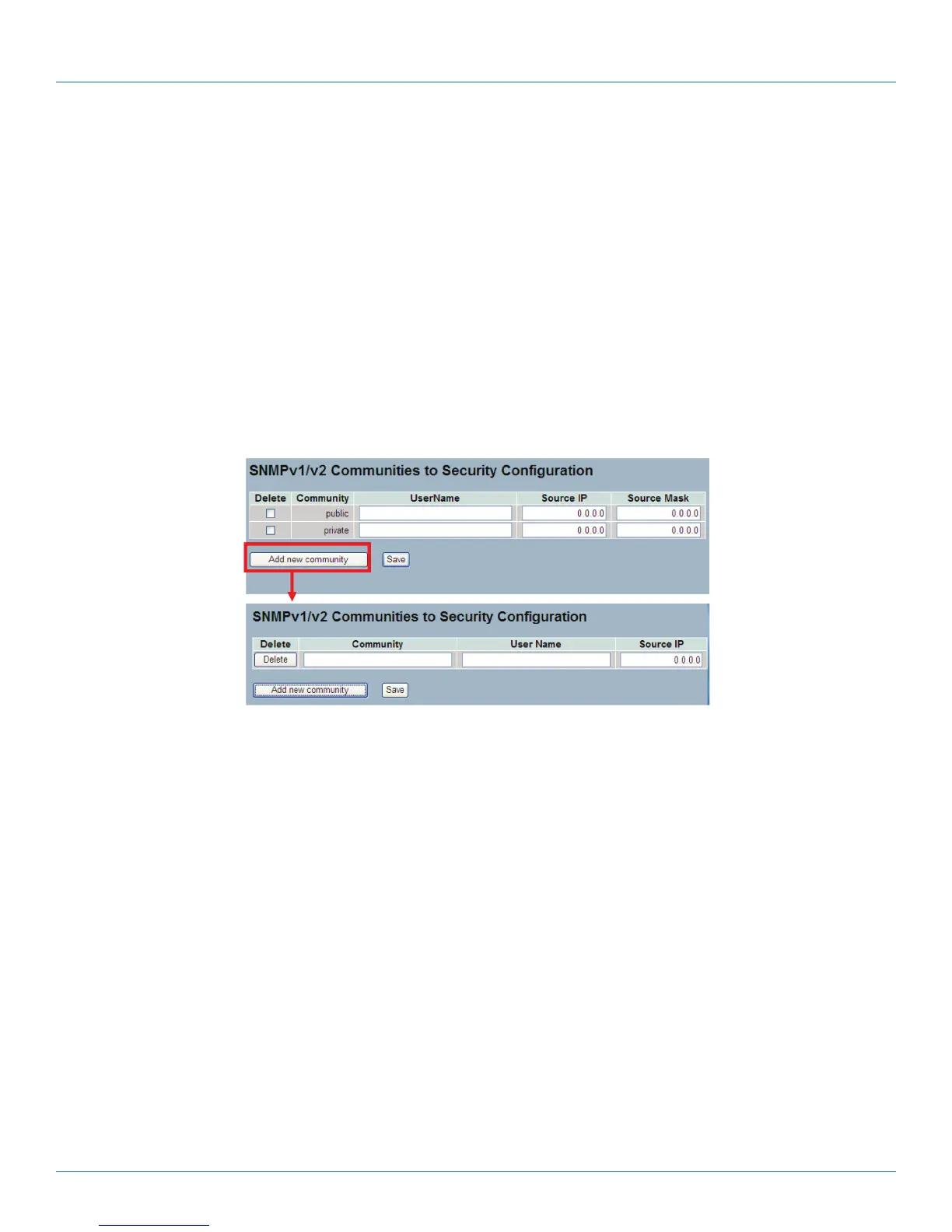
This function is used to configure SNMPv3 communities. The Community and UserName are unique. To create a new community
account, check <Add new community> button, and enter the account information. Then click <Save>. The maximum group
number is four.
Web Interface
To display the configure SNMP Communities in the Web interface:
1. Click SNMP, Communities.
2. Click Add new community.
3. Specify the SNMP communities parameters.
4. Click Save.
5. If you want to modify or clear the setting, then click Reset.
Figure 2-14. The SNMPv1/v2 Communities to Security Configuration screen.
Parameter Description
• Delete: Check to delete the entry. It will be deleted during the next save.
• Community: Indicates the community access string to permit access to SNMPv3 agent. The string length should be 1 to 32
characters, using ASCII characters from 33 to 126. The community string will be treated as a security name and will map a
SNMPv1 or SNMPv2c community string.
• UserName: The UserName access string to permit acccess to SNMPv3 agent. The “UserName” string is restricted to 1 to 32
characters.
• Source IP: Indicates the SNMP access source address. A particular range of source addresses can be used to restrict source
subnet when combined with source mask.
• Source Mask: Indicates the SNMP access source address mask.
LPB2810A











 To Next Page