724-746-5500 | blackbox.com
Page 46
724-746-5500 | blackbox.com
Chapter 3: Configuration
3.1.5 Qos Statistics
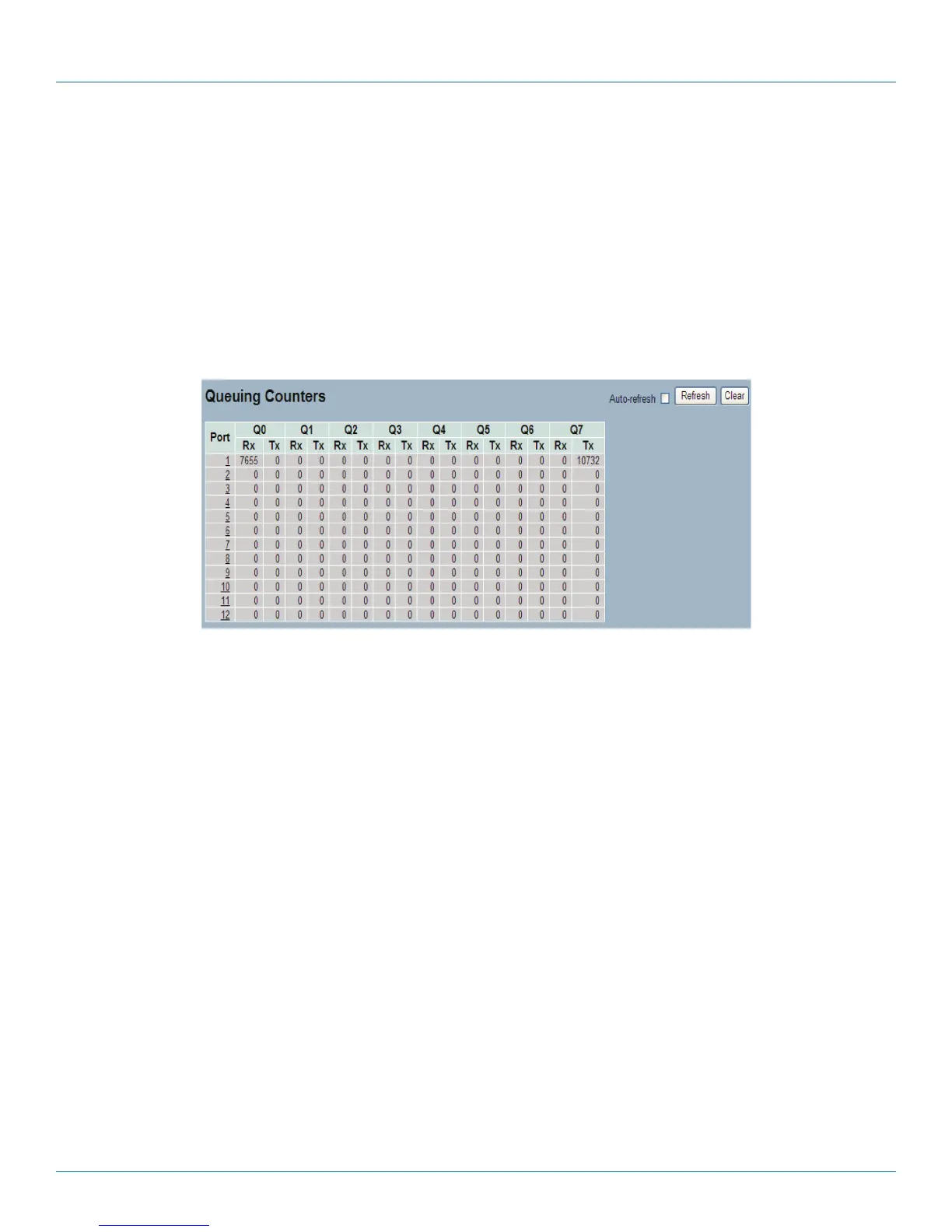
This section describes how the switch displays the QoS detailed Queuing Counters for a specific switch port for the different
queues for all switch ports.
Web Interface
To Display the Queueing Counters in the Web interface:
1. Click Configuration, Port, then QoS Statistics
2. To auto-refresh the information, check “Auto-refresh”.
3. Click “Refresh“ to refresh the Queueing Counters or clear all information when you click “Clear”.
Figure 3-5. Queuing Counters Overview screen.
Parameter Description
• Port: The logical port for the settings contained in the same row.
• Qn: Qn is the Queue number, QoS queues per port. Q0 is the lowest priority queue.
• Rx / Tx: The number of packets received and transmitted per queue.
• Auto-refresh: Check <Auto-refresh> to refresh the Queuing Counters automatically.
• Icons, upper right of screen (Refresh, clear): Click to refresh Queuing Counters or clear them manually.
LPB2810A











 To Next Page