Connection Diagrams
49
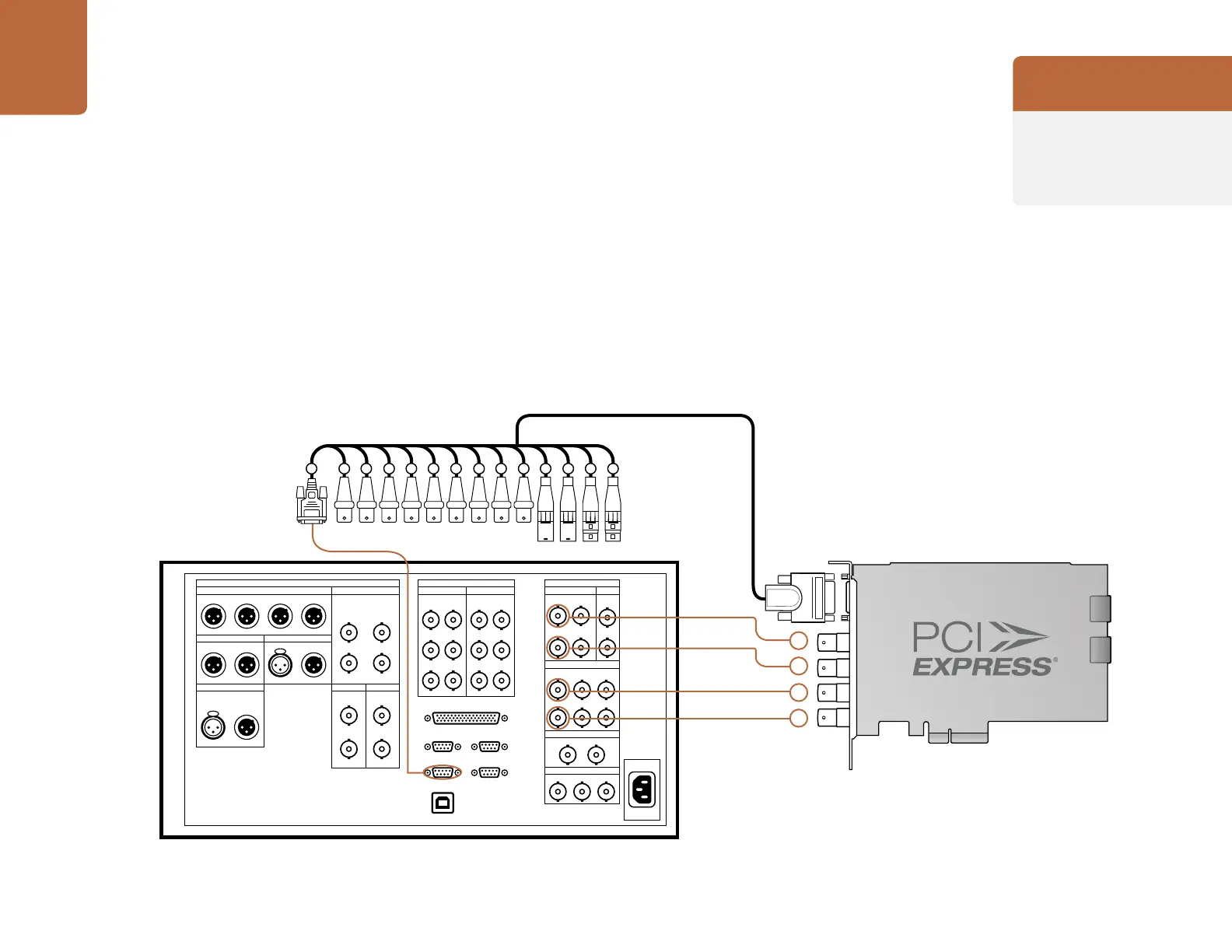
Connecting to a Sony HDCAM SR deck in dual stream 3D
This example shows DeckLink HD Extreme 3D+ connected to a Sony HDCAM SR™ series digital
deck in dual stream 3D mode. The connections are exactly the same as for dual-link HD-SDI. Four
HD-SDI connections are used for dual stream, HD-SDI, 3D video in and out. The HDMI output can be
used for local monitoring of 3D video.
ANALOG I/O DIGITAL I/O (AES/EBU) DIGITAL I/O
AUDIO OUTPUT REF INPUT INPUT HD SDI INPUT
HD SDI OUTPUT
FORMAT CONV. OUT (OPTION)
MONITOR1 2
SD SDI OUTPUT
FC OUT BOUTPUT
AUDIO
A 1
2B(OPTION)
B(OPTION) B(OPTION) B(OPTION)
1
A
2
A
MONITOR
A
1 2 MONITOR
INPUT
MONITOR
B INPUT
MONITOR
CH1/2 CH3/4
CH5/6 CH7/8
CH9/10 CH11/12
AUDIO
MONITOR OUTPUT
CUE HD REF OUT SD OUT
TIME CODE
IN OUTR L
CH3 CH4 1 2
1 SYNC
2
COMPOSITE
(MONITOR)
CH1 CH2
IN OUT
CH1/2 CH3/4
CH5/6 CH7/8
CH9/10 CH11/12
REMOTE 2 PARALLEL I/O (50P)
REMOTE 1-IN (9P) REMOTE 1-IN/OUT (9P)
RS422
USB
VIDEO CONTROL
DeckLink HD Extreme 3
Breakout Cable
2 3 4 5 6 7 8 9 10 11 12 13 14 15
Cards which can be used in
this workflow...
DeckLink HD Extreme 3D+
Previous DeckLink cards
DeckLink HD Extreme 3D



 To Next Page