EasyManua.ls Logo

Blackmagicdesign DeckLink Series - Connecting to S-Video Decklink HD Extreme

Blackmagicdesign DeckLink Series
111 pages
Print Icon
To Next Page IconTo Next Page
To Previous Page IconTo Previous Page
Loading...
Previous DeckLink Cards Connection Diagrams
81
B-Y Input
Y Input
S-Video
B-Y Input
Y Input
S-Video
B-Y Input
Y Input
S-Video
B-Y Input
Y Input
S-Video
B-Y Input
Y Input
S-Video
B-Y Input
Y Input
S-Video
DeckLink HD Extreme
Consumer Breakout Cable
3
4
5
7
8
9
10
12
13
14
15
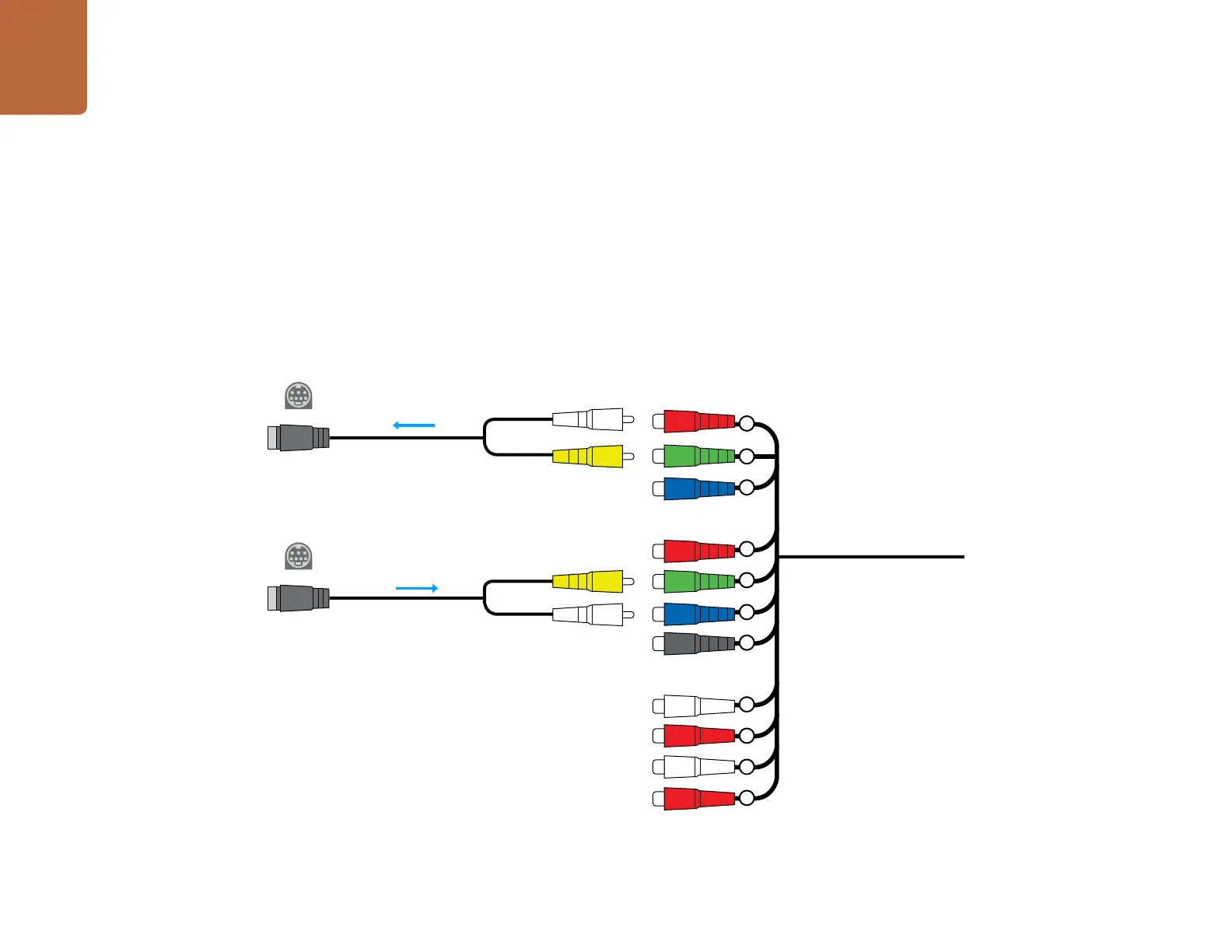
DeckLink HD Extreme - connecting to S-Video
This example shows the DeckLink HD Exteme Consumer Breakout Cable connecting to S-video
adapter cables. The Professional Breakout Cable can also be used with S-video adapter cables. The
numbering on the cables is the same on both the Consumer and Professional Breakout Cables so it’s
easy to use either cable.

Table of Contents

Other manuals for Blackmagicdesign DeckLink Series

Related product manuals