18n
How to select functions
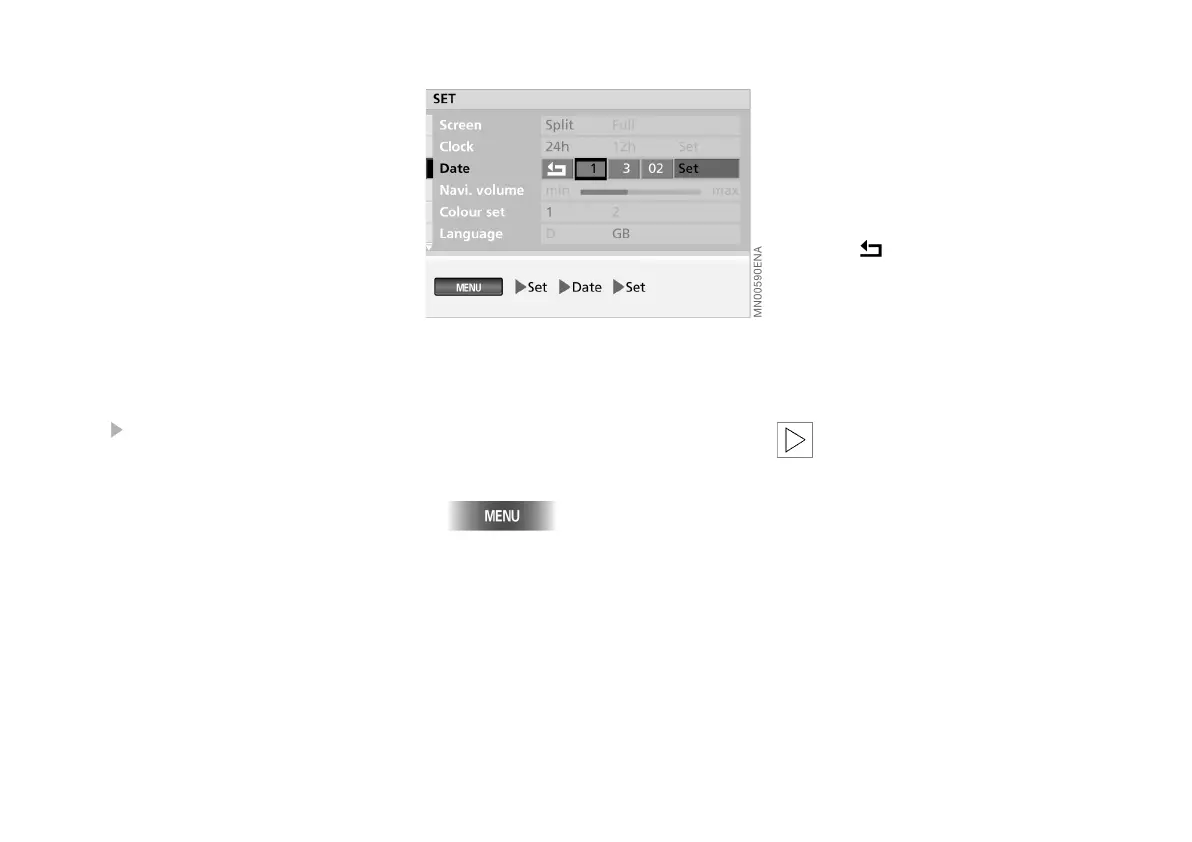
To enable you to find your way round at
a glance, the individual steps to be per-
formed in making each selection are
shown beneath the illustration of the
corresponding menu.
Depending on the operation, the follow-
ing elements may be involved:
> Buttons to press
> Functions to select with the right-
hand rotary control. "Selecting func-
tion", see page 16
> The right-hand rotary control with ar-
rows, if it is to be only pressed or only
turned.
The individual steps are separated by
the symbol.
An example: adjusting date
The structure and operating principle
are illustrated here, using the proce-
dure for adjusting the date as an exam-
ple:
1. Call up "MENU"
2. Select "Set"
3. Select "Date"
4. Select "Set"
5. Select the year
6. Turn right-hand rotary control to
adjust the year
7. Press right-hand rotary control to
memorise the setting
8. Set the month and day in the same
way.
The date settings are retained
9. Select .
The last operation takes you out of
the date input routine.
You can also choose the order in which
the date is expressed: either the days
(dd) first, followed by the months (mm) -
or in the opposite order.
To exit a function or adjustment
option that has been selected in-
advertently, select it a further time. You
can now select any of the other func-
tions.<
Online Edition for Part No. 01 41 0 156 676 - © 01/02 BMW AG



 To Next Page