19n
OverviewNavigation
Entertainment
TelephoneComputerKeywords
Settings
Selecting settings
Depending on the country for which
your vehicle is supplied, the on-board
computer has specific basic settings for
all displays. These settings can also be
made as preferred individually.
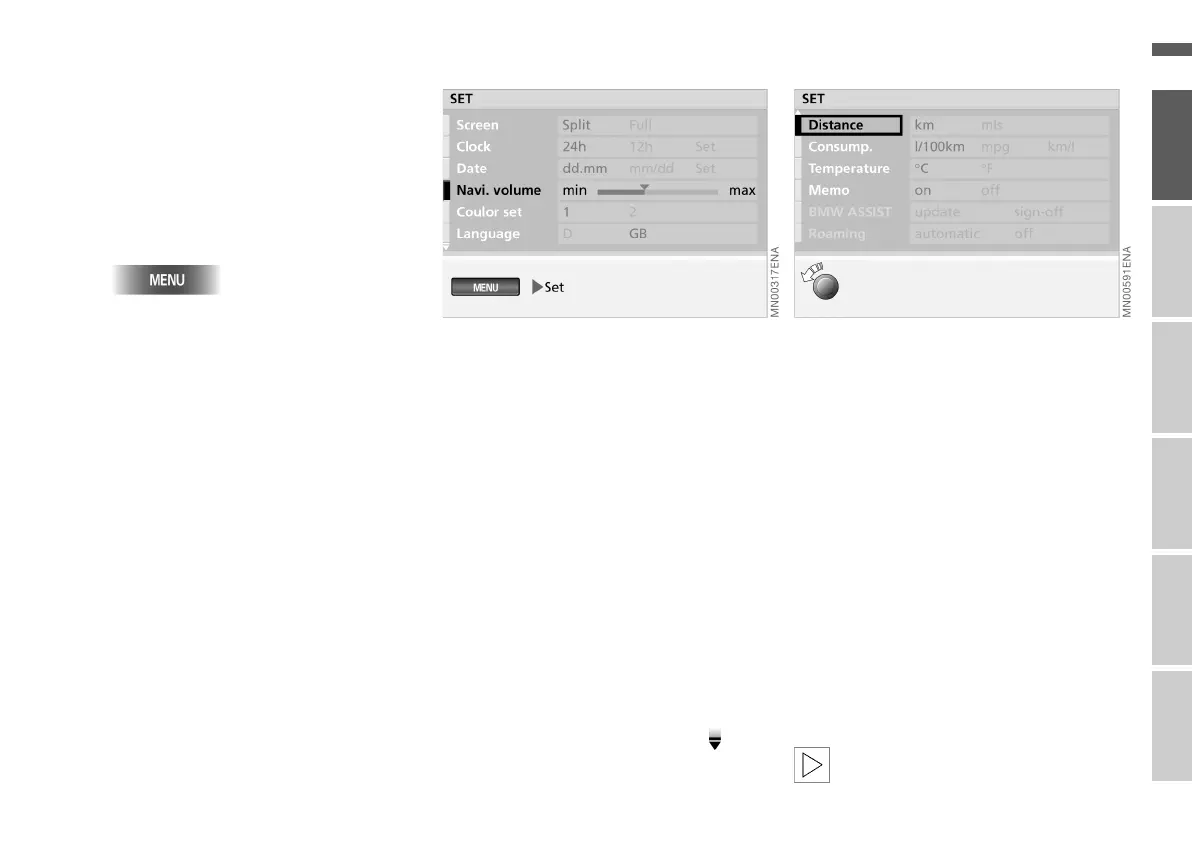
1. Call up "MENU"
2. Select "Set".
The adjustment options are dis-
played.
You can adjust the following:
> "Screen"
To select the screen layout (split or
full), see page 15
> "Clock"
> "Date"
To adjust the time and date and alter
their form of expression
> "Navi. volume"
To adjust the volume of the audio
source in relation to the navigation in-
structions (min to max)
> "Colour set"
To select a set of colours for the
screen display
> "Language"
To select the language of the display
texts.
For further settings, follow the sym-
bol.
You can now adjust:
> "Distance" (km or mls)
> "Consump." (l/100 km, mpg or km/l)
> "Temperature" (6 or 7)
To alter the units of measurement for
distance, fuel consumption and tem-
perature
> "Memo"
To set a signal which sounds on the
hour
> "BMW ASSIST"
*
You can initialise or update this emer-
gency-call and information service if
it has been arranged for you by BMW
Service
> "Roaming" (only with BMW ASSIST)
You can use the above service when
abroad (automatically or off).
For details of how to make the
settings, see page 18.<
Online Edition for Part No. 01 41 0 156 676 - © 01/02 BMW AG



 To Next Page