27n
OverviewNavigation
Entertainment
TelephoneComputerKeywords
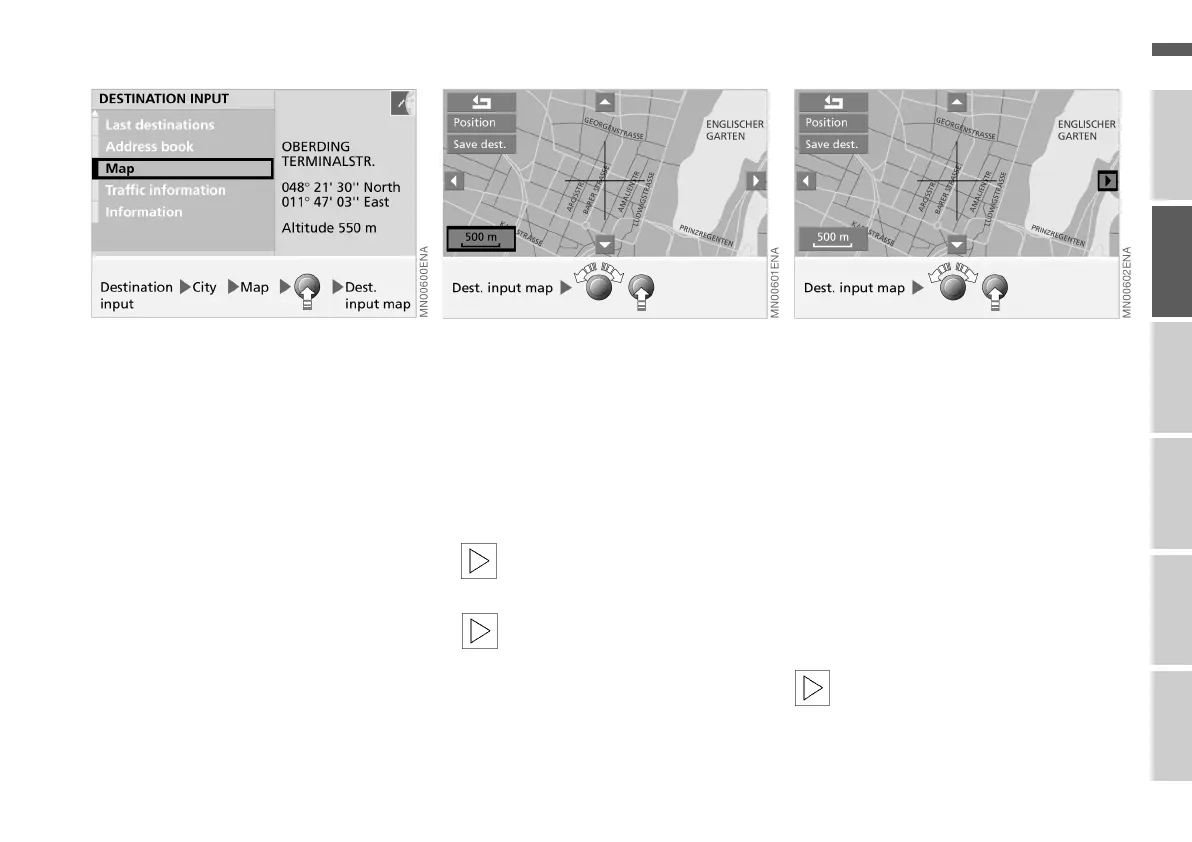
Selecting the destination from a map
If you know the city but not the exact
position of the road, the system offers
you maps on which you can identify
your destination with cross-hairs, then
transfer this information for destination
guidance.
1. Enter the desired city, see page 25
2. Select "Map"
3. Press right-hand rotary control.
A selection menu is displayed, see
also page 23
4. Select "Dest. input map".
5. If necessary, change the scale:
> Turn right-hand rotary control until
the box with the details of the scale
is highlighted
> Turn the right-hand rotary control
again to select the desired scale
> To save the scale, either do not ad-
just the right-hand rotary control
for a few seconds, or press it.
If the scale is greater than 1 km,
the function "Save dest." cannot
be selected.<
After the scale has been altered,
it may take a few seconds for
the map to appear.<
Localise the destination with the cross-
hairs:
> Turn right-hand rotary control to mark
the cursor for the desired direction
> Hold right-hand rotary control
pressed until the map is moved in the
desired direction beneath the cross-
hairs
> Release right-hand rotary control to
retain the new position
> Select the other cursor if desired
> Hold right-hand rotary control
pressed to move the map in the other
direction
> Release to retain the new position.
The new map section may take a
few seconds to appear.<
Online Edition for Part No. 01 41 0 156 676 - © 01/02 BMW AG



 To Next Page