EasyManua.ls Logo

Boox TabX - Long press to select a word

Boox TabX
105 pages
Print Icon
To Next Page IconTo Next Page
To Previous Page IconTo Previous Page
Loading...
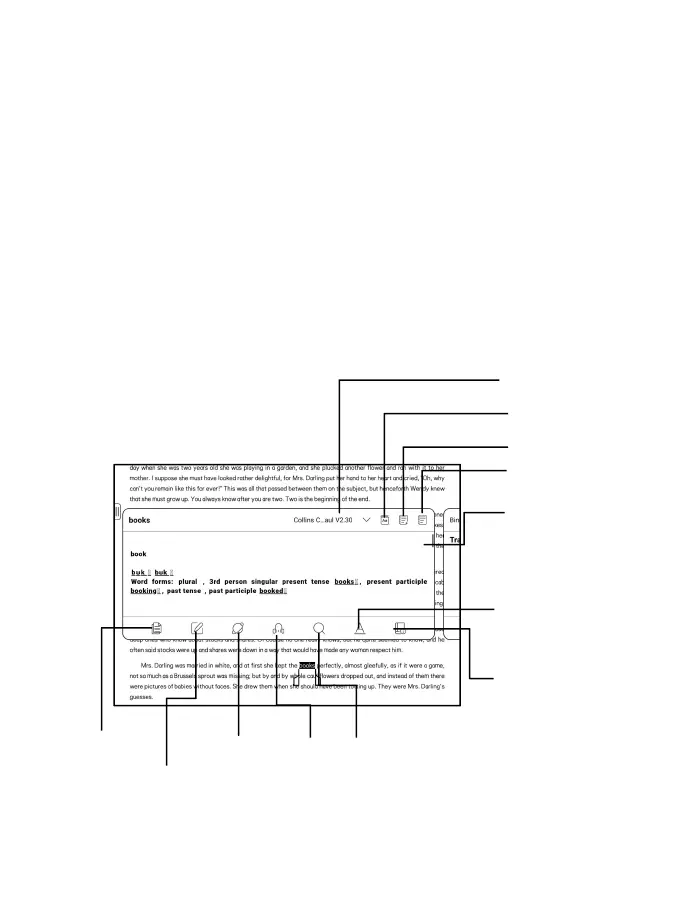
Long press to select a word
Long press a word to call out the dictionary dialog box. You can
switch between different dictionaries. Select the one you want
from the dropdown list.
This function requires you to install dictionaries. If you haven’
t installed a dictionary, you cannot look for words. Tap any area
outside of the dictionary dialog box to exit it.

Switch to Translator
Vocabulary Builder
Jump to Dict App
Add a New Word
Switch Dicts
Copy
Annotations
TTS
Internet
Search
3
rd
Party App
Add Link to

Table of Contents

Related product manuals