Home
Boox
eBook Reader
TabX
Page 76 (Tag Management)
Boox TabX - Tag Management; Insert text
105 pages
Manual
Save Page as PDF
To Next Page
To Next Page
To Previous Page
To Previous Page
Loading...
Tag
Manag
ement
The
tag
i
s
a
global
f
eature
and
all
notepads
share
the
same
tags.
Go
t
o
Options/
T
ag
Management
t
o
c
heck
all
tags.
When
you
d
elete
a
tag,
the
corresponding
notes
will
not
be
deleted.
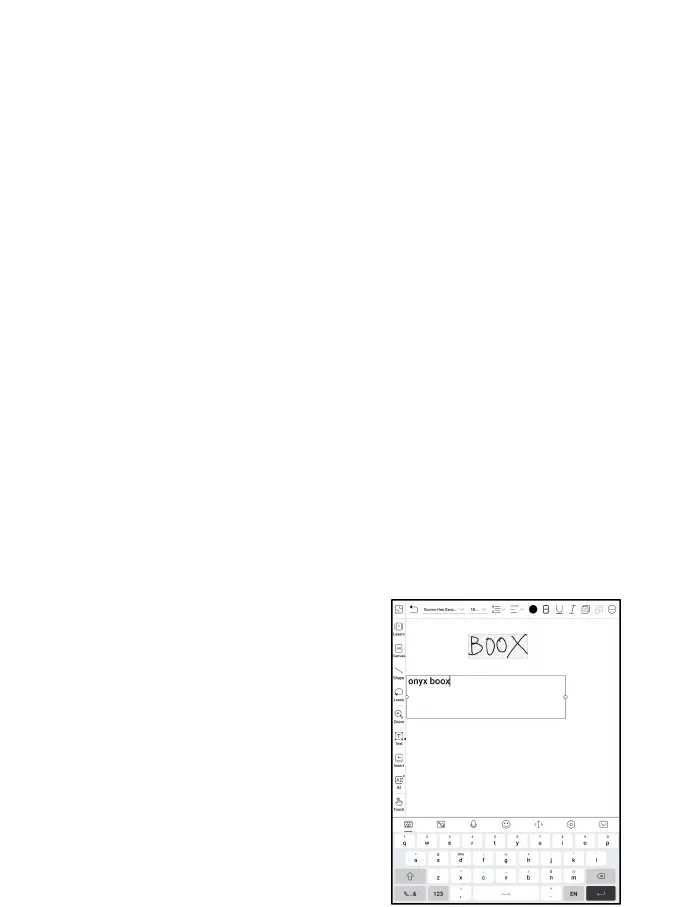
Inser
t
text
In
i
nserted
t
ext
m
ode,
you
can
use
keyboard
t
o
t
ype.
The
text
box
can
be
moved
around.
You
c
an
change
the
font
size
and
line
spacing,
embolden
fonts,
underline,
italicize,
and
delete
text.
75
77
Table of Contents
Main Page
1.Copyright Declaration
2
2.Product Details
3
3.Safety Guide
5
4.Quick Start
8
4.1 Power On
8
4.2 Home Screen
9
System Bar
9
Control Center
10
Notification Center
10
Content Area
11
Add Desktops
12
Favorite Apps
12
Navigation Bar (Default)
13
Gestures
13
Customize Gestures
14
Other Gestures
14
4.3 E-ink Center (App Optimization)
15
Refresh Modes
15
Dark Color Enhancement
16
Light Color Filter
16
More Settings
16
Display
17
Color
18
Others
20
Scribble (Only support some apps)
21
5. System Functions
23
5.1 Screen Cast
23
5.2 Screen Recording
27
5.3 Split Screen
29
6.ONYX APPS
31
6.1 Library
31
Library Mode
31
Filter and sort
32
Library Settings
32
Lock
36
Reading Statistics
37
6.2 NeoReader
39
Floating Toolbar
40
When a page is divided into several columns, singl
40
Long press to select a word
41
OCR(Beta Version)
42
Handwriting Toolbar
43
PDF documents with embedded data
45
PDF Documents without embedded data
46
Handwriting Recognition
47
Reading Menu at the bottom (PDF)
49
Contents
49
Progress
51
Format
52
Contrast
54
Navigation
54
Reflow
55
Split View
56
Reading Menu at the bottom (Free Flow Documents)
57
V2 Engine
58
Progress
58
Format
59
Screenshot
60
Refresh
60
Settings
61
6.3 Store
62
6.4 Notes
64
ONYX Cloud Sync(In Bulk)
65
Sync individual notepad
66
Menu
66
Sync Settings
67
ONYX Cloud Sync
67
Sync to other accounts (export)
67
Options
68
Password Settings
69
Notepad Interface
70
Layers
71
Templates
71
Canvas
72
Brushes
74
Lasso
74
Tags
75
Search tags
75
Tag Management
76
Insert text
76
Insert other attachment
77
Insert Recorder
77
Insert pictures
78
Insert attachments
78
Insert a link to a page
78
Insert a link to website
79
AI Recognition
79
6.5 Storage
80
Recent Files
80
Storage
80
OTG External Flash Drives
81
Low storage warning
81
6.6 Navigation Ball
82
6.7 Dictionaries
83
6.8 BOOXDrop
85
Push History
88
6.9 PushRead
88
RSS\OPDS Subscription
89
6.10 Calendar Memo
90
7.System Settings
91
7.1 Onyx Account
91
7.2 WLAN (WLAN)
92
Wi-Fi Setting
92
Bluetooth Settings
92
Network and Connection
93
7.3 Accounts
93
System Account
93
Other Accounts
93
7.4 Apps and Notifications
93
App Startup
94
App Refresh Mode
94
Freeze Settings
94
Reset App Optimization Tutorial
95
7.5 Desktop and Screensaver
95
7.6 Display
96
7.7 Sound
97
7.8 Location Info
97
7.9 Password and Security
98
7.10 Power
98
7.11 Storage
99
7.12 System Navigation
99
7.13 System Settings
100
7.14 Feedback and Advice
103
FAQ
103
Feedback
103
7.15 About Device
104
8.Thank you for your support
105
Related product manuals
Boox Color Series
167 pages
Boox Palma
74 pages
Boox Leaf2
72 pages
Boox A60
119 pages



 To Next Page