Part III: Advanced Commands
ADD/CHANGE USER (COMMAND + 5 + 6)
D1260 Owner’s Manual
© 2003 Bosch Security Systems 50410C
Add/Change Level
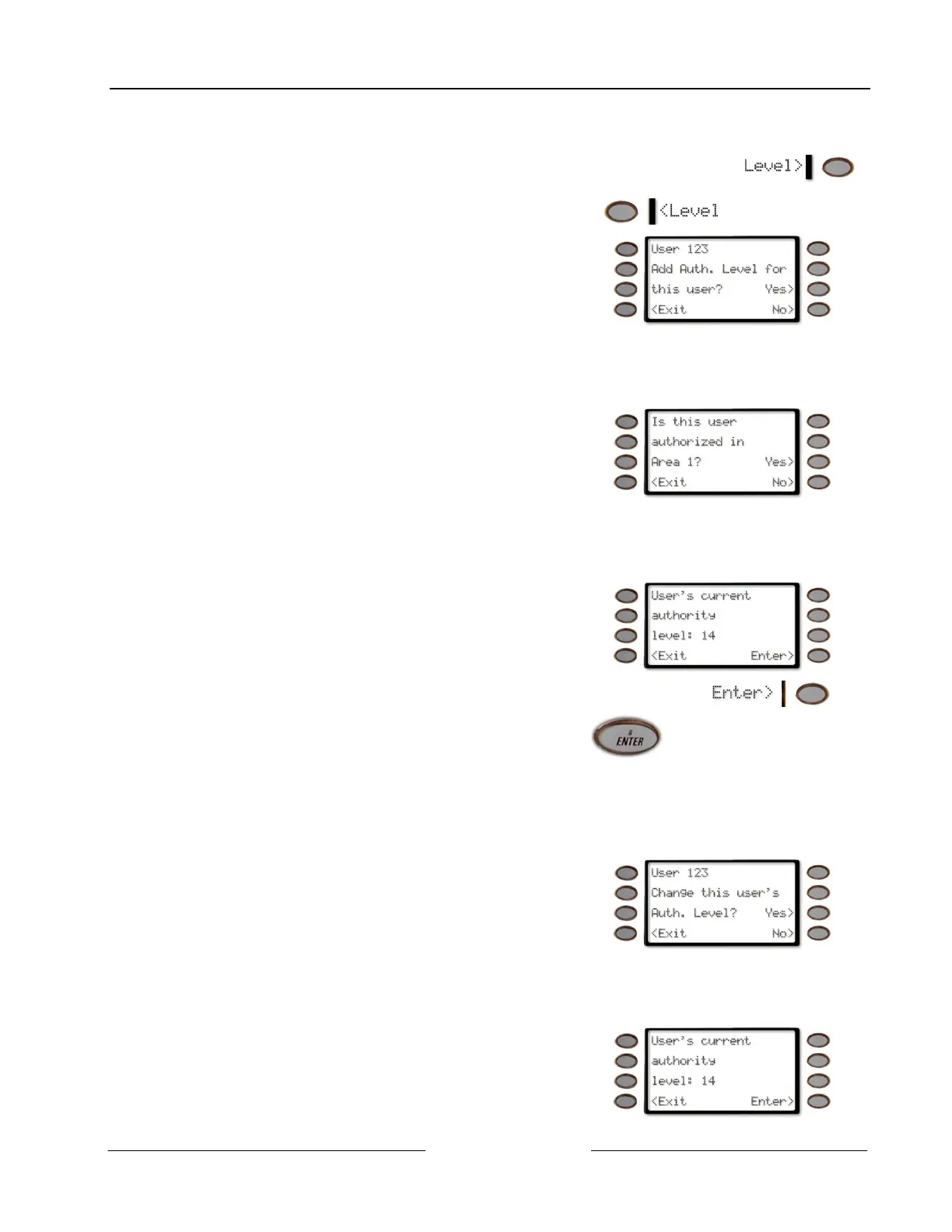
1. Pressing the <Level or the Level> soft key will allow
you to add/change a user’s authority level.
or
2.
The display changes to User 123 Add Auth. Level for
this user?
Press the Yes> soft key to add an Authority Level.
See Step 3.
Press the No> soft key to advance to Add/Change Passcode - if the panel is a D9112 or a D7212) or
to Change Sub-User ID - if the panel is a D9412 or a D7412.
Press the <Exit soft key to exit out of this menu and return to the Level changed. display (See step 7).
3. The display changes to Is this user authorized in Area
1?
Press the Yes> soft key to/add change this user’s
authority level in Area 1.
Press the No> soft key if the user isn’t authorized in Area 1 and proceed to display user’s
authorization in Area 2.
Press the <Exit soft key to exit out of this menu and return to the Level changed display.
If the user is authorized in Area 1, the displays changes
to User’s current authority level: 14 for Area 1.
(14 is used as an example here)
To change the Authority Level, Enter a new authority
level (from 1 to 14), if desired, and press either the
Enter> soft key or the ENTER button.
Before determining the Authority Level for a user,
please consult your security company to assist you in
selecting the correct authority level.
Press the <Exit soft key to exit out of this menu and return to the Level changed display.
4. Repeat Step 3 for each area through Area 8.
5. The display changes to User 123 Change this user’s
Auth. Level?
Press the Yes> soft key to add/change this user’s
authority level in Area 1.
Press the No> soft key to advance to Add/Change Passcode (if the panel is a D9112 or a D7212) or
to Change Sub-User ID (if the panel is a D9412 or a D7412).
Press the <Exit soft key to exit out of this menu and return to the Level changed. display (see Step 7).
If the user is authorized in Area 1, the displays changes
to User’s current authority level: 14 for Area 1.
(14 is used as an example here)



 To Next Page