DCN-DDI Dual Delegate Interface
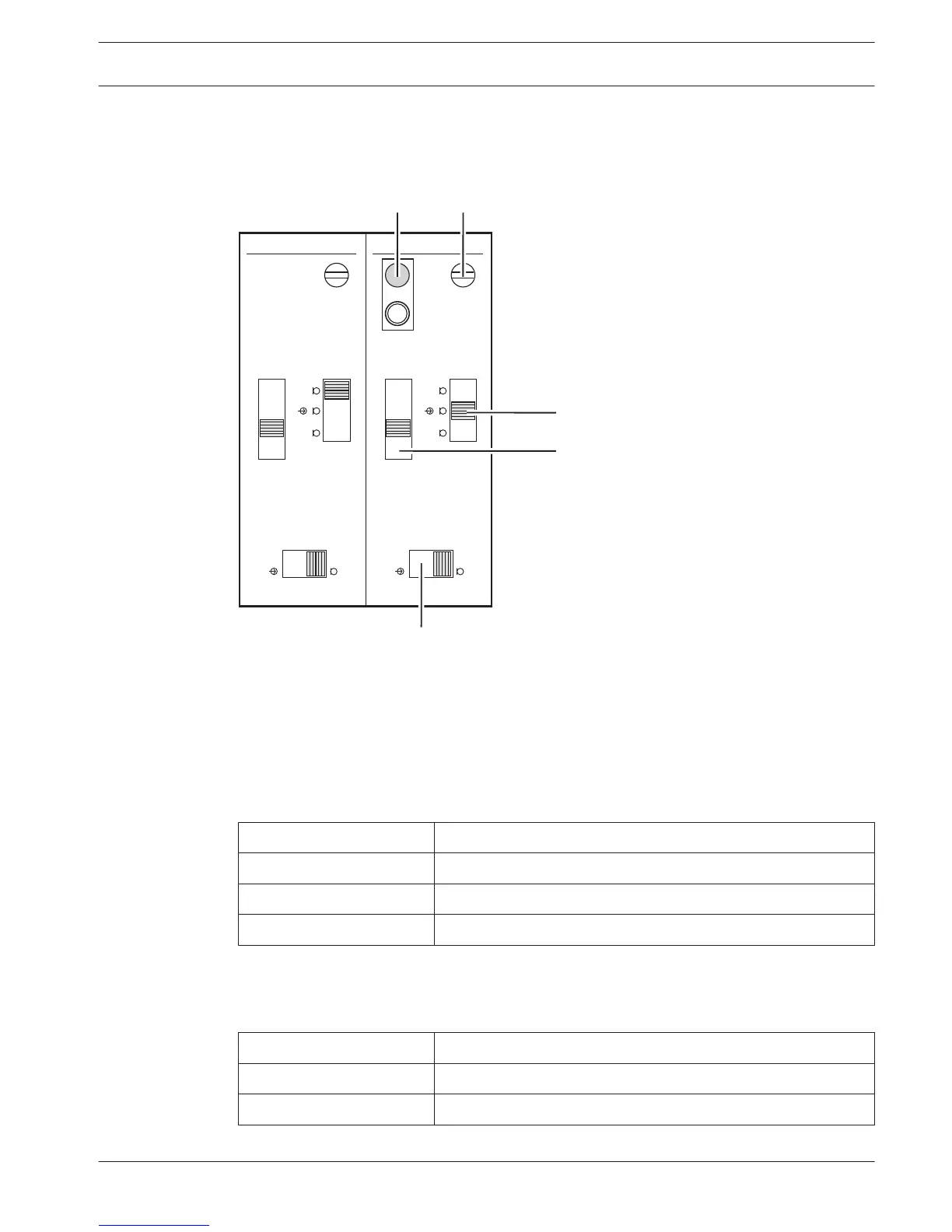
Remove the lid of the dual delegate interface to get access to the controls inside.
Figure 7.17: Internal settings
1. De-init switch - Erases the address of the dual delegate interface (refer to Initialization,
page 178). The red LED adjacent to the de-init switch comes on when the dual delegate
interface does not have an address.
2. Input adjustment potentiometer - Adjusts the sensitivity of the audio input.
3. Input type switch - Sets the type of audio input.
Position
Description
Upper Balanced signal with phantom power*
Center Balanced signal without phantom power
Lower Unbalanced signal
Table 7.30: Input type switch (*= default)
1. Input adjustment switch - Sets the sensitivity of the audio input.
2. Signal level switch - Sets the signal level of the audio input.
Position
Description
Left Line level signal
Right Microphone signal*
Table 7.31: Signal level switch (* = default)
7.12
Conference System Configuration | en 213
Bosch Security Systems B.V. Operation Manual 2013.11 | V2.0 | DCN-NG_OM_V4.x












 To Next Page